
I’ve been playing quite a bit with reverse engineering using REA. I explained in that article how it brings Ghidra, Hopper, IDA, Frida, and other tools into an interface an agent can operate while preserving the evidence and provenance behind its findings.
It helps a lot. Just don’t confuse help with a magic button. You cannot type “REA, decompile this game” or “port this to Windows” and go grab coffee while it finishes. You need to understand the architecture, binary format, old APIs, what to observe at runtime, which tool belongs where, and how to prove the reconstruction matches the original program.
The thinking remains your job. REA speeds up evidence collection and gives extra hands to someone who knows how to run the investigation. Without technical knowledge, the result is still a pile of plausible pseudocode.
The project is on GitHub, and it is still experimental and a work in progress. The version shown here can already play a full stage, but I am building the next round: frame pacing and vsync controls, bilinear, trilinear, and anisotropic filtering, plus an investigation into mipmaps without changing the original data. It also needs testing on more machines and native Windows. Expect changes and new releases.
Now watch this:
This is the original 1998 Colin McRae Rally running a full New Zealand stage. The capture is 1080p, but the game reaches 4K in proper 16:9, showing more scenery on the sides. The HUD has moved to the corners, the draw distance is much longer, and the constant pop-in is nearly gone.
This setup presents the image at 60 fps while the original physics runs on a fixed 25 Hz tick. The game already separated updates from rendering and interpolated frames. The old DirectDraw/Direct3D 5 chain only needed to reach a modern display properly.
And this is the launcher I built for it:
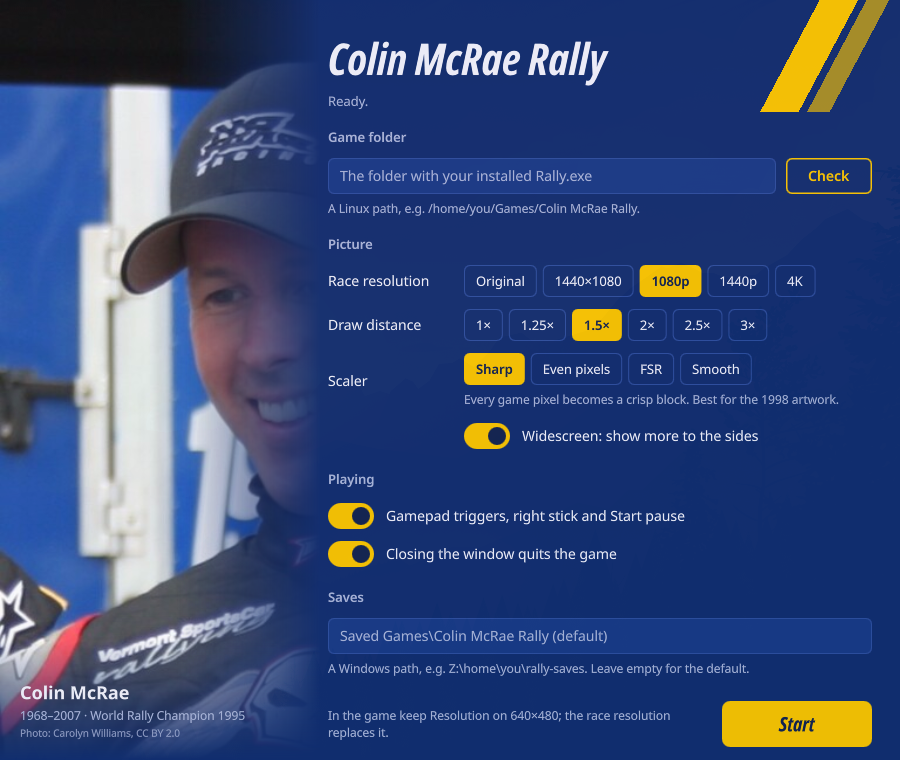
Yes, I built a modern launcher for the first Colin McRae Rally on PC.
The Game Trapped in 1998
Most people remember Colin McRae Rally from the PlayStation. It was a low-resolution 4:3 game built around the cadence of PAL and NTSC televisions. In 2026, you can still play it in an emulator and raise the internal resolution, but the result retains the console’s visual and presentation limits.
Codemasters also released a native Windows version in 1998. It was built for Windows 95 and 98, using a 32-bit x86 executable with Direct3D 5 and DirectX 6.
The game is out of print today and treated as abandonware by the community. That label describes the preservation reality; it does not grant anyone a license to redistribute it. My launcher carries no Codemasters executable, stage, car, music, or other asset. You need your own installed copy from the CD or an old backup, updated to patch 1.5.
Finding those files has become archaeology. I will neither host nor point to downloads of a commercial game. The project currently accepts two known European variants of Rally.exe 1.5 and displays the SHA-256 when it finds another version, so support can be added without guessing offsets.
The Ordeal Before the Launcher
I had already automated Colin McRae in my retro racing games on Distrobox project. It worked, but look at what it took:
- copy a portable installation and reconstruct the
CDPath,HDPath,AVIPath, andWAVPathRegistry keys in Wine; - force the Windows XP SP3 compatibility profile;
- pin a rootful Xwayland server to an 800x600 canvas because the menu opens at 640x480 and the race switches modes;
- force the GLX backend and NVIDIA offload so Wine would not choose the AMD iGPU or
llvmpipeon my machine; - emulate a keyboard from the gamepad because the old DirectInput path detected the controller but the game would not accept its axes;
- live with a stretched 4:3 image and the dead ends involving gamescope, dgVoodoo2, and other wrappers.
After all that, the game reached 800x600, 4:3, with the original draw distance. The controller had to be awake before launch. Clicking the old joystick control panel could leave a black screen with the music still playing. This was the kind of configuration that works on my PC because I spent hours documenting every hack.
On Windows 11, you may be able to assemble another combination of compatibility modes and wrappers. I did not test it. PCGamingWiki itself recommends XP SP3 compatibility and documents the problems this 1998 release has on current systems.
Depending on a secret sequence of Registry entries, Xwayland, Wine, and graphics wrappers reduces “preservation” to something temporarily working on somebody’s computer.
I Tried a Full Decomp
OpenCMR2 encouraged me to try something more ambitious. It is an in-progress native port of Colin McRae Rally 2.0, built on CMR2Decomp, using SDL3 and data from the original copy. This is exactly the kind of project that can leave DirectDraw, DirectInput, and other old APIs behind.
I tried to build the equivalent for the first game. The reconstruction began on October 20. When I stopped to review the direction on the 28th, after eight days of nearly continuous commits, the experiment had about 250,000 lines of Rust, 2,922 tests, 2,168 mapped procedures from the executable, 32,530 symbols, and 2,310 cataloged strings. The roadmap marked 117 of 119 items complete.
By the eighth day, the pattern was clear. REA kept finding functions, relationships, and local evidence, and the agents kept turning every discovery into more code and tests. But the process was drifting. Repository volume kept growing while the distance to a faithful, usable port stopped shrinking.
The partial work concentrated the hardest integration problems: runtime collision and suspension, car and wheel animation, live gear and rev producers, the full finish and post-race flow, paint fidelity, reflections, damage, and equivalent Windows execution. A drivable harness existed and was useful for proving subsystems, with some parts recovered and others approximated. Each new layer exposed more hidden contracts in the original executable.
When the repository grows faster than the result, it is time to review the strategy.
I treated it like any engineering spike: I learned what I needed, recognized that the path was moving away from the objective, and stopped. Continuing just because I had invested eight days would have been sunk-cost thinking. The experiment did its job by showing where a full reconstruction began to lose convergence.
On the 28th, I changed the plan. The original executable already handled physics, rendering, audio, menus, and all the game logic. The shorter route was to preserve that core and fix only the boundaries broken by time. That is where the launcher came from.
This strategy applies to many old Windows games. When the x86 executable still runs and Wine or Proton can supply the basic APIs, the job often shrinks to rebuilding its connection to the current system while keeping the original decisions inside the binary. That is enough when the goal is to play it again on a modern computer.
The expected LLM token cost drops sharply. A full decomp makes the agent read, explain, reconstruct, and test physics, audio, rendering, menus, file formats, and every intermediate state. The launcher reduced the problem to a bounded list: Registry, CD and Windows checks, video mode, controls, resolution, projection, HUD, and draw distance. When the goal is to play the game, this kind of rewiring delivers much more per token.
A Thin Launcher Around the Original
The project is on GitHub. The architecture became much smaller: a Rust launcher prepares a private environment, validates the game version, configures the runtime, and applies in-memory fixes to Rally.exe. A small DLL intercepts the points where resolution and HUD handling need additional context.
Nothing changes in the original directory. On first run, the launcher creates a private copy under %LOCALAPPDATA%\CMRLauncher\Rally, synchronizes the files, and keeps saves outside the installation. That removes the dependency on writes to Program Files, VirtualStore, and stale state left by a previous attempt.
The launcher also recreates the Registry keys expected by the game. It points CDPath, HDPath, video, and audio to the private copy, chooses the language, and prepares the hardware. The old CD is no longer a runtime dependency, provided the game was installed with the full-install option.
The fixes are tied to the exact executable hash. The project currently knows the official European 1.5 release and one fan-pack variant. When the binary does not match, the launcher refuses to apply addresses from another version. Approximate binary patching is a great way to turn an old game into a random crash generator.
Basic Compatibility
The executable starts by testing a collection of assumptions from the 1990s. I removed or replaced the ones that no longer make sense:
- the CD check and Windows version gate;
- privileged VGA port reads;
- the incompatible 8-bit video path, replaced with the 16-bit frontend already present in the game;
- the behavior that ignored closing the window or pressing
Alt+F4; - a busy-wait based on a CPU clock that behaves poorly on modern processors.
Wine and Proton still provide DirectDraw, Direct3D 5, WinMM, and the other old APIs. My work stayed focused on the contract between the game and the compatibility layer, without rewriting an entire renderer.
Modern Controls
The game recognized old DirectInput controllers and expected axes from the era before modern analog triggers. Acceleration and braking can now use the triggers or right stick, and Start pauses the race.
I also fixed a bug where the game saved a controller that did not exist, fell back to the keyboard by itself, or loaded a broken configuration that left the car spinning. The launcher detects that state and repairs the save. This eliminates the keyboard bridge I maintained in Distrobox.
Resolution and Widescreen
The four original resolutions were 320x240, 512x384, 640x480, and 800x600. The frontend was designed at 640x480, while each race recreates the graphics device using the selected resolution.
The launcher supports 1920x1080, 2560x1440, and 3840x2160. During a race, the entire 2D interface uses a virtual 640x480 screen. Sprites, fonts, messages, pause screens, results, and loading screens scale from that virtual area; the side elements of the HUD remain anchored to the corners of the real display.
Widescreen uses a Hor+ projection. The center keeps the same framing as 4:3 while the display gains information on the sides instead of stretching cars and trees. I validated the geometry by comparing 1440x1080 with 1920x1080: the center strip remains identical.
The menus are still drawn internally at 640x480 and enlarged with sharp pixels. At 4K, that copy can fall below 30 fps on some machines. Races do not have the same problem; using 1440p or 1080p also makes navigation smoother.
Draw Distance
The stages are already loaded in full. The disappearing scenery came from the far plane and culling limits stored in each stage’s data, usually between 100 and 200 meters.
The launcher can multiply those distances by up to three. It adjusts the far plane, object wedge, terrain limit, and special cap used by some stages. The geometry was there all along; a 1998 PC simply lacked the budget to draw it.
Pushing it too far costs performance and can expose distant flicker due to the 16-bit Z-buffer’s precision. That is why the control ranges from 1.0 to 3.0, and the default does not force the enhancement.
60 fps Without Touching Physics
This part surprised me. The simulation runs at 25 Hz, and a hidden 50 Hz mode changes the physics results. Enabling it would change the game.
In normal mode, a timer thread updates the simulation while the main loop renders as quickly as Flip permits. The code calculates an alpha from the time since the previous tick and interpolates the car, camera, and objects. Under gamescope without vsync, I measured about 190 presented frames per second at 1080p. At 4K, the software renderer stayed close to 60 fps.
The 60 fps presentation comes from that original interpolated rendering pipeline. On a real display, the game presents at the monitor’s refresh rate, limited by the vsync behavior of its host layer. The physics remains the same as it was in 1998.
How to Install It
You need the 1998 PC release of Colin McRae Rally, fully installed and updated with the European 1.5 patch. Its folder should contain Rally.exe, Game, New_Fe, and ini.
Download the ZIP from the latest launcher release. It includes CMRLauncher.exe, cmrhooks.dll, and the Linux helpers. It does not include the game.
Linux with Steam and Proton
- Extract the ZIP, for example under
~/Games/cmr-launcher. - In Steam, select Games → Add a Non-Steam Game to My Library and choose
CMRLauncher.exe. - Under Properties → Compatibility, force GE-Proton. I tested GE-Proton 11.
- Under Launch options, pass the location of your installation:
%command% --game "Z:/home/you/Games/Colin McRae Rally"The launcher remembers the path after the first run. There is also a Wine script using gamescope and a Quickshell interface, the one shown in the screenshot.
Windows
Extract the ZIP next to Rally.exe and open CMRLauncher.exe. To keep the launcher somewhere else, use:
CMRLauncher.exe --game "C:\Games\Colin McRae Rally"The code targets Windows 10 and 11, but I have not tested it on native Windows yet. Everything I validated so far ran on Arch Linux through Wine and Proton. Testing it on Windows, another distribution, AMD, Intel, other displays, and other controllers would already help a great deal.
When you find a problem, open an issue on GitHub with launcher.log, the Rally.exe hash, operating system, GPU, Wine or Proton version, and reproduction steps. “It doesn’t work” provides nowhere near enough information to fix compatibility.
Less Than Two Days
The launcher-specific work went from the first playable compatibility commit to the video above in less than 30 hours. During that time, I changed the strategy from a massive native port to a small layer around the original executable, reverse engineered the necessary points, implemented the fixes, tested a complete stage, and packaged the release.
Full recomps remain difficult. They demand months or years, platform knowledge, comparison against the original, and an enormous amount of validation. REA helps reach the evidence; Claude and Codex help write and test; somebody still has to decide which problem is worth solving and recognize when the strategy is wrong.
Cheap code also makes it cheaper to throw code away.
I discarded a reconstruction with about 250,000 lines because it did not deliver the result I wanted. The useful solution was much smaller: I preserved the original game, replaced the boundaries that had aged badly, and added the improvements modern hardware permits.
Doing this by hand used to take long enough that I probably would have accepted 800x600, pinned Xwayland, and the keyboard bridge. Now I restored an out-of-print game to a modern playable experience in less than two days.
The practical value of reverse engineering with AI lies in making those small, cumulative incompatibilities feasible to solve, the ones that used to leave old software trapped on one person’s computer. Asking for a complete PC port is still nowhere near enough.
The work continues. Frame pacing and vsync selection, anisotropic filtering, mipmapping where the data permits it, borderless mode with safe Alt-Tab, rumble, button remapping, and more distant detail are already planned for the next round. Today’s launcher is experimental; keep an eye on the releases because I still want to pull quite a bit more out of this 1998 executable.