
Strata showed up in almost every article in the home stretch of benchmark v4. In the consumer-grade open source one it was the lead; in the what a team costs on B300 and H200 one, the model it serves became the recommendation for the DGX Spark; and in the v4 verdict it’s the only serious answer for anyone who wants to run a good model at home.
The result, in short: Qwen3.8 Flash-Next served by Strata on an RTX 5090 scored 91, Tier A, with zero nudges and all 14 planted defects fixed (two only after the reveal), 1.5 points behind the same model running on a datacenter B300. And it did that at about 159 tokens per second.
In this article I go through what Strata is, why it matters right now, what it doesn’t solve, and how I set it up for daily use, with automatic loading and unloading and wired into OpenCode.
What Strata is
Strata is an open source inference engine, MIT licensed, built around one model: Qwen3.8 Flash-Next, a 125B-parameter MoE with 6B active per token, which normally calls for a server. The code is C++ and CUDA, reuses parts of llama.cpp/ggml, and has builds for NVIDIA, AMD (Strix Halo included), Intel Arc and Mac. It brings up an OpenAI- and Anthropic-compatible API on localhost.
The trick is treating the whole PC as a memory hierarchy. The model has 24,576 experts, 512 in each of its 48 layers, and each token uses only 10 per layer, plus one shared expert:
- VRAM holds the most-used experts, like a cache;
- RAM holds all of them, and when a token needs one that isn’t on the card, the processor computes it right there while the card works on the others;
- the SSD holds a lookup table of about 29 GB, from which the model reads a few rows per token.
On top of that, a speculation head that ships with the model itself guesses the next tokens and the big model checks them all at once. The README promises the same answer 1.6 to 1.8 times faster.
On my 5090, the log shows what this looks like in practice. The 32 GB of VRAM hold 10 to 11.5 thousand experts in about 20 to 22 GiB, almost half the total, and generally 90% to 97% of the experts each token asks for are already on the card. The CPU computes the rest directly in RAM, and only a small fraction gets copied to the card over the PCIe bus. That’s why the CPU works hard too, as you can see further down.
Why this matters now
Because memory has become a luxury item. In 2026 the DRAM contract price almost doubled in a single quarter, manufacturers keep prioritizing servers, and Micron walked away from the consumer market to serve the big customers. The RTX 5090 itself, when it shows up, costs two and a half to almost five times MSRP, as I covered in the verdict.
In this scenario, the traditional way of running a Tier A model at home, with the whole model inside VRAM, is a non-starter. Flash-Next in NVFP4 took about 100 GB of card memory on the B300; nobody has that at home.
Strata flips the premise: instead of demanding VRAM for the whole model, it uses VRAM as a cache and RAM as the warehouse. That’s what lets a Tier A model run on a fraction of the video memory it would otherwise ask for.
It isn’t magic
Strata makes it fit, but it doesn’t work miracles. The stated minimum is 32 GB of RAM and VRAM combined, but that only runs the most compressed version; the IQ3_S that scored 91 asks for about 64 GB of RAM. Add about 80 GB of disk, preferably SSD, and a 12 GB card or better on the official path. Below that it’ll still start, there are reports with an 8 GB card, but at about 15 tokens per second.
Memory bandwidth sets the speed
In token generation, the bottleneck on a local machine is almost never compute. It’s how many bytes per second the memory can deliver to the cores, because every token has to read the model’s active weights. And there the gap between memory types is brutal:
| Memory | Approximate bandwidth | Versus the 5090 |
|---|---|---|
| RTX 5090 GDDR7 VRAM | ~1.8 TB/s | 1x |
| Strix Halo LPDDR5X unified memory | ~256 GB/s | 7 times slower |
| Desktop DDR5 RAM, dual channel | ~60 to 100 GB/s | 18 to 30 times slower |
| PCIe 5.0 x16 bus | ~64 GB/s per direction | almost 30 times slower |
| PCIe measured by Strata on my machine (card at x8) | ~29 GB/s | about 60 times slower |
The last row is from my machine: the card is running on 8 PCIe lanes instead of 16, and Strata measures that at startup. One more reason the VRAM cache matters so much.
The Strix Halo has 128 GB and fits a lot more than a 5090, but every byte arrives seven times slower. That’s what I measured in the benchmark: the dense Qwen 3.8 27B in Q8 reads about 29 GB per token, and on the Strix the theoretical ceiling sits near 9 tokens per second. I measured 7.7. The same math on the 5090’s bandwidth would give about 60, seven times more, if the model fit along with the context.
That’s why Strata’s design works: the hot path stays in GDDR7, and whatever misses the cache gets computed by the CPU in DDR5, or crosses PCIe, both dozens of times slower. With over 90% cache hits, the little that’s left out doesn’t drag the speed down. On a small card, the cache covers less, more experts take the slow road, and speed drops: the author himself publishes 53 tokens per second on a 12 GB RTX 5070, a third of my 5090.
A potato PC won’t run it
So forget the laptop with integrated graphics and 16 GB of RAM. Without a reasonable dedicated card, without 32 GB of RAM and VRAM combined and without an SSD, the model won’t load, or it loads and runs at RAM speed, which is horse-and-buggy speed.
And there’s an entry cost that doesn’t show up in generation speed: Strata reads the whole first message of every conversation, and the README cites about 60 seconds per 30 thousand tokens as a rule of thumb. On my 5090 it’s much faster, about 100 thousand tokens in 16 to 20 seconds, but on a smaller card count on the README number. Coding agents send big system prompts, so the first answer of each session takes longer than the ones after it.
Heavy even on my 5090
My machine is no slouch: Ryzen 9 7950X3D, 96 GB of RAM (the system sees about 92), 32 GB RTX 5090. Even so, Flash-Next takes up everything:
- at load time, it pushes about 50 GB of experts into RAM, at about 3 GB per second with a cold SSD, and fills the card’s cache with over 20 GiB;
- with everything loaded, less than 800 MB of VRAM is left free;
- with the server up, the machine sits at 88 of 92 GB of RAM used, and the system starts swapping.
This is btop in the middle of a work session with OpenCode. The Strata process alone holds 54 GB of RAM and half the CPU, with half of the 7950X3D’s 32 threads pinned at 100% and the rest above 50%. The 5090 is at 99% utilization, with 30 of 32 GB of VRAM in use and pulling 351 W. There’s 4 GB of RAM left available, and almost 48 GB already in swap.
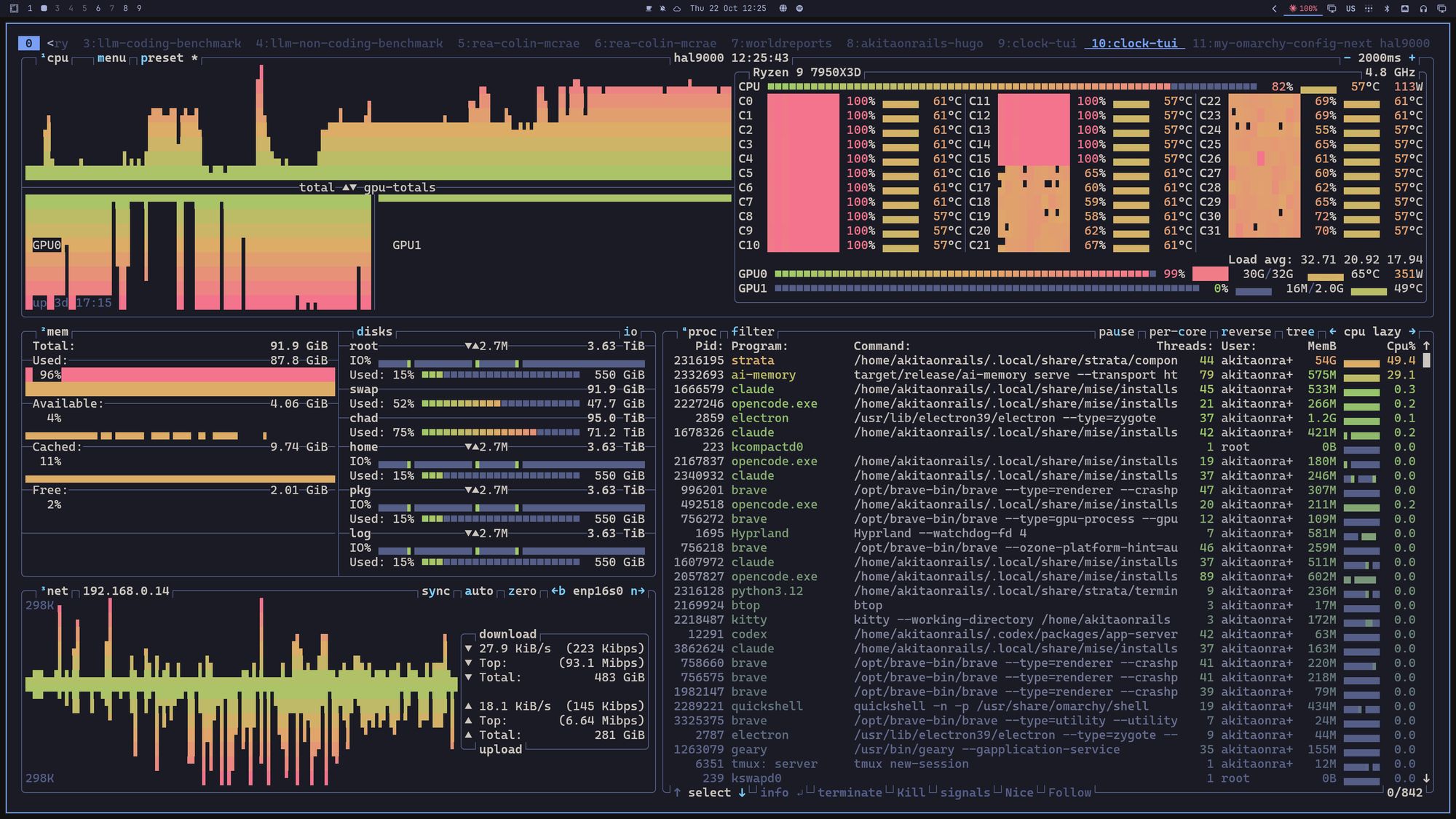
The side effect shows up in the rest of the system. With VRAM at the limit, my desktop’s app launcher and the terminal on a secondary monitor stopped opening properly, and other programs get sluggish. The fix was telling Strata to give about 2.5 GB of VRAM back to the desktop, with the --vram-elastic option, at the cost of a slightly smaller cache.
With all that, I firmly believe my machine is the minimum for using a local LLM in real programming work, beyond small exercises. With less than that, count on much lower speed, shorter context and the whole PC suffering while the model is loaded.
How to install
The official path on Linux and Mac is the one-line installer. It checks the SHA-256, doesn’t ask for root and installs into your home folder. Like any curl | sh, download it and read it first:
curl -fsSL https://github.com/Niko1221/Strata/releases/latest/download/install.sh -o install.sh
less install.sh
sh install.sh
After that, strata launch asks for model, context and access, downloads the right engine for your card and the model, and starts serving. For scripts, everything goes through flags:
strata launch                                # guided screens
strata launch --model <variant> --yes --no-tui   # no questions
strata launch --status                       # what is being served
strata launch --stop                         # stop
strata monitor --url http://127.0.0.1:8080   # speed, GPU, memory
I used the IQ3_S variant, the one that scored 91 in the benchmark. On disk it takes about 84 GB in two files (the 55 GB model and the 29 GB lookup table), plus about 7 GB for the speculation head.
The configuration strata launch generates is a JSON with the engine arguments. The ones that matter in mine:
"args": [
  "--expert-cache", "auto",
  "--prefill", "auto",
  "--spec", "4", "--spec-min-p", "0.5",
  "--mtp", "/mnt/data/strata-models/mtp/rt",
  "--max-context", "262144",
  "--kv", "int8",
  "--kv-resident", "32768",
  "--vram-elastic"
]
--spec 4 turns on speculation with a window of 4 tokens per step, up to 3 guessed by the speculation head; --kv int8 stores the attention cache in 8 bits; --kv-resident keeps only 32 thousand positions of the context cache, the most-read ones, in VRAM; and --vram-elastic lets it give VRAM back to the desktop with the server running.
From 128 thousand to 256 thousand tokens of context
The benchmark ran with 128 thousand tokens of context, which is what the install configured by default. Later I bumped it to 256 thousand, with --max-context 262144, and the loss was small: in the server logs, generation averaged about 190 tokens per second in a short session with 128 thousand and about 175 with 256 thousand, about 10% slower for twice the context, a bit more with VRAM given back to the desktop.
What holds this together is --kv-resident: only 32 thousand positions of the attention cache, the most-read ones, stay in VRAM, the rest stays in RAM, and even so about 97% of the reads from that cache happen on the card. The benchmark’s 91 was measured with 128 thousand; with 256 thousand I measured speed, and quality hasn’t been re-tested yet.
For me, 256 thousand is the minimum for long agent work. With 128 thousand, a real session blows through the context fast, and the agent starts compacting its memory all the time. That gets annoying very quickly, and every compaction throws away details the model will need later.
Short context is a hidden problem with local models. Before looking at tokens per second, check how much context you can serve without the speed collapsing.
Loading and unloading on its own
Keeping about 50 GB of RAM and the entire card tied up all day, just to have the model ready when I need it, makes no sense. So I put together a small proxy, in pure Python, that’s always up on port 8080 and controls Strata:
- it answers the model list on its own, so OpenCode sees the model without waking anything up;
- on the first chat request, it brings Strata up on an internal port and waits for it to be ready, about 40 seconds;
- it relays the responses in streaming;
- after 10 minutes without traffic, it takes Strata down and gives the card and the RAM back to the system.
The core is this:
def ensure_up():
    with _lock:
        if ready():
            return True
        subprocess.Popen([STRATA, "serve", "--config", CFG,
                          "--host", "127.0.0.1", "--port", str(UP_PORT)],
                         start_new_session=True)
        for _ in range(90):          # cold start takes ~35-40 s
            if ready():
                set_reserve()        # give VRAM back to the desktop
                return True
            time.sleep(2)
        return False

def idle_watch():
    while True:
        time.sleep(30)
        if time.time() - _last > IDLE_TTL:
            stop_up()                # free the GPU and ~50 GB of RAM
And a systemd user service keeps the proxy up from login (trimmed version):
# ~/.config/systemd/user/qwen-strata.service
[Unit]
Description=Qwen3.8 Flash-Next on-demand proxy (Strata RTX 5090)
After=network-online.target

[Service]
Environment=QWEN_IDLE_TTL=600
Environment=QWEN_VRAM_RESERVE_MIB=2560
Environment=QWEN_UP_PORT=8781
Environment=QWEN_PROXY_PORT=8080
ExecStart=%h/.local/bin/qwen-strata-ondemand
Restart=on-failure
KillMode=mixed

[Install]
WantedBy=default.target
systemctl --user daemon-reload
systemctl --user enable --now qwen-strata.serviceThe price is the wait on the first message after some idle time. In exchange, when I’m not programming, the machine is mine again.
Configuring OpenCode
Strata has a shortcut, strata connect opencode --write, that writes the configuration after asking and keeps a backup. By hand, it’s an OpenAI-compatible provider pointing at the local port:
"provider": {
  "strata-5090": {
    "npm": "@ai-sdk/openai-compatible",
    "name": "Strata (RTX 5090)",
    "options": {
      "baseURL": "http://127.0.0.1:8080/v1",
      "apiKey": "local"
    },
    "models": {
      "qwen3.8-flash-next-iq3_s": {
        "name": "Qwen3.8 Flash-Next IQ3_S (Strata 5090)",
        "reasoning": true,
        "tool_call": true,
        "limit": { "context": 262144, "input": 229376, "output": 32768 }
      }
    }
  }
}
Any key works, because the server is local. Strata itself warns that OpenCode needs limit.input, to know how much of the context is left for input; in the example I set it to the context minus the max output. Claude Code works too, by pointing ANTHROPIC_BASE_URL at http://127.0.0.1:8080 and setting CLAUDE_CODE_MAX_CONTEXT_TOKENS to the context size, since Strata speaks the Anthropic API as well.
One detail: by default Strata serves one request at a time. If your agent fires off subagents in parallel, they get queued.
And day to day?
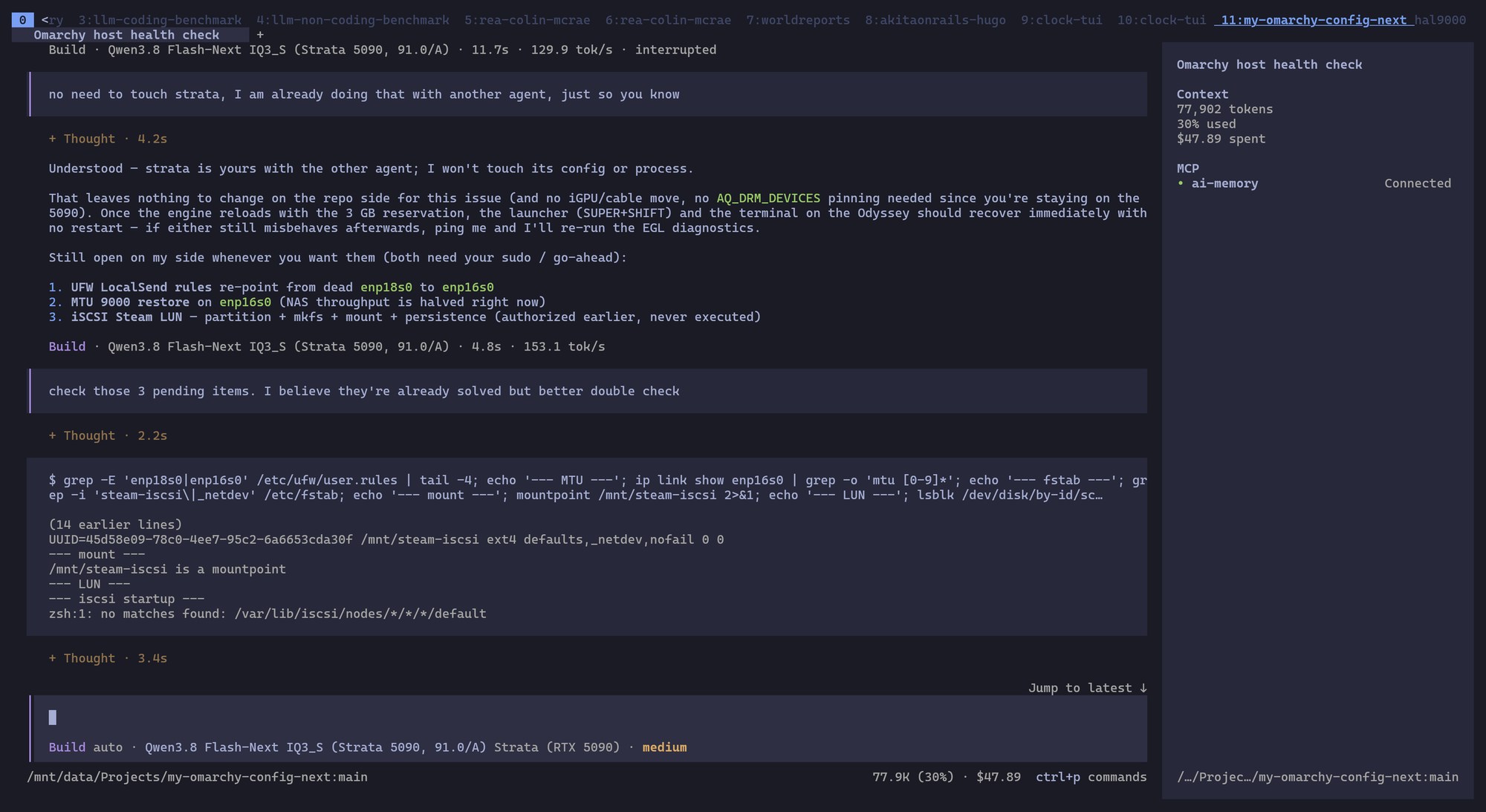
If you have the machine for it, the result is good. Flash-Next stays above 150 tokens per second most of the time, as you can see in the screenshot at the top, and tool calling is solid: in the benchmark it ran all seven sprints in OpenCode without a single nudge, and in normal use it reads files, runs commands and edits code without tripping over the format.
In practice, I don’t feel much difference from Claude Code, or from OpenCode with GLM or Kimi in the cloud. And the cloud isn’t at its best right now: in my perception, all those services have been a bit slower than usual lately, probably struggling with more demand than available capacity. Running at home, the speed is always the same, and the code never leaves my machine.
Even with good tokens per second, I still feel Flash-Next is a bit less responsive than a commercial model. There are the seconds of reading on the first message of each session, the pause when it needs experts that aren’t on the card, and the cold load after some idle time. That’s to be expected: we’re running a server model with resources at the limit.
Considering it’s free and runs on my machine, it’s almost good enough. For the first time, running a local model for programming feels like a genuinely usable scenario, and I find myself using it more and more as a replacement.
The catch is still the hardware. A 5090, 96 GB of RAM and a strong processor are the minimum for this scenario, and that hardware keeps getting more expensive and harder to find. But for those who already have it, Tier A at home is no longer a promise.