
This post is a direct sequel to the disaster on my NAS. Summary for newcomers: my Synology, with eight drives in SHR (single parity), lost two drives in one strike during an upgrade. I survived thanks to an SHR implementation detail, bought a QNAP in a hurry, spent a week copying and verifying 91 TB, and lost not a single file by accident. The new QNAP runs ZFS in RAID-6; the rebuilt Synology now runs SHR-2.
Underneath this whole story there’s a decision almost nobody makes consciously: the filesystem. The Synology used btrfs all along. The QNAP uses ZFS. And your Linux machine, most likely, came from the factory with ext4 without anyone asking you anything. That’s what this is about.
Where the two came from
ext4 is the end of a dynasty of over three decades. ext (extended filesystem) was born with Linux itself, ext2 became the standard in the 90s, ext3 added a journal in 2001 so you wouldn’t need an epic fsck after every power loss, and ext4 arrived in 2008 with extents, delayed allocation and volumes up to 1 exbibyte. The design goal was always the same: be the default filesystem, fast, simple and predictable. It’s excellent at that. And it stopped there.
btrfs was born in 2007, at Oracle, with Chris Mason, with a completely different goal: be Linux’s answer to ZFS. Instead of writing data over data, it’s copy-on-write: every write goes to a new block and the pointers are updated cascading up the tree. That single decision is the mother of everything that matters in it.
What each one delivers, in a list:
ext4:
- journaling (consistent metadata after a crash)
- extents and delayed allocation (good performance)
- mature, stable, everywhere, every tool works
btrfs:
- copy-on-write on everything
- data and metadata checksums on every block
- instant, cheap snapshots
- independent subvolumes inside the same volume
- transparent compression (zstd, lzo, zlib)
- native RAID and scrub (verification sweep)
- snapshot send/receive for incremental backup
- reflinks (copies that don’t duplicate blocks)
The list already answers the title’s question. Let’s go piece by piece.
Even NTFS and APFS have passed ext4
And if the comparison with btrfs seems unfair, look sideways. NTFS was born in 1993, with Windows NT, already with metadata journaling and ACLs, and back in the 2000s it gained a log of every change on the volume plus shadow copies (Windows’ “Previous Versions”). APFS, which Apple launched in 2017 made for flash, is copy-on-write like btrfs: native snapshots (it’s what Time Machine uses for local restores), instant file clones that share blocks, volumes sharing the space of the same container, and per-file encryption.
Read the ext4 list again and compare: no snapshots, no data checksums, no CoW, no compression. Windows’ and Mac’s filesystems, which nobody considers examples of sophistication, protect your data better than Linux’s default, whose last big feature came out in 2008. btrfs is what puts Linux in the same generation as the other two, instead of a decade behind.
Why btrfs is far superior
What copy-on-write is, for those who never stopped to think about it
In classic filesystems, writing is destructive by definition: updating a block means writing the new content over the old one, in the same place on disk. If the machine dies mid-write, the file ends up half old, half new. The ext3/ext4 journal covers that for metadata (the directory structure doesn’t corrupt), but your data itself is left to luck.
Copy-on-write inverts the order: nothing is ever overwritten. Writing to a file allocates a new block, writes the new content there, and only when everything is safely on disk does the filesystem flip the pointers to the new version, atomically. At any instant, you have either the whole old version or the whole new version. Never a mix of the two.
What that buys in practice:
- Nearly free snapshots. The old blocks already persist by CoW’s nature; a snapshot is just the filesystem holding the root pointer of that instant, pure accounting.
- Power loss doesn’t corrupt. An interrupted write leaves the previous version intact, because it was never touched. For anyone who has lost a VM image or a database to a mid-write crash, this is worth the whole filesystem.
- Verification becomes possible. Since each block is written once and never touched again, keeping its checksum forever makes sense. It’s the base of the corruption protection I detail further down.
The cost exists and I pay it knowingly: random-write-heavy files (VM disks, databases) fragment and duplicate blocks, because each rewrite becomes a new block. For those cases you disable CoW per directory with chattr +C, which must be set before the file is created. In my layout, the VM image made with the right +C stayed healthy; the one made without became the textbook fragmentation case.
Snapshots are the feature that changes your life
A btrfs snapshot is an instant photo of a subvolume, and it costs almost nothing, because CoW already keeps the old blocks while someone references them. Creating a snapshot is a seconds operation, not hours. In practice: before every upgrade, the system takes a photo. If the upgrade breaks, you don’t “uninstall packages”: you boot back into the previous photo and you’re done. The boot recovery section, further down, shows this happening for real.
Subvolumes are the right way to organize the disk
A subvolume is an independent namespace inside the same filesystem, with its own snapshot policy. And it has a killer property: snapshots are not recursive. A child subvolume inside another is automatically left out of the parent’s snapshot.
I use this for everything. On my desktop, the cache directories that can be re-downloaded (mise, rustup, npm, opencode, AI caches) are becoming nested subvolumes inside @home: they stay in the same place for any program, but out of every snapshot. That separation alone takes 165 GiB out of snapshot scope, and the big caches (Hugging Face, yay, uv, pip) already live outside the system volume, with symlinks pointing to them: minus 148 GiB of snapshot, part already migrated and part in progress. The snapshot stays small, the restore stays fast, and whatever can be re-downloaded from the internet never enters the photo.
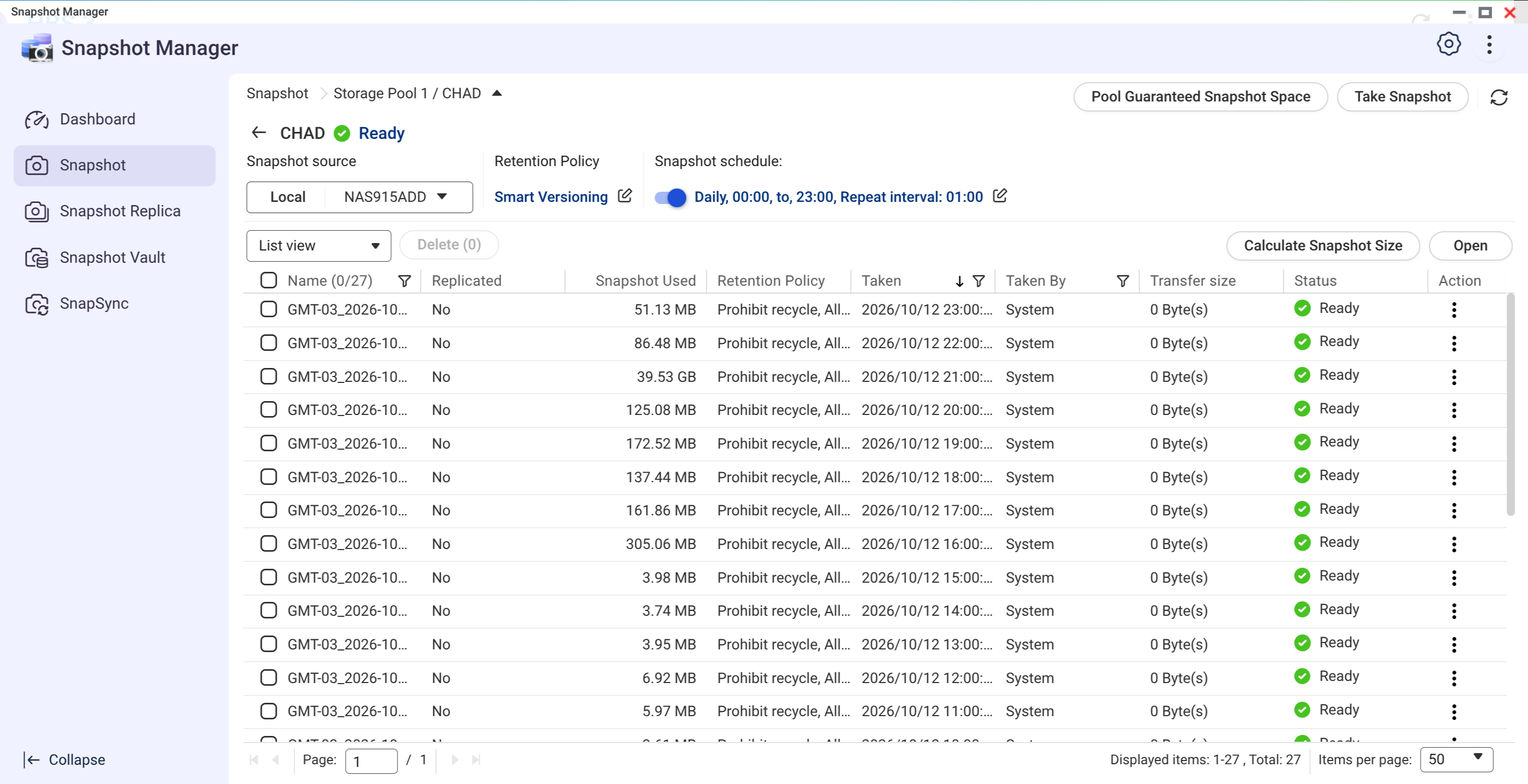
The real cost, measured on the new QNAP (ZFS, but the CoW math is the same): 27 hourly snapshots of a folder with almost 80 TB, and nearly all of them consume megabytes, because between one hour and the next almost nothing changed. Cheap snapshots are what let this routine exist without guilt.
Reflink deduplication
First, the caveat that matters: btrfs has no native online deduplication like ZFS (which keeps a dedup table in RAM and charges dearly for it). What it has are two practical things: reflink and offline dedup. Reflink is a copy that shares blocks: cp --reflink=auto creates a new file that points to the same blocks as the original, instant and free, and each one starts diverging only where written. In the era of dozens of checkouts, worktrees and similar builds, that saves a mountain of blocks. For retroactive dedup there are userspace tools like duperemove and bees.
Real corruption protection
Every btrfs block, data or metadata, carries a checksum. When the filesystem reads and the checksum doesn’t match, it knows the block rotted, and if there’s a second copy (RAID or metadata DUP) it self-heals. ext4 checks no data at all: bit rot passes silently until you open the file years later.
Two pieces of my configuration show what that buys in practice, and what ext4 simply doesn’t offer. The first is metadata in DUP mode. On ext4, each structure on the volume exists only once: a well-placed bad sector corrupts the directory table and the whole drive stops mounting. On btrfs, even with a single drive, every metadata block exists duplicated. The bad sector keeps existing, but the checksum flags the rotten block on read and the second copy answers in its place, without you noticing. It’s the difference between losing the volume and noting a warning in the log.
The second is the monthly scrub. ext4 never re-reads anything to check health: if a block rots, you find out the day someone tries to open that specific file, maybe years later, when there’s no fixing it anymore. The scrub is a scheduled sweep that re-reads the whole volume validating checksums, and finds the rot while it’s still small and recoverable. When the btrfs device stats counter leaves zero, it’s the siren to replace the drive before the disaster, not after.
Transparent compression, measured
Every mount on my desktop uses compress=zstd:1. Level 1 costs a few percentage points of one CPU core, and btrfs detects what doesn’t compress (model blob, video) and writes it raw, at no cost. The result, measured this week on my two new drives:
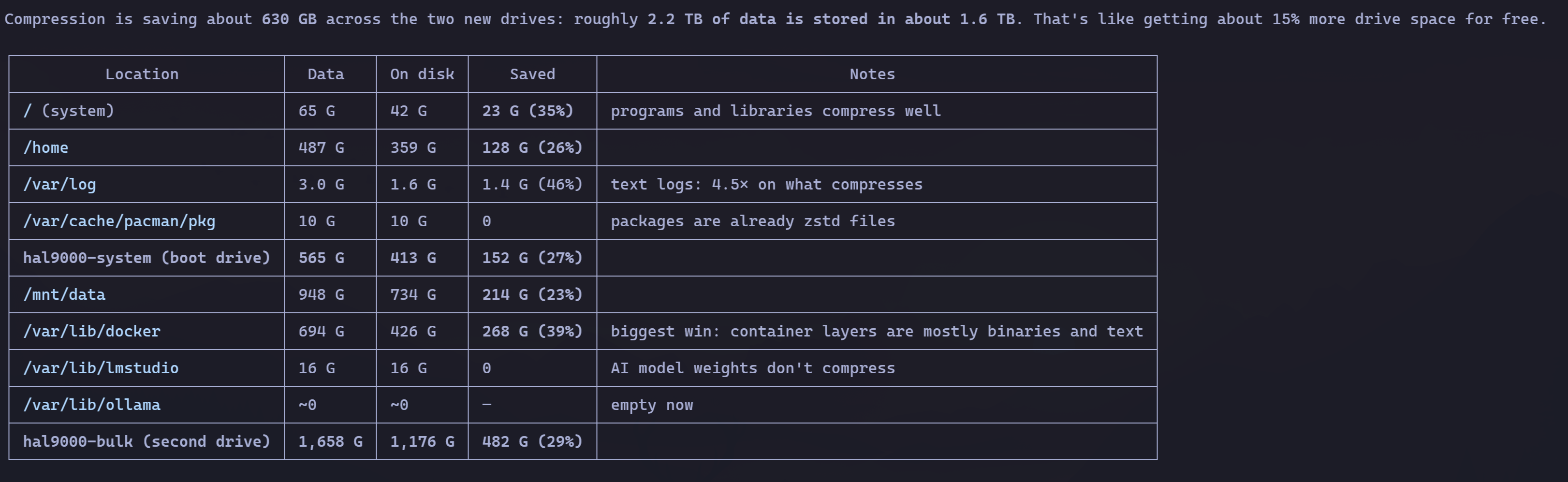
That’s 630 GB of free space on 2.2 TB: 15% more drive, paying nothing. On the initial migration the gain was even bigger, 45% on the system volume, because there was more text and less binary. Notice the table’s details: programs and libraries compress well, Docker layers compress even better (39%), text logs compress 4.5x, and AI model weights compress nothing, which is expected and costs nothing. Source code, which is what we produce the most in the AI era, compresses beautifully.
Synology uses btrfs, QNAP uses ZFS
Being fair to ZFS: for a big NAS it’s superior, and it’s what I chose for the QNAP. Native checksums and self-healing, mature RAIDZ, excellent send/receive. The price is complexity and resources: ZFS wants RAM for the ARC cache (my QNAP has 7 GB for a 174 TB pool, and I feel the lack), its online deduplication would need about 190 GB of RAM just for the table on my volume, and its provisioning model gave me a free scare when the snapshot was refused with 20 TB free (the thick vs thin story is in the NAS article).
btrfs is the right balance for a consumer machine. Light, native in the kernel, does almost everything ZFS does without demanding a storage administrator. Desktop, laptop, homelab, small or medium NAS: btrfs. Synology proved it in practice, twice: the btrfs volume survived readable with two drives out, and its snapshots saved 11 albums I deleted by mistake in the middle of the cleanup, byte by byte.
Big, serious NAS, with RAM to spare: ZFS. Everything else: btrfs. And for a personal Linux machine, it’s not even a discussion.
Boot recovery via snapshot
The feature that has saved me for real, told on both machines.
On the desktop, Omarchy configures snapper to take a snapshot before every update and limine-snapper-sync publishes each snapshot as a boot entry in Limine. New kernel won’t come up? In the boot menu you pick yesterday’s snapshot and the machine comes back as if nothing happened. On my machine the scheduled routine runs via Timeshift on cron (every boot and hourly), with snapper covering the update points: the way back is the same mechanism. (The gotcha: each snapshot entry carries the kernel image along, so a small ESP fills up fast. My 1 GB one already refused a kernel update for lack of space; the system stayed bootable on the old kernel, which is the right behavior.)
On the server, which runs openSUSE MicroOS, it’s even stronger: the whole system is transactional btrfs, and every update is a new snapshot. Last week, kernel 7.2.9 took down the NVMe controller silently, twice, in the middle of the nightly backup. The fix was a transactional-update rollback and a reboot back to 7.2.6, which ran the whole load (754 GiB of backup reads with concurrent download) without a hiccup. A kernel regression became a scheduled reboot, not a recovery all-nighter. One documented caveat: /etc lives inside the snapshot, so the rollback undoes configuration changes along with it. After any rollback, check your units again.
Maintenance is not optional (and the deleted file that won’t go away)
A modern CoW filesystem delivers a lot, but it charges two routines ext4 never asked for.
The first is the scrub, which already appeared here: re-read everything and check checksums, monthly, on all machines. It’s bit-rot detection in action, and without it the checksum only warns you about the rot when you try to read the file. The second point is subtler: a snapshot pins the blocks of deleted files. When you delete a file inside a snapshotted subvolume, the space doesn’t come back, because the block stays referenced by the photo. That’s exactly what happened on my NAS: the 2.14 TB cleanup I ran on the Synology only freed space for real after the old snapshots were removed; until then, the blocks stayed pinned.
The treatment is simple routine. Retention has to be automatic, with snapper or Timeshift deleting the old snapshots per policy (on the QNAP, the Snapshot Manager’s retention policy plays the same role). Space that doesn’t come back after deleting old snapshots is usually over-allocated chunks: a btrfs balance start -dusage=50 returns the little-used pieces to the free pool (in my house I don’t blindly schedule balance, I monitor the unallocated space and act when it gets tight). And on the restic side, forget alone only removes the snapshot’s reference: the repository space is only reclaimed with prune along, forget --prune.
House cleaning in the AI coding era
Now the part almost nobody connects with filesystems: the agent era produces garbage at industrial speed. I know because I measured.
- Rust is the biggest disk polluter in the dev world. Every build leaves behind 100 to 180 MB test binaries, and they accumulate with each edit. On my desktop, the
target/directories added up to 920 GiB. ai-memory alone accounted for 704 GiB. The hygiene tool I was using is cargo-sweep, weekly. A reader pointed out that the project declares itself unmaintained, and its own README points to cargo-clean-all, which works differently: instead of pruning old artifacts inside onetarget/, it finds every Rust project under a directory and deletes the wholetarget/of the ones you filter, for examplecargo clean-all --keep-days 7 ~to clean only what hasn’t been compiled in a week. - Docker is right behind. On my machine I found 1.26 TB of build cache plus 938 GB of images. A single cleanup recovered about 600 GB. On the server, the weekly cleanup collects 0.6 to 4.5 GB every Sunday.
- AI and package caches bloat quietly. The Hugging Face cache had 86 GB until I deleted three dead models and it dropped to 21. Pacman had 22 GB of outdated packages. yay, uv and pip, another 125 GB.
- And agents create temporary directories without asking permission. A complex project with several branches means worktrees, and each release worktree has its own
CARGO_TARGET_DIRfull of test binaries. On ai-memory that has already blown up the disk, and it became a mandatory rule in the project’s AGENTS.md: after every release,cargo cleanin each created worktree and removal of finished worktrees, no exceptions.
The solution is to automate the sweeping. My minimal example, a user timer that runs on the 1st and 15th at dawn, with Nice and idle I/O:
- deletes
target/directories of projects idle for more than 14 days - cleans the yay cache
- prunes only Docker build cache older than 30 days, never images or volumes
And the part that became standard in my house: instruct the agents to clean up what they create. Three real rules from my projects, for you to copy:
In the desktop’s AGENTS.md: “Never run broad cleanups like
docker system prunewithout explicit user authorization after a read-only inventory. Cleanup uses an exact list of IDs; idle, old or unreferenced does not mean disposable.”
In the homelab’s CLAUDE.md: “Before finishing any task, remove the temporary things the task created, and only those. Never delete what you didn’t create or can’t attribute to the task. When in doubt, list it for the owner.”
In ai-memory’s AGENTS.md: “
target/grows without limit: every edit to a shared crate leaves behind a copy of each 100-180 MB test binary (seen at 157 GiB). Weeklycargo sweep --time 7, and mandatorycargo cleanafter every release.”
And the real backup: restic
A snapshot lives on the same drive, so a snapshot is not a backup: if the drive dies, the snapshot dies with it. The last item in the kit is restic, which for me is the best backup system on Linux today.
restic is a single open source binary, written in Go, that does deduplicated, encrypted and versioned backup to practically any destination: another directory, another NAS via SFTP or REST, S3, Glacier. The central trick is content-defined chunking: it slices each file into variable-size blocks defined by the content, hashes each block and only writes to the repository the blocks that don’t exist there yet. That’s why the delta is cheap: today’s backup carries the blocks that changed since yesterday, not the files that changed. Editing a 100 GB database in the middle costs a few megabytes of backup, not 100 GB again. Each run becomes a repository snapshot, a restore point you browse with restic mount as if it were a filesystem, and restic check audits the whole repository’s integrity whenever you ask.
Configuration matters more than the tool, so here’s ours, mistakes included. On the desktop, the repository lives on the NAS and retention is keep-daily 7, keep-weekly 4, keep-monthly 6, keep-yearly 1. On the server, backup runs daily at dawn to the repository on the QNAP, covering /etc, /usr/local/bin, /home and the container volumes, with the password off the machine and pg_dump before the databases, because a filesystem snapshot doesn’t guarantee consistency for a database that’s writing. The first full load was 729 GiB in under an hour, and restic crossed unharmed, on retries, the window in which the NFS mount went read-only by mistake during the migration.
The most important part of the configuration is what does not go into the backup. Our exclusions, all with a reason:
- AI model caches (Immich, Hugging Face, EasyOCR): if lost, download again;
- Prometheus metrics: history that regenerates itself;
- the Fulcrum database: reindexes from bitcoind;
- the decision classifiers’ weights: re-downloadable by revision hash (and this exclusion’s glob goes inside quotes inside the bash array, because unquoted it becomes a backup source instead of an exclusion);
node_modules,target/, cargo registry, rustup toolchains: pure build artifacts.
And one retention lesson to close. When we shortened the server policy to “yesterday, 2 dailies, 2 weeklies and 1 monthly”, the correct translation to flags is --keep-daily 3 --keep-weekly 3 --keep-monthly 2, not 2/2/1: restic’s levels overlap, and yesterday’s snapshot is also the newest of this week and this month, so each number needs to be one more than the older points you want to keep. The detail caught us off guard: the script had a literal 2/2/1, and with it the monthly level would never hold anything older than last night. In practice, the intention was to keep 5 restore points, and 2/2/1 delivers only 3: yesterday, plus one daily, plus one weekly. We erred, measured, corrected.
A humility note from the disaster: the old repositories were left on the Synology by my decision (almost 2 TB of abandoned history, because the content was already re-covered on the new QNAP). A backup repository ages too, and revisiting its scope is part of the hygiene.
Conclusion: in the AI era, disk is not a detail
Agents coding all day change the storage math at both ends. On the volume end: builds, caches, worktrees and models fill the disk much faster than any human habit ever did, and without a cleanup routine you find out when it blows up. On the safety end: the more generated code, the more you need a cheap way back, because not every agent change is a good one.
btrfs covers both. Transparent compression gives back 15% of disk for free, and source code is exactly the kind of data that compresses the most. Snapshots and subvolumes give you instant rollback on the system and isolation for what doesn’t need protection. Checksums and scrub watch the health of blocks that ext4 simply ignores. ext4 had its 15 years of well-deserved reign. In 2026, choosing it on a new Linux is giving up protection you’ll need, sooner or later. Choose btrfs and set up the cleanup today.