
I wasn’t going to write an article for every little open source project I make. Most of them solve a very specific little problem in MY day-to-day, and a dedicated article would be out of proportion. But the little projects kept piling up, and looking back I realized there are already several that never showed up here. So I decided to do it differently: a single article, mentioning most of them at once.
The pattern repeats in all of them: I run into a small friction in daily life, the kind we normally swallow because fixing it would cost an entire weekend, and instead of swallowing it I open an AI agent and fix it. The cost of turning irritation into tooling dropped so much that the math flipped. Today it’s worth fixing almost everything.
Everything below is on my GitHub, with binaries, releases and install instructions.
In this post: clock-tui (with the google-calendar-tui and ghpending widgets), github-visualize, frank_geary, frank_scanlation, frank_lyrics, frank_type, distrobox-gaming and aitrepreneur-docker.
clock-tui: a desk clock that became a panel
The use case is simple: I have a secondary vertical monitor, and I wanted something more useful there than a wallpaper, something I could just glance at and get relevant information. But it all started because I just wanted a desk clock. I found a little old open source terminal clock program, the original clock-tui, which had been paused for ages, and decided to fork it and continue the work: clock-tui.
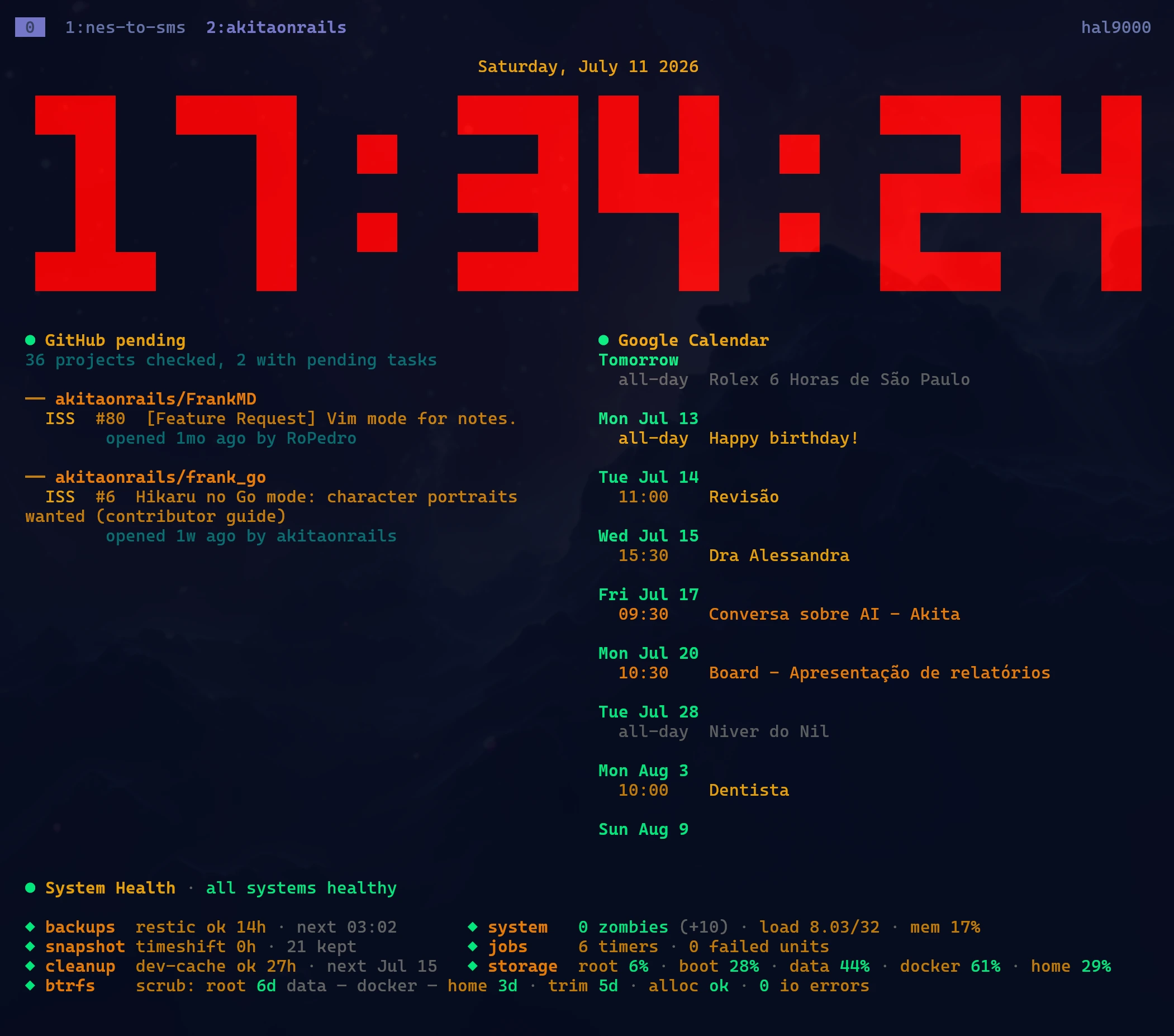
I made it prettier, modernized the Rust dependencies, and the most important change: I added support for command widgets. The clock sits at the top and below it come panels that run any command that prints text, each with its own refresh. Two widgets I built for it myself:
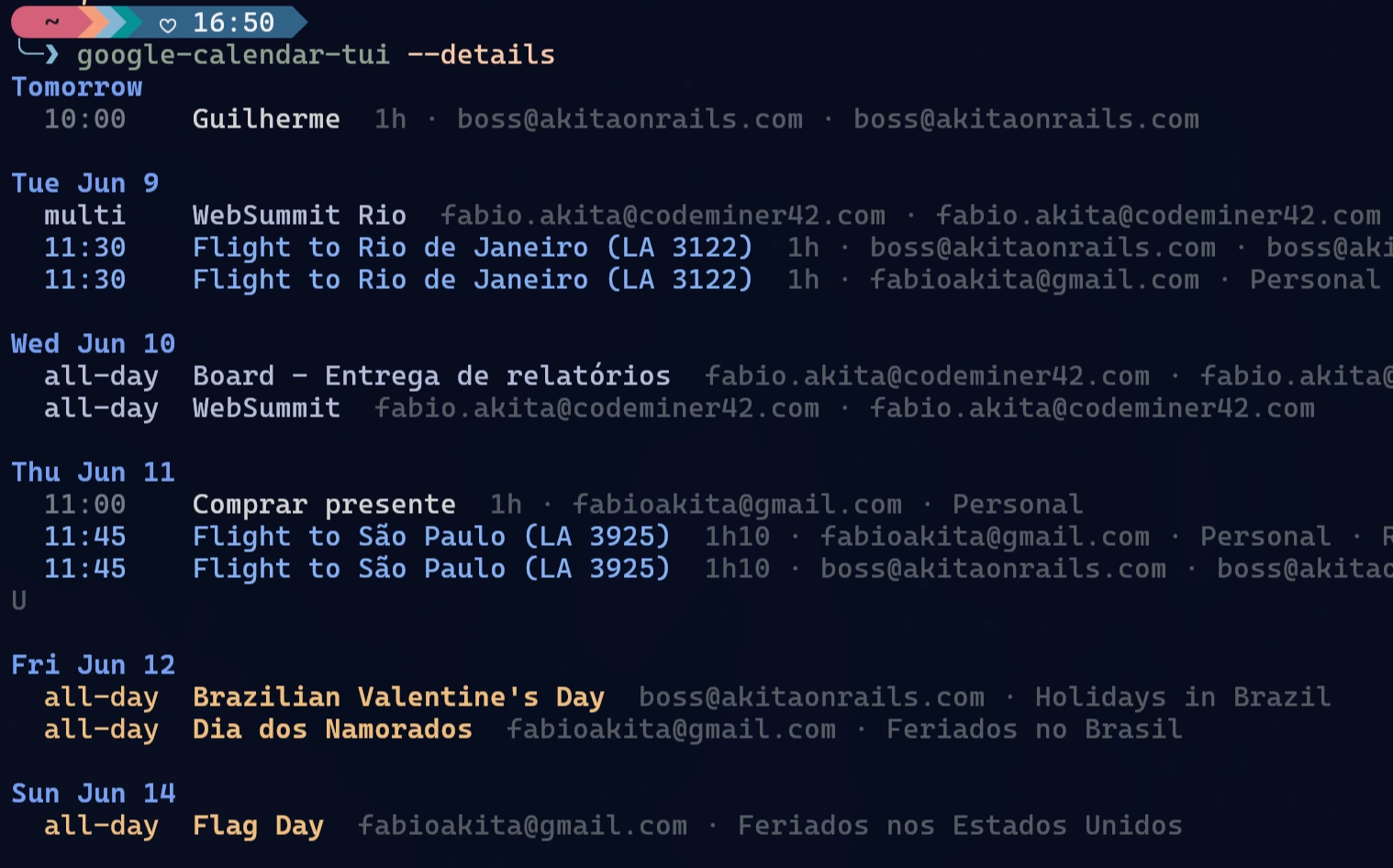
- google-calendar-tui: a read-only Google Calendar agenda in the terminal, using the accounts already in GNOME Online Accounts (zero OAuth setup). One glance and I know my appointments for the day.
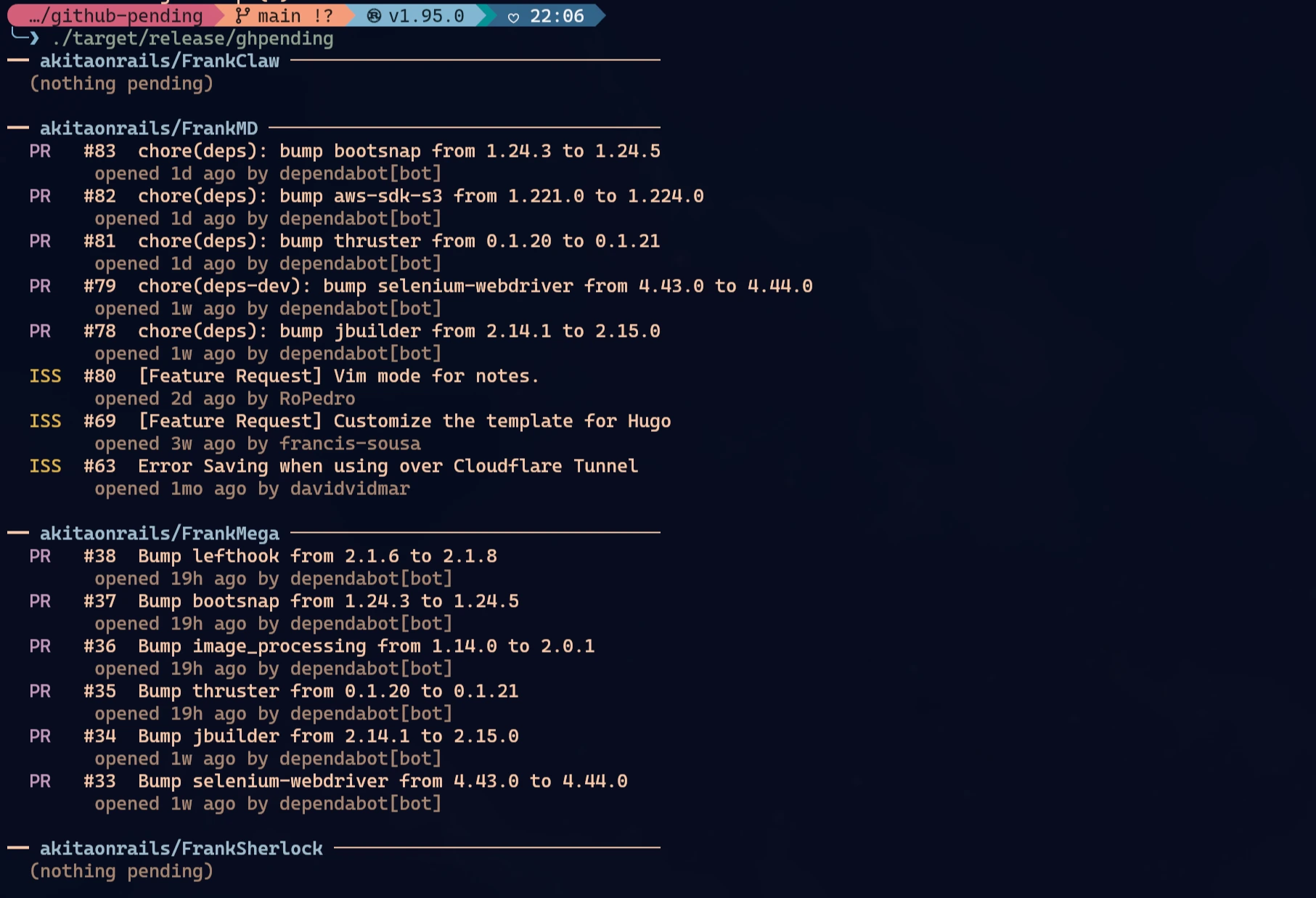
- ghpending: lists open issues and pull requests across all the repositories I care about. Now that I have dozens of open source projects, this is how I notice within seconds when a new PR or issue arrives, without opening GitHub.
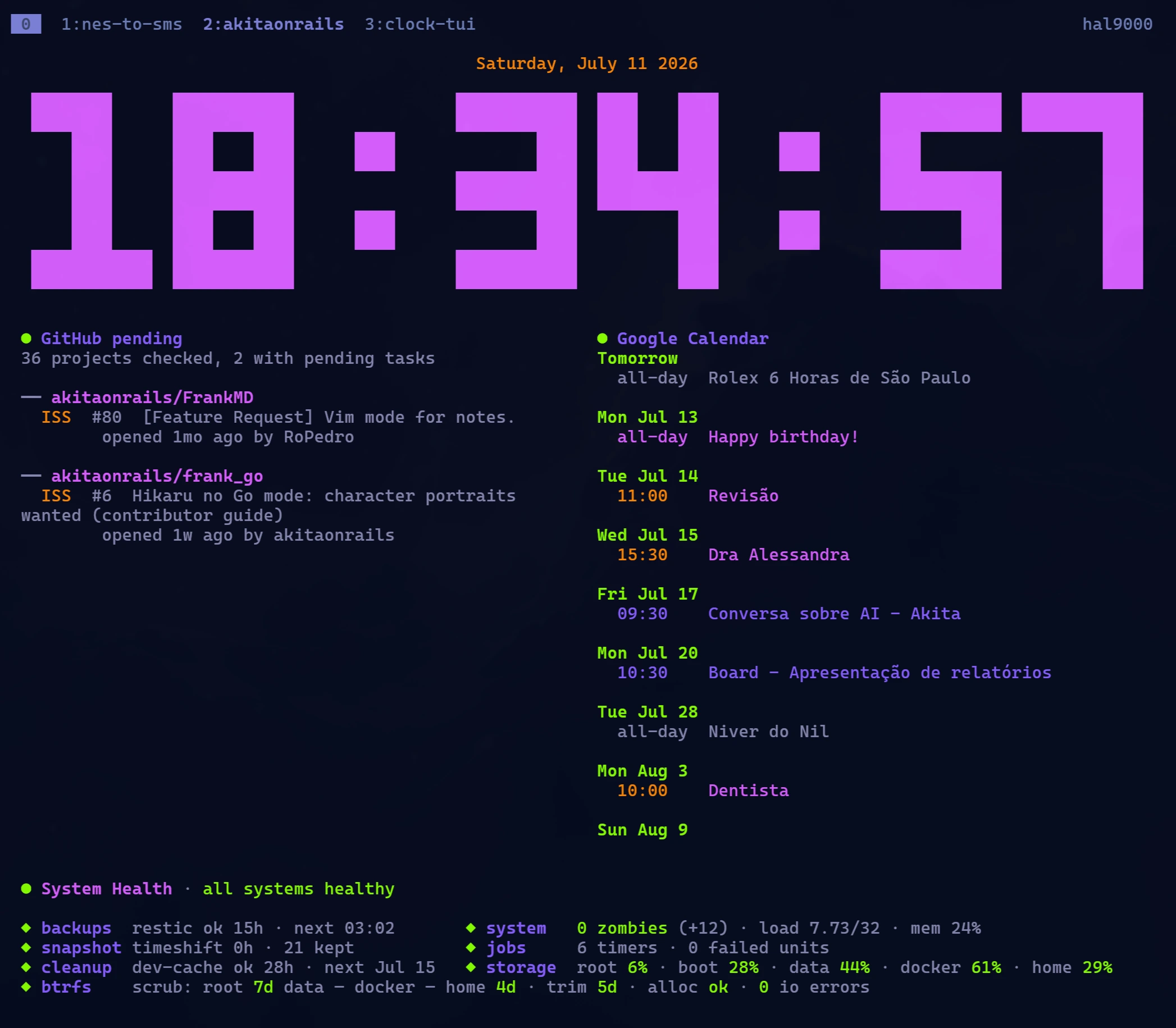
And today I spent the day adding theme support, because someone on X commented that the look could be made to resemble Evangelion. Challenge accepted: there’s now an evangelion theme (purple and lavender) and a nerv theme (red, amber and green, inspired by the show’s alert screens), switching at runtime with Shift+T. The theme is injected into the widgets via an environment variable, so the panels follow the palette.
Installing on Arch: yay -S clock-tui-bin. The widgets: yay -S ghpending-bin (there’s also brew install via akitaonrails/tap on macOS) and yay -S google-calendar-tui-bin. All of them have prebuilt binaries on GitHub Releases for those not on Arch.
github-visualize: useless, but pretty
This one was born because of Jarred Sumner’s article about rewriting Bun’s TypeScript in Rust, which I posted about recently. I don’t know which tool he used to illustrate the post, but I really liked the chart animations. Is it useless? It is. But it’s pretty, and pretty is reason enough to make a copy.
github-visualize is a self-hosted dashboard that monitors my GitHub repositories and replays their progress with animated visualizations: a commit timeline with lines added and deleted on a log scale, a commit heat map by day and hour, a CI race to green. Now I can add any repository of mine and get pretty visualizations of productivity, activity, commits and builds. Maybe I’ll use it in presentation slides, or to illustrate future posts here on the blog.
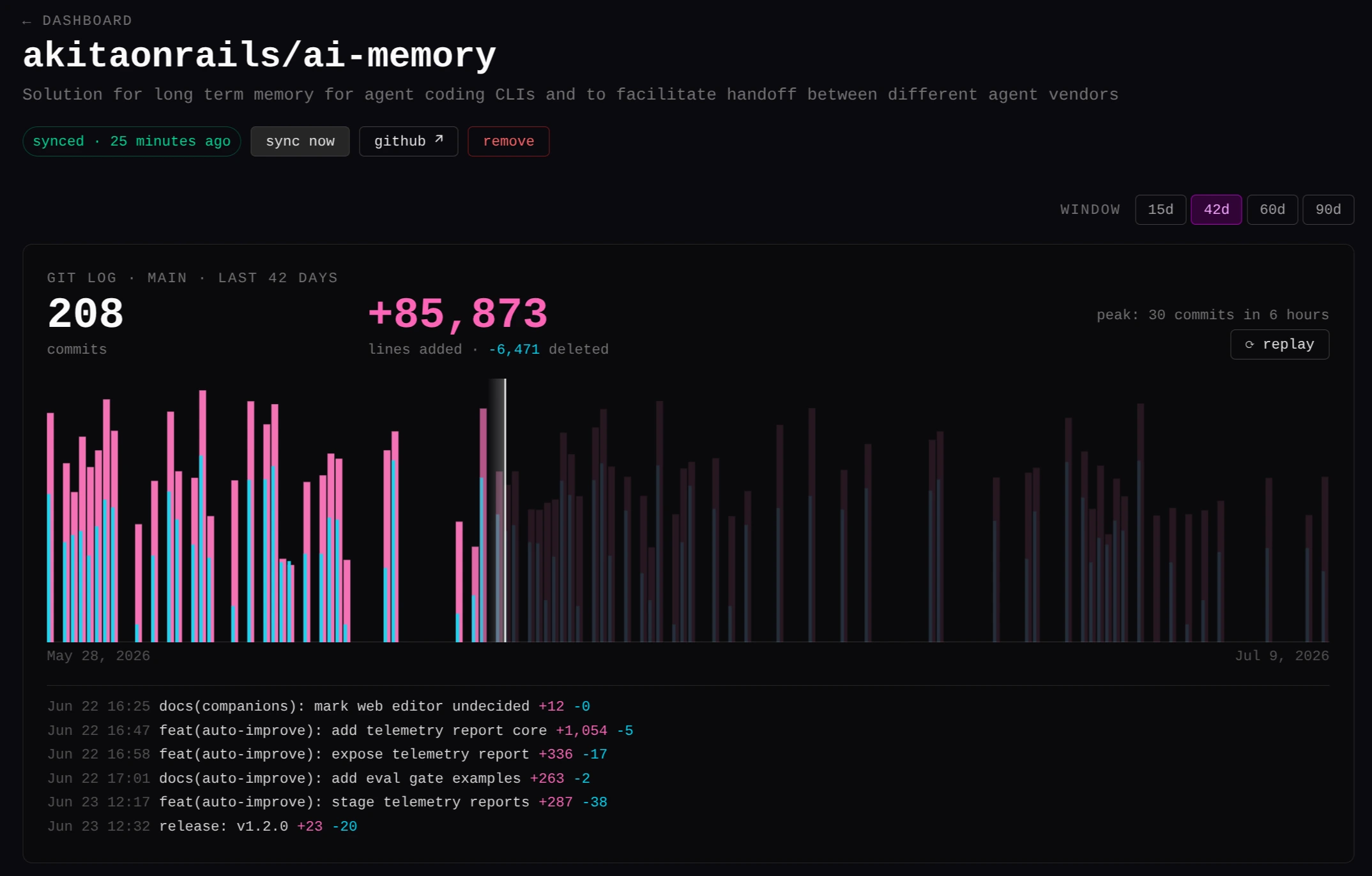
Install: public image on Docker Hub as akitaonrails/github-visualize, single container with SQLite in a volume, no external database or Redis.
Frank Geary: email the way I wanted it
I decided to use GNOME’s Geary as my main email client. It’s the closest to the interface of Apple’s default Mail app: clean, direct, no ceremony. I know, there’s Thunderbird, but I find it bloated and very ugly. There’s Mailspring, which I find bloated and heavy. My email flow is short: sweep the inbox, tag, archive and reply. Nothing else.
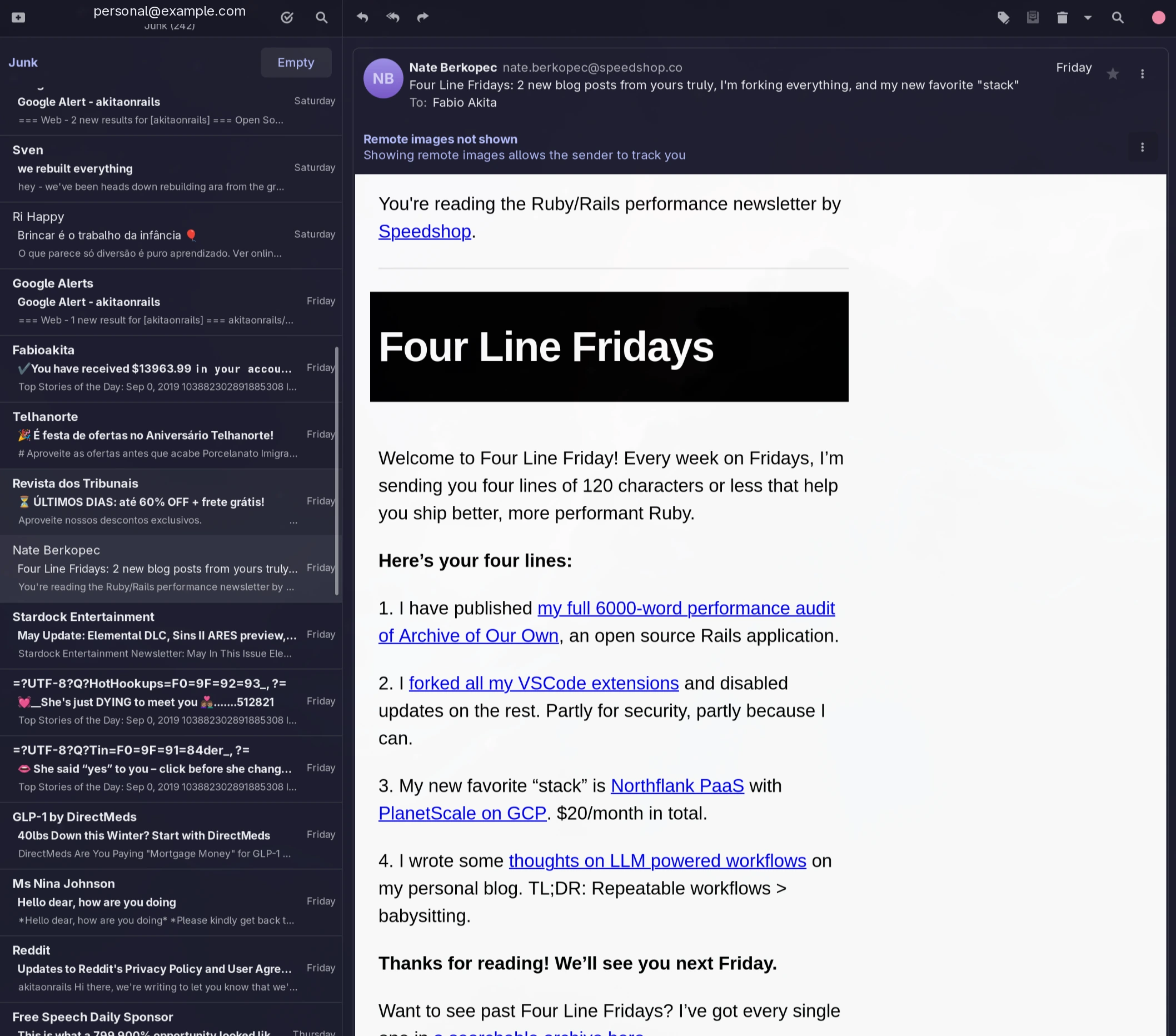
Geary is almost perfect, but it had two big problems for me. First: on my vertical monitor there’s much less horizontal space, and Geary has 3 fixed columns. The first column, which only lists accounts and folders/tags, I don’t need to see all the time, but there was no way to collapse it.
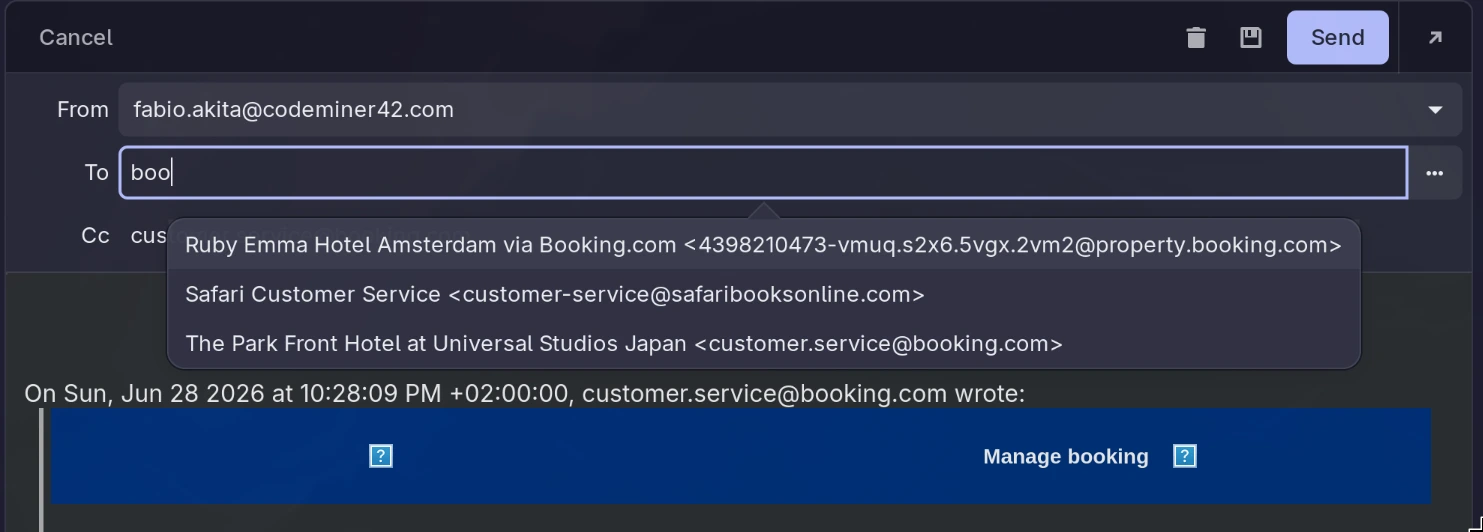
Second, and worse: the composer’s recipient field in practice never autocompleted anything (Geary does have the mechanism, but with a contact visibility filter so restrictive it never suggested anyone). I had to type the address by hand or copy and paste from another email. In 2026.
My first solution was two external GTK modules injected into Geary, one for each problem (both obsolete now). They worked, but they required installing Geary compiled from source, and on every yay -Syu there it went recompiling everything again.
I got tired and did what I should have done from the start: I forked Geary and created Frank Geary, which adds both features straight into the code. The sidebar now collapses, and the recipient autocompletes by consulting the contacts from your existing emails. I’ll keep maintaining the fork by rebasing from upstream frequently.
And the best part: there’s now a package on the AUR, so installing goes like this:
yay -S frank-geary-bin    # prebuilt binary (x86_64), from the GitHub release
yay -S frank-geary        # or compiling from source
Both packages replace the system’s geary (they provide/conflict with it), so the swap is clean and updates arrive like any other package. One detail after installing or upgrading: when the watch-for-new-mail option is on, Geary keeps running in the background as a D-Bus service, so run a geary --quit to make sure no old process is left hanging around.
Japanese manga: FrankYomik, FRANK MANGA+ and FRANK Scanlation
Anyone following the blog knows about my love for Japanese manga. I already posted about FrankYomik, which was born so I could read the original Japanese manga I buy from Amazon Japan.
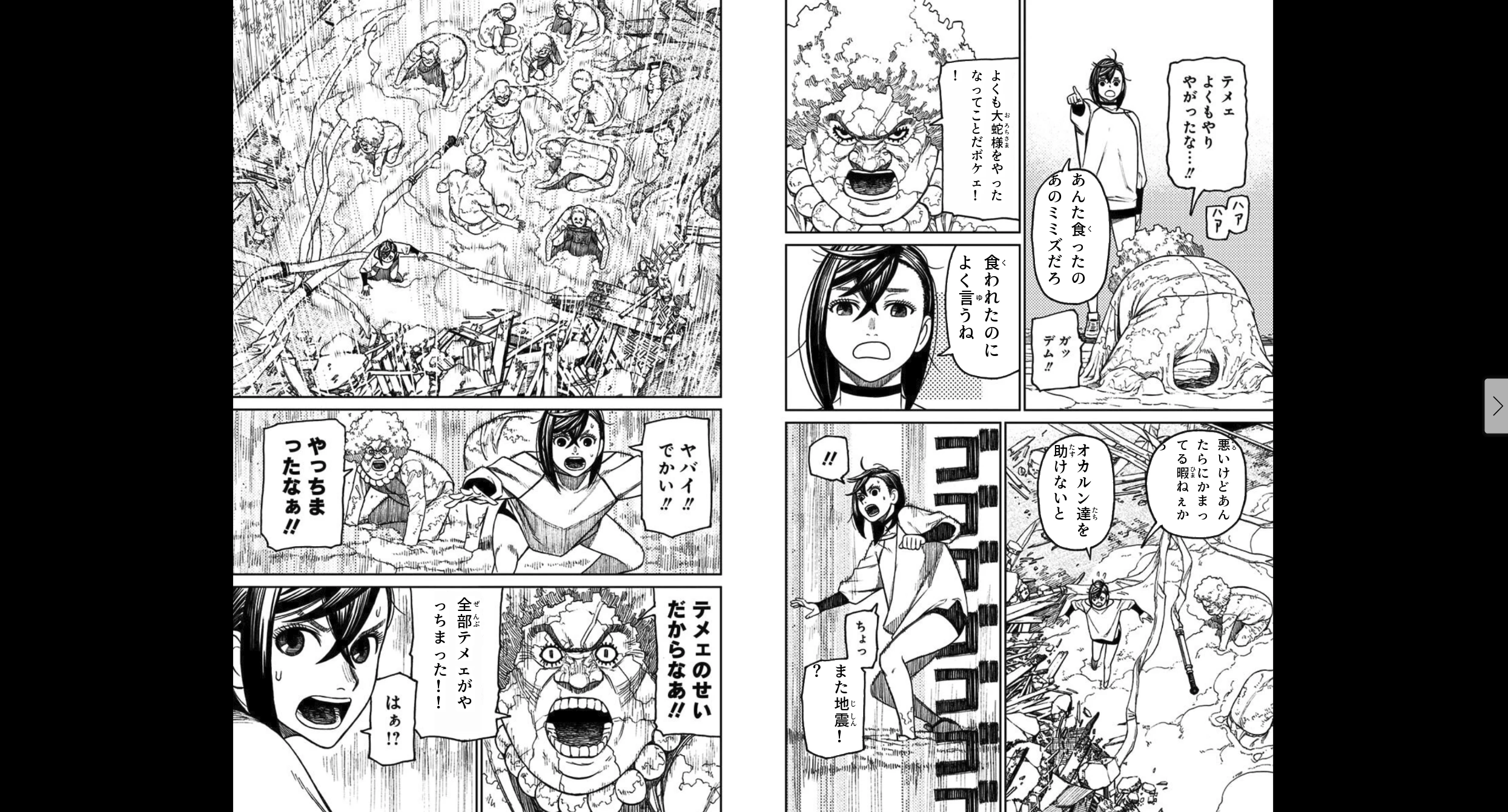
The problem: manga aimed at adult audiences (no, not porn! I’m talking about subjects like business or military topics) doesn’t have “furigana”, the little kana subtitles printed next to difficult kanji, indicating the reading. Shounen manga has furigana on everything, so you can read it with student-level vocabulary. The adult ones assume you already know how to read the rare kanji. I don’t.
FrankYomik solves that by adding furigana on top of the page, in real time: a model detects the speech bubbles, manga-ocr extracts the text, and the furigana (or a full translation, via a local LLM on Ollama) is rendered on top, all running on my own hardware. And the important detail: on-the-fly, over the image I already have legitimately open, without downloading or redistributing a single page, so no copyright or license infringement.
Then came FRANK MANGA+, which I also posted about. I pay for the subscription to Manga Plus, Shueisha’s official app, but it only lets me read on mobile (Android/iOS). On a small tablet it’s tolerable, but I have a 32" Samsung Odyssey OLED monitor sitting right in front of me.
I figured out how to use my own subscription outside the app and built a desktop reader in Tauri: it runs on Linux, macOS and Windows, the free tier works out of the box and subscribers paste their own secret to unlock the premium chapters.
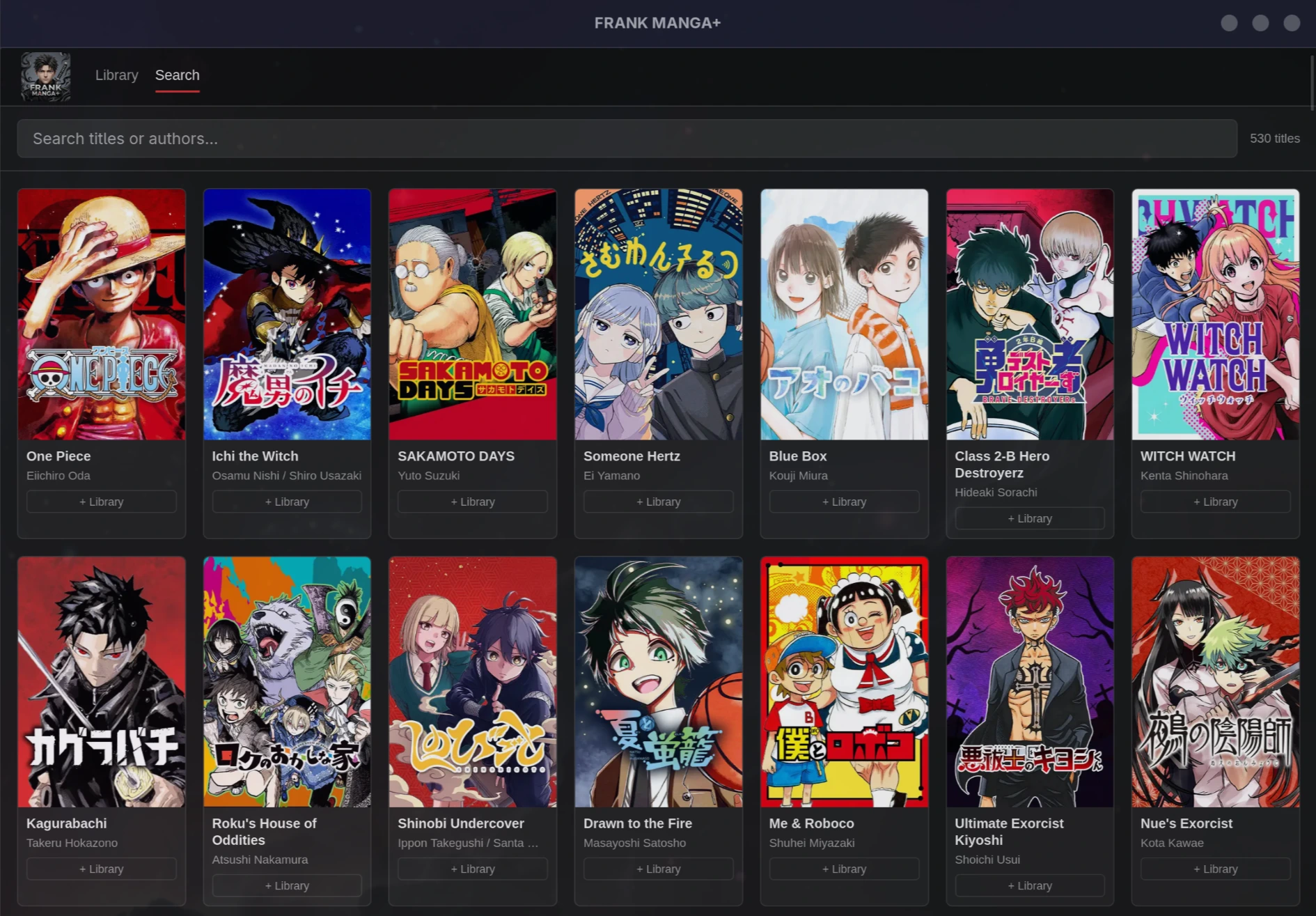
Install: AppImage, .deb and .dmg on the releases, or yay -S mangaplus-reader-bin on Arch.
And finally, I also read the occasional community “scanlations”: fans scan the pages of the original Japanese manga and translate them (nowadays most use AI in the process, there are even models trained to recognize speech bubbles, and I used one of those in FrankYomik itself). These scanlations are spread across several different websites, like MangaDex.
First I made a Chrome extension to prettify those sites (obsolete now), but I got tired of living with dozens of tabs in Brave just for scanlation sites. So I built FRANK Scanlation, along the same lines as FRANK MANGA+: a desktop app that concentrates all my favorite scanlations in one place, with a library, per-title reading progress and checking for new chapters.
The reading windows load the site itself and inject a decent reader on top, with double-page spreads and keyboard navigation. Nothing is hardcoded to any website: they’re heuristics that detect image sequences and chapter numbering in any URL. It became my preferred way to read the manga that can’t be bought on Amazon or from Shueisha.
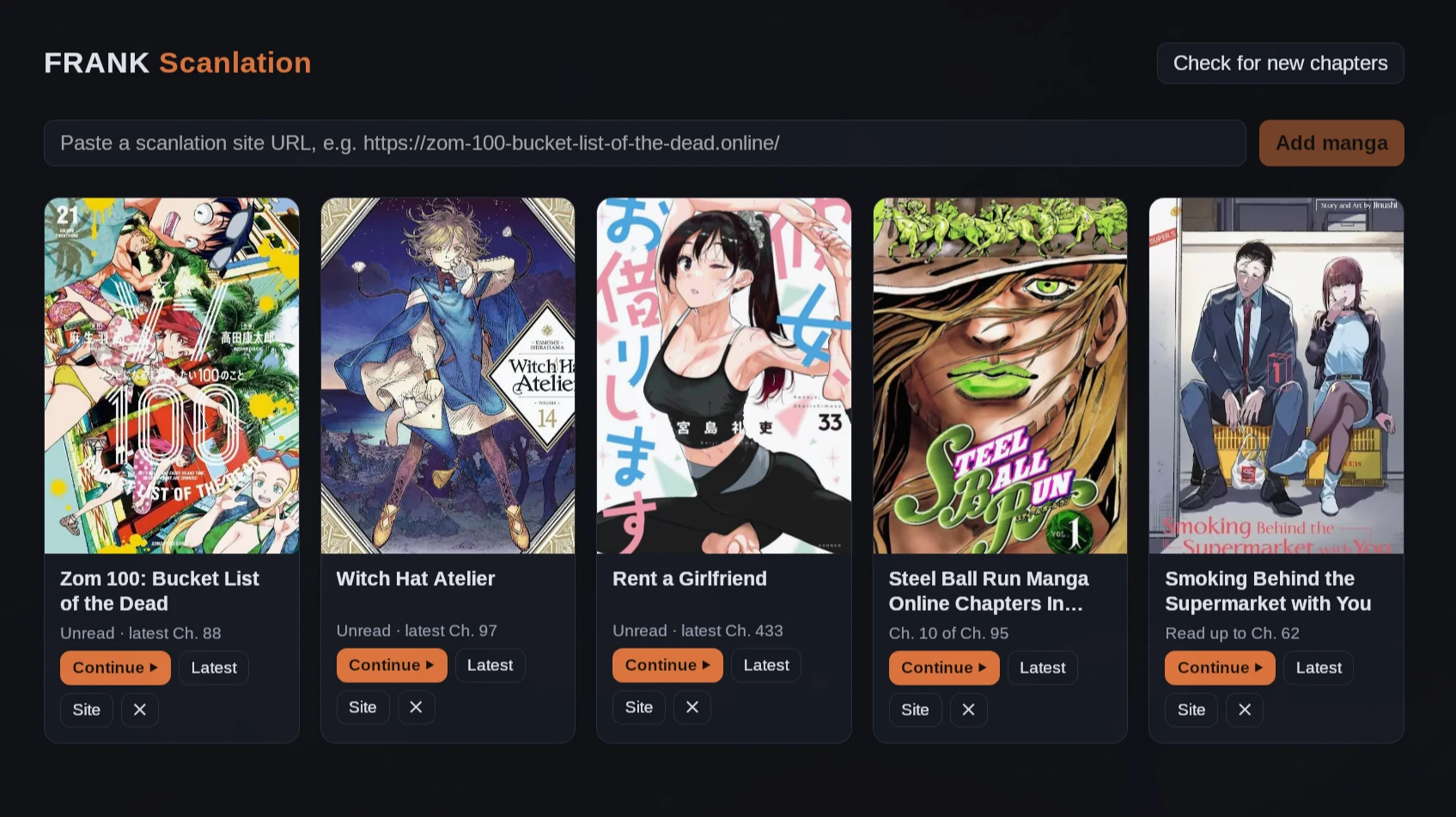
Install: AppImage, .deb and .rpm (and a macOS build) on the GitHub releases.
Frank Lyrics: memorizing songs line by line
I already posted about Frank Karaoke, a little app to add scoring on top of YouTube and enjoy karaoke with family and friends. But there’s a sibling use case: I like learning new songs (a new anime opening, for example), and the process of memorizing lyrics is repeating the SAME line several times. In the YouTube player that’s hell: you keep hunting by hand for the exact spot on the timeline to go back to, miss it by two seconds, rewind too much, overshoot.
To solve that I created Frank Lyrics, a simple Chrome extension that figures out the correct timing for each line of the lyrics using the public markers from LRCLIB and injects controls into the YouTube page itself. LRCLIB, for those who don’t know it, is an open, community-driven library of synchronized lyrics: each line comes with a timestamp (the classic LRC format from music players), with a public API, free and keyless.
The extension matches those timestamps to the video and gives me buttons to repeat the exact line I’m memorizing, as many times as I need, without hunting the timeline. If you enjoy karaoke, the Frank Karaoke + Frank Lyrics combo should serve you well.
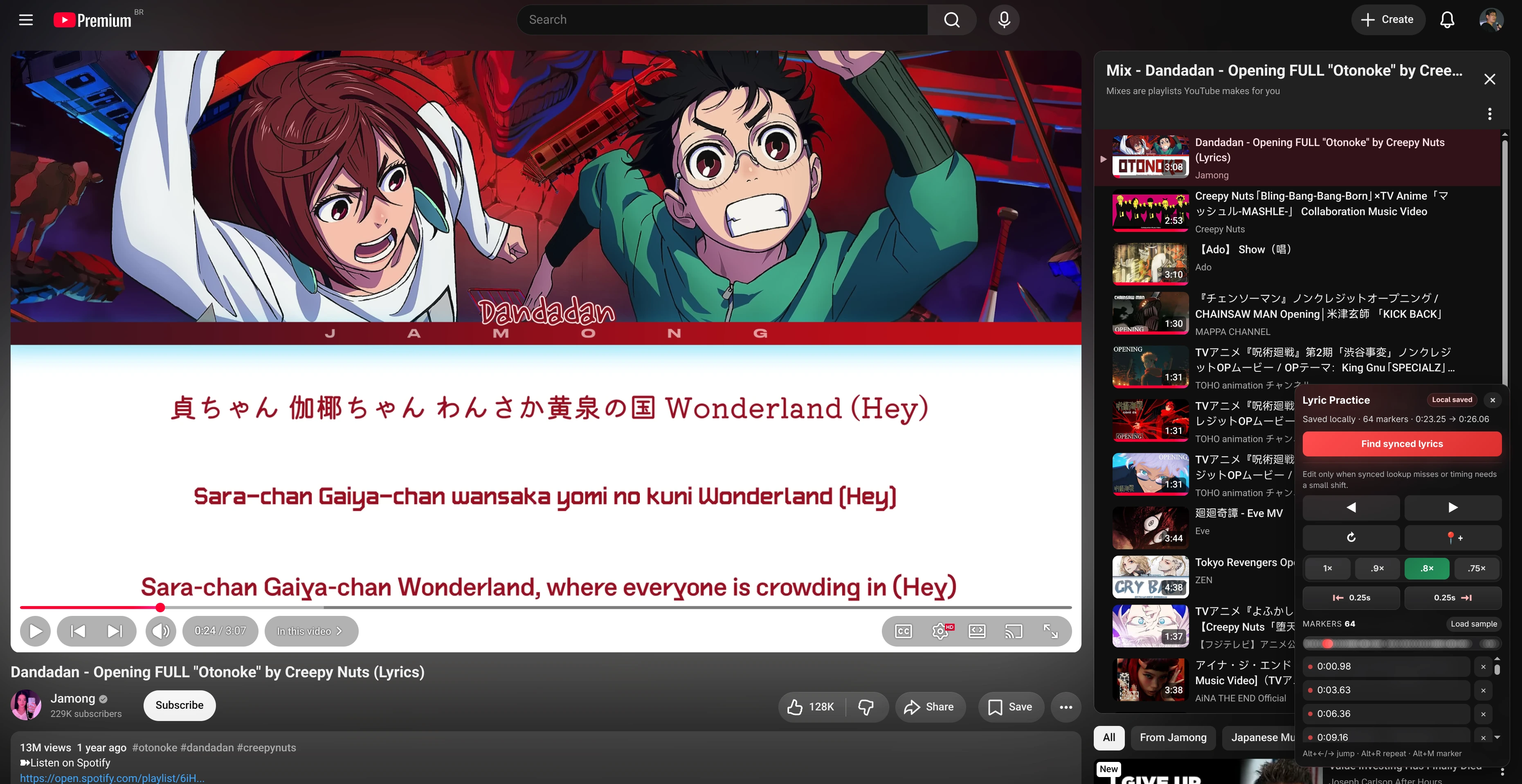
Install: download the .zip from the releases, unzip it, open chrome://extensions, enable developer mode and “Load unpacked” pointing at the folder.
Frank Type: typing practice with actual prose
Anyone who has followed me for a while knows I love my keyboards. There are videos on the Akitando channel about it and posts here on the blog about my favorite keyboards. And from time to time I like to train on MonkeyType. But I dislike typing random words. TypeRacer solves that by using real public texts, except it makes me wait for other players in the room (I hate multiplayer games). In other words: I wanted a single player experience, with real prose, but with the MonkeyType aesthetic, which I prefer.
So I created Frank Type, a mini-clone of both: a typing trainer in Rails 8 that uses normalized public-domain prose excerpts instead of random word lists. It’s local-first and account-free: session history, timing data and profile charts stay in the browser’s local storage. It even has a digraph heat map to show which key combinations slow you down.
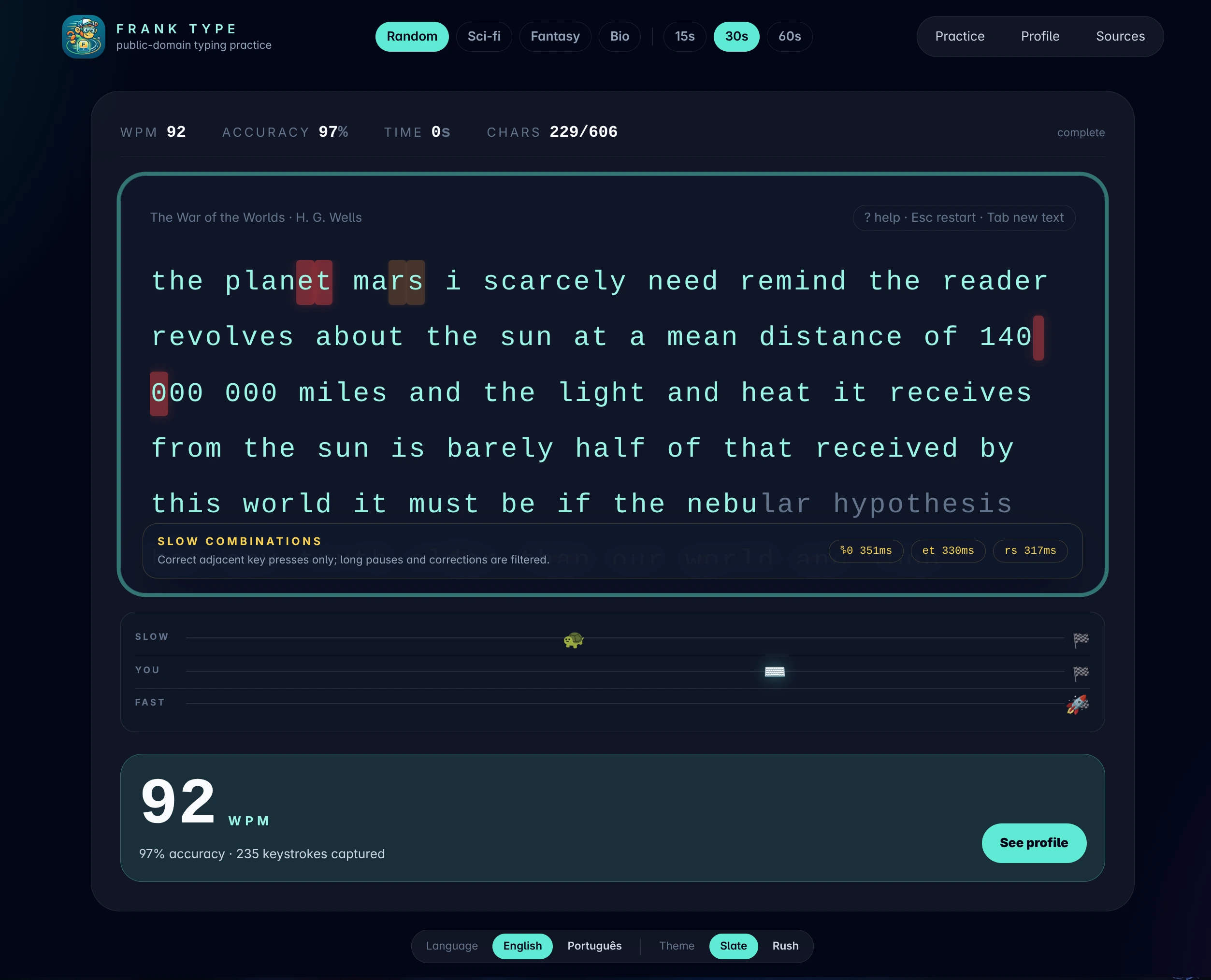
Install: it’s a Docker container published as akitaonrails/frank_type. One command brings it up at http://localhost:3200:
curl -fsSL https://raw.githubusercontent.com/akitaonrails/frank_type/master/bin/docker-run.sh | bashdistrobox-gaming: a library of how to install games on Linux
I game on the same PC I work on, but I refuse to mix emulator packages and Wine hackery with my development environment. The solution was to isolate gaming entirely inside a distrobox (containers that integrate with your desktop as if they were native), and distrobox-gaming is the repository of Ansible playbooks that builds that Arch box from scratch: ES-DE as the frontend, standalone emulators, RetroArch cores, per-game configs. My Arch/Omarchy host stays clean.
The rule I imposed on myself: every new game I install has to become a reproducible Ansible recipe. I confess I haven’t tested the full rebuild from scratch yet, but that’s the idea: any trick or hack required gets documented in code instead of lost in shell history.
And there’s no shortage of tricks, because I’ve been installing old abandonware: the Colin McRae Rally series (from the PS1 version with a 60 fps patch up to 2007’s DiRT), Sega Rally Revo, OutRun 2006 Coast 2 Coast, among others. Each with its own Wine quirks, patches and configs. Without meaning to, the repository is becoming a library of documentation on how to install games, emulators and retro games on Linux.
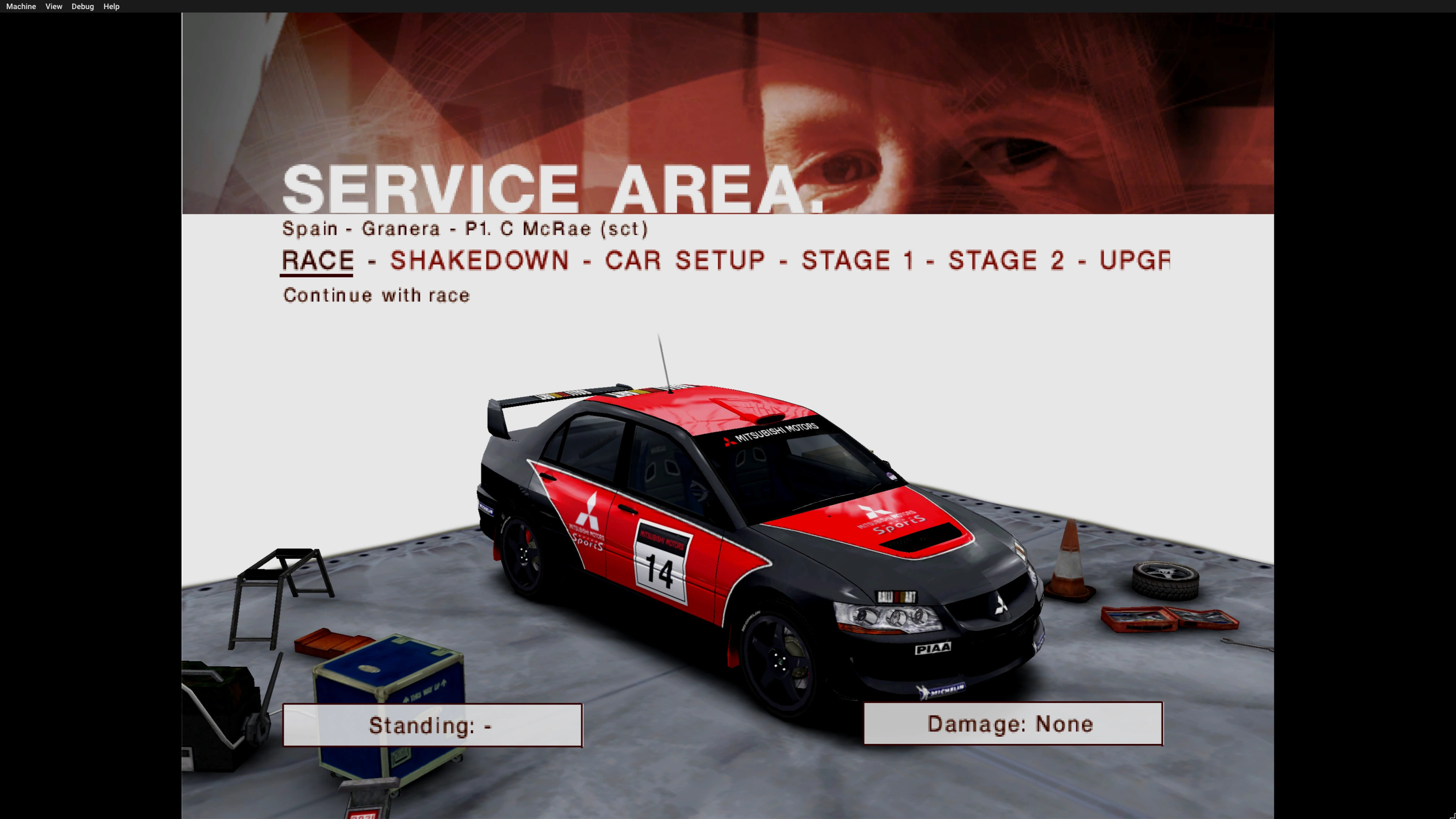
Along the same lines there’s distrobox-llm, which does the same isolation for my local LLM environment (CUDA, Ollama, LM Studio and friends), leaving only the NVIDIA driver on the host.
Install: clone the repository and run the playbooks:
cd ansible
ansible-galaxy collection install -r collections/requirements.yml
cp host_vars/localhost.yml.example host_vars/localhost.yml
$EDITOR host_vars/localhost.yml
ansible-playbook site.yml
aitrepreneur-docker: ComfyUI without dirtying the system
For image generation I like ComfyUI, and I posted about it last year. I follow a youtuber called Aitrepreneur who maintains a Patreon page with recipes to install and configure ComfyUI with the newest models and workflows. His curation work is great, but the recipes are old school .sh scripts, meant to run as one-shots on a RunPod instance, for example.
Now that LLMs evolved to the point of writing decent Dockerfiles, I created aitrepreneur-docker, which converts those scripts into proper Docker images and containers: pinned versions, persistent data on the host or NAS, one command to bring up or upgrade each app. That way I run everything isolated on my machine, without littering my Linux with tons of Python packages and hacks that could destabilize the system.
Two important notices. The credit for the stack selection, model curation and workflows all goes to Aitrepreneur: the repository only translates his work into Docker form, and his original scripts are paid Patreon content that is NOT included.
If you find it useful, subscribe to his Patreon to contribute to his content creation (that’s also where you get the original files). And the repository doesn’t cover everything he has produced, only the most recent recipes.
Install: git clone, make setup (creates the .env for you to put your Hugging Face token), make build and make up.
And there’s more where these came from
If you’re new here: this is just the batch that hadn’t shown up on the blog yet. There are plenty more projects I’ve covered in dedicated posts. ai-memory is the most popular, most used and most contributed-to of all. ai-jail, which showed up again in yesterday’s post about destructive agents, was the first of the series and is the second most popular.
And there are the others in the Frank series (“Frank” in honor of Frank Rosenblatt, creator of the perceptron, the original neural network; the name marks the experimental projects I do for fun):
- Frank Sherlock: smart image indexer
- Frank Mega: MEGA clone for my home server
- FrankMD: markdown editor
- Frank FBI: email fraud analyzer
- Frank Investigator: teaches you to question the news
Everything is open source and on my GitHub. Everybody is welcome to contribute with issues, pull requests, or just by sharing with your friends. Each of these projects was born from a real little problem of mine. Maybe one of them solves yours too.