Going After Email Fraud | Frank FBI
This past weekend I worked on 3 projects. Two of them I already published: easy-ffmpeg, a smart wrapper for FFmpeg in Crystal, and easy-subtitle, a port of 10 thousand lines of Python to Crystal in less than 40 minutes. I keep improving both, adding features and fixing edge cases as I use them day to day.
But the third project is a different beast. It’s a security project. And the motivation comes from an old pain.
The problem: too many emails
As an ex-YouTuber and content creator, I get an absurd amount of email. Event invitations, collab proposals, sponsorship offers, requests to promote stuff. Every kind of pitch.
I delete 100% of them. I don’t read them. Most of them I mark as SPAM without even opening. The easiest way to get reported by me is to send me an email — I don’t care, because I don’t need to. I also don’t answer the phone. Ever. And I automatically block anyone who messages me directly on WhatsApp, regardless of the content. My time is too valuable to spend triaging messages from strangers. I delete everything and move on.
It works for me. But I know most people don’t operate that way.
The poison is VANITY
Most people who fall for email phishing don’t fall because of technical ignorance. They fall because of VANITY.
“Hello, we’d like to invite you to our exclusive event.” “Your brand has been selected for a special partnership.” “Congratulations, you’ve been nominated as a reference in your sector.”
The dopamine hits before reason has a chance to step in. Someone recognized your work, someone wants to give you money. That’s exactly when the scammer gets you.
It isn’t the multinational CEO who falls for the Nigerian prince scam. It’s the micro-influencer who gets a sponsorship offer that’s “too good to be true.” It’s the small business owner who gets an invite to an event that looks legitimate. Vanity turns off critical thinking.
And the scams are getting more sophisticated by the day. With LLMs, any criminal can generate perfect emails in Portuguese, with no grammar errors, professional formatting, and domains that mimic real companies. The old “look at the typos” doesn’t work as a filter anymore.
The idea: Frank FBI
Instead of trying to teach everyone how to spot phishing (which doesn’t work, because vanity beats training), why not build a tool that does it automatically?
Got a suspicious email? Forward it to a dedicated address. In a few minutes, you get back a detailed report with everything the tool managed to find out about that email.
That’s how Frank FBI was born — Fraud Bureau of Investigation.
How it works
You set up a dedicated Gmail account (any Gmail with an App Password works). You register the email addresses authorized to use the service. From there, the flow is:
- You receive a suspicious email in your personal inbox
- You forward it to the Frank FBI address
- The system analyzes it automatically
- You receive the response in the same thread, with the full report
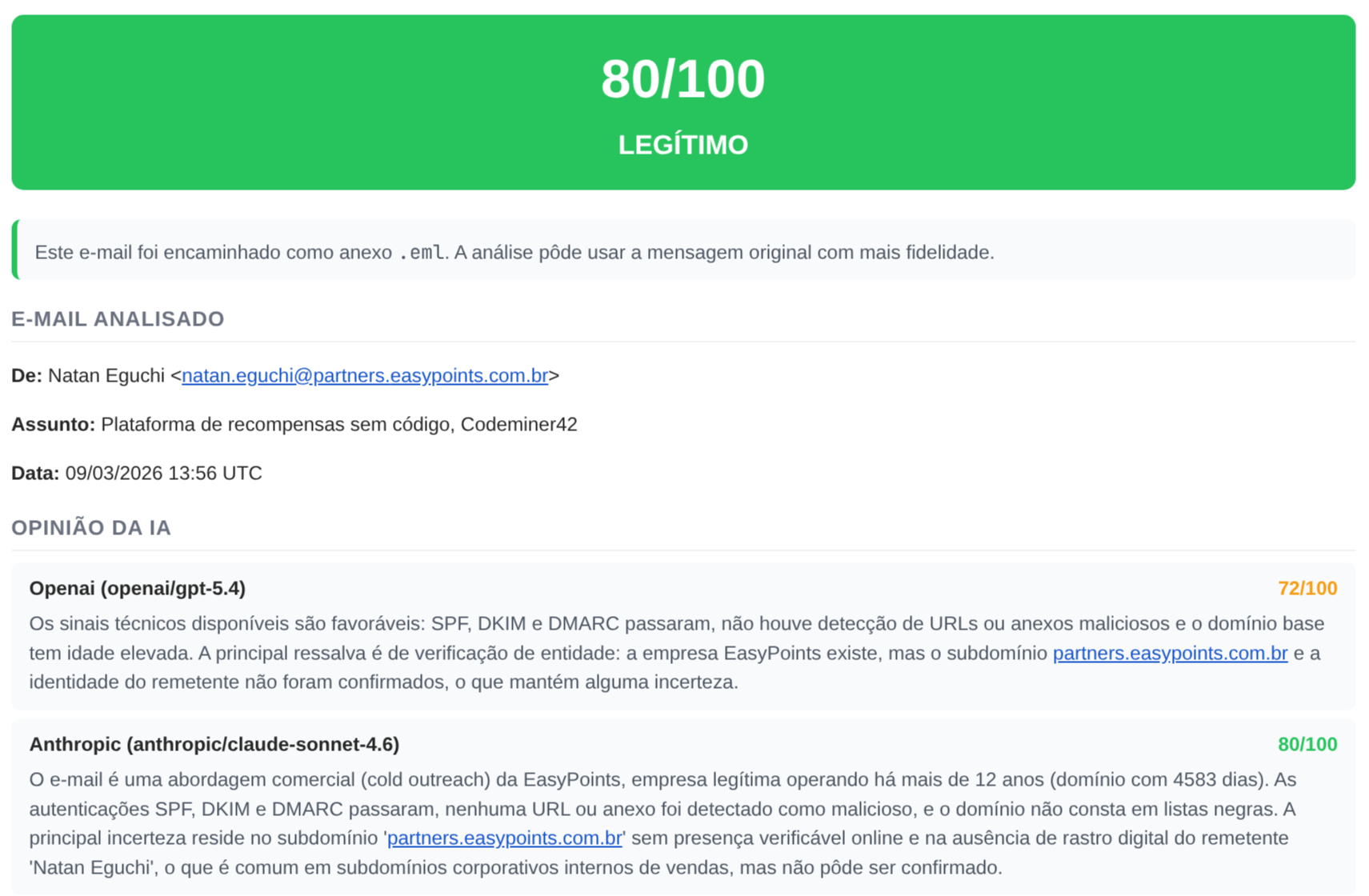
To give you a sense of the result, here’s a report for a legitimate email (cold outreach from a real company):
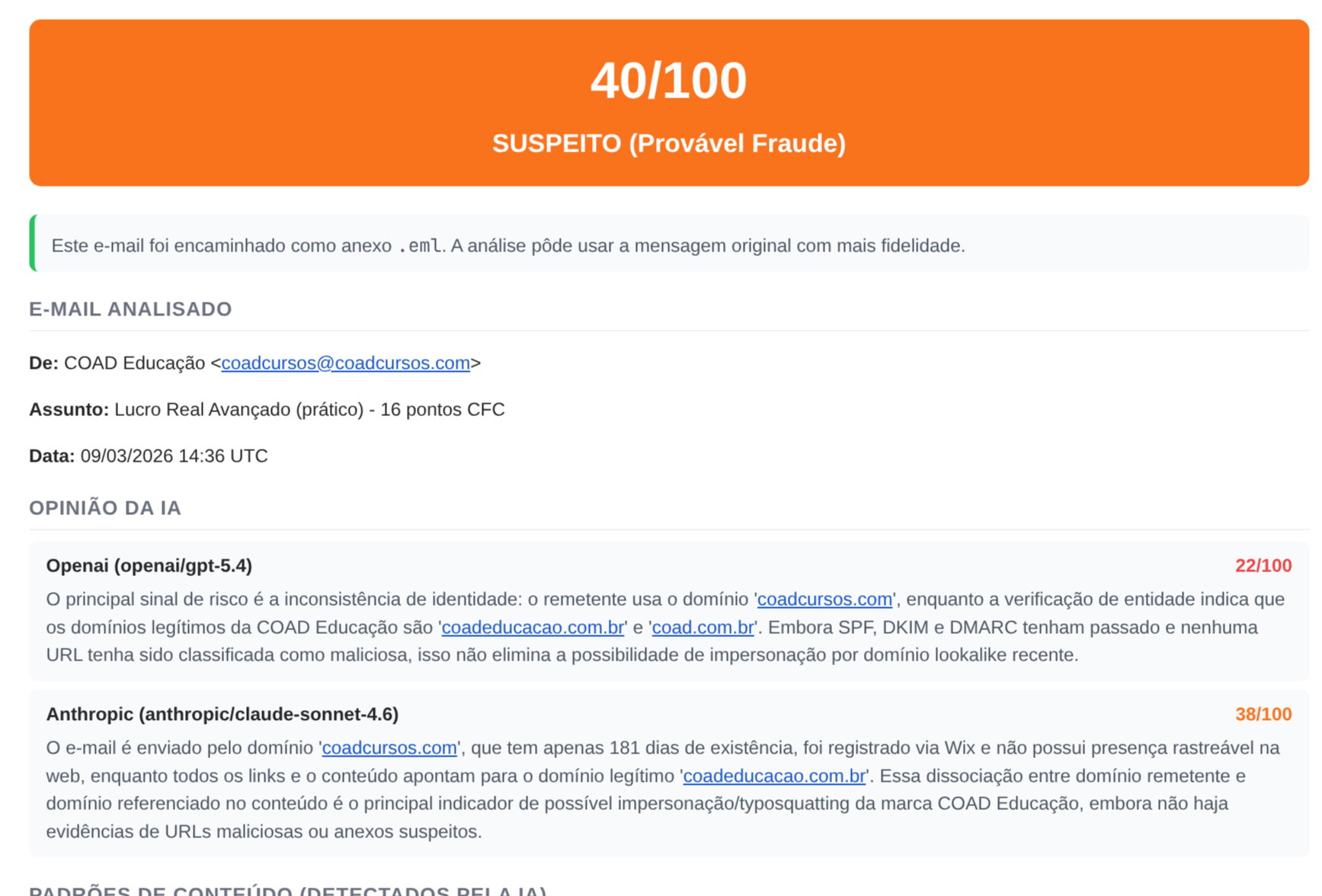
And here’s a suspicious one, where the sender’s domain tries to impersonate another company:
Frank FBI runs 6 layers of analysis, each with a specific weight in the final score:
Layer 1 — Header authentication (15% weight)
SPF, DKIM, DMARC. Does the Reply-To match the From? Are there suspicious anti-spam headers? This layer answers the most basic question: did the email actually come from who it claims to?
Layer 2 — Sender reputation (15% weight)
Looks up the domain’s age via WHOIS (a domain registered last week is already a signal), checks whether the IP is on DNS blacklists (DNSBL), and maintains a local reputation database that improves as more emails are analyzed. If the sender pretends to be a company but emails from a Gmail, that weighs in.
Layer 3 — Content analysis (15% weight)
This is where pattern matching comes in: artificial urgency (“your account will be locked in 24 hours”), requests for personal data, authority impersonation, financial offers. It also detects URL shorteners and links where the displayed text doesn’t match the real href — that classic “click here” pointing at a completely different domain. Checks for dangerous attachments (.exe, .scr, Office macros).
Layer 4 — External APIs (15% weight)
URLhaus (abuse.ch) maintains a known-malicious URL database. VirusTotal aggregates results from dozens of antivirus engines. If any URL in the email has already been flagged as malware or phishing by these databases, the score goes up. Results are cached with a TTL so we don’t blow through the rate limits of the free APIs.
Layer 5 — Entity verification (10% weight)
This is the layer I find the most interesting. Frank FBI does OSINT — Open Source Intelligence. It uses Brave Search to verify whether the sender or company actually exists. Does WHOIS on the domain directly. Captures a screenshot of the site with headless Chrome. Cross-references all of it to try to answer: “is this entity real and is it who it claims to be?”
Here’s a real example of this layer in action, analyzing an email that tried to impersonate a legitimate company:
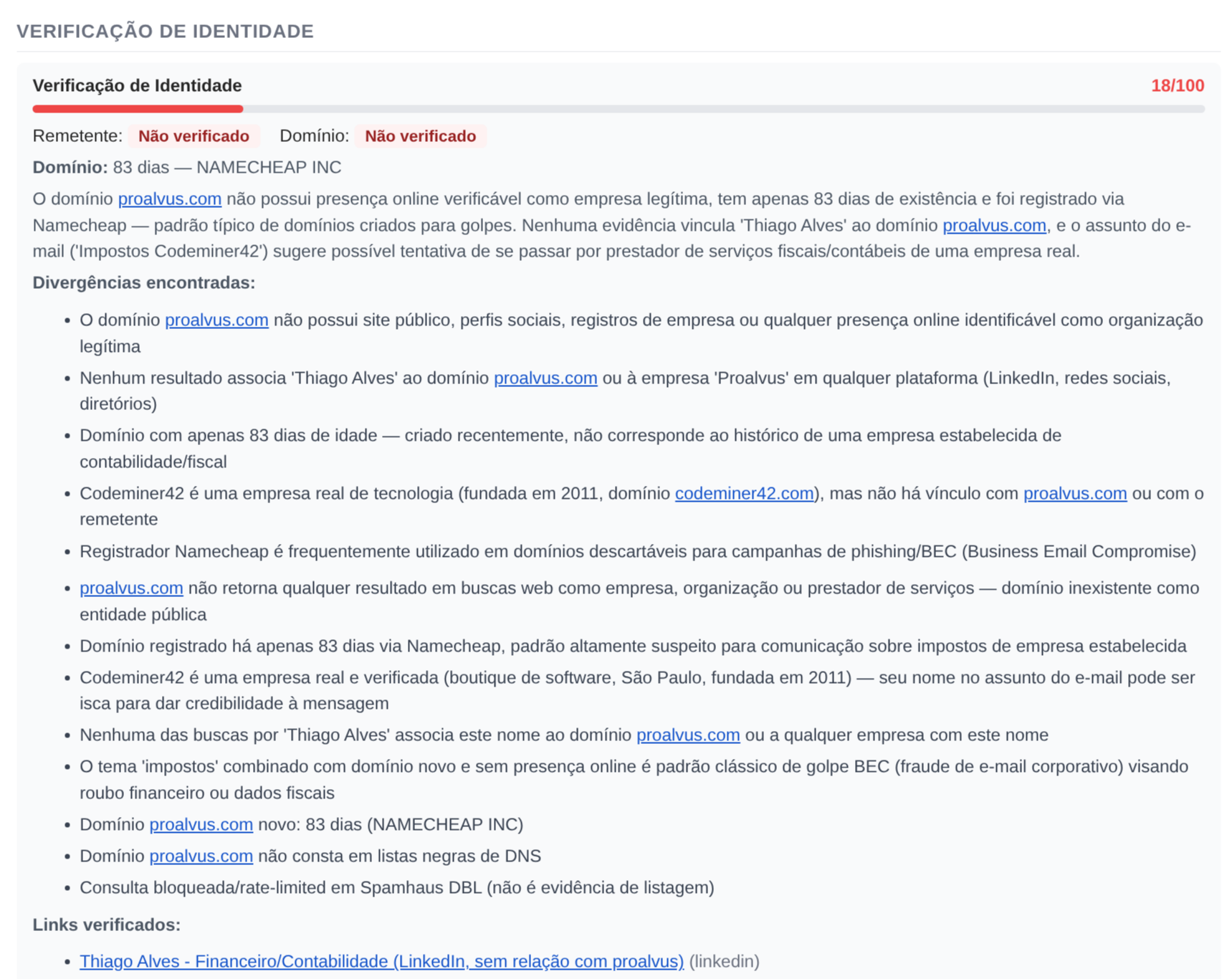
The domain was 83 days old, registered through Namecheap, with no verifiable online presence. The system found discrepancies between the name in the email and the public records, and identified that the legitimate company’s real domain was a different one.
Layer 6 — LLM analysis (30% weight)
Queries 3 AI models in parallel: Claude Sonnet (Anthropic), GPT-4o (OpenAI) and Grok 4 (xAI), via OpenRouter. Each model analyzes the email independently. A confidence-weighted consensus system combines the results. If all 3 agree it’s fraud, confidence is high. If they disagree, the system weighs them. If every LLM fails, it falls back to a neutral score of 50 instead of guessing — better to admit ignorance than to hallucinate.
The final score is a confidence-adjusted weighted average. Possible verdicts: Legitimate (0-25), Suspicious OK (26-50), Suspicious Fraud (51-75) or Fraudulent (76-100). There’s also a risk escalation policy that imposes minimum floors: if critical indicators were detected (confirmed malicious URLs, DKIM failure), the score can’t fall below certain thresholds, even if the other layers found nothing.
Self-hosted: your data stays with you
Frank FBI is self-hosted. You run it on your own server. Your emails don’t pass through any third-party service (except the verification APIs like VirusTotal, which only receive URLs, not the email’s content).
You can install it on your home server, like I did, or inside your company’s infrastructure for your employees to use. The deploy is via Docker Compose with 4 containers: the Rails app, a background job worker, an IMAP poller, and an initial database setup. Bring everything up with a docker compose up -d and it’s running.
Reporting fraud to the community
Beyond analyzing emails for you, Frank FBI can optionally report confirmed fraud to community databases. This only happens when the score is >= 85 and the verdict is “fraudulent.” It’s opt-in.
ThreatFox (abuse.ch) is an open database of indicators of compromise (IOCs) maintained by the security community. When you report a malicious URL or domain there, firewalls, email filters and SIEMs around the world can consume that information to block the threat.
AbuseIPDB is the same idea, but for IPs. If the IP of the sender of the fraudulent email gets reported there, email providers and network admins can block malicious traffic before it reaches users.
And SpamCop is one of the oldest spam reporting services. Frank FBI forwards the full email to SpamCop, which analyzes the headers and reports to the responsible providers. It’s reporting directly to whoever can act.
Each report is a contribution so other people don’t fall for the same scam. And it’s automated: if the email is clearly fraudulent, the report goes out without manual intervention.
But reporting wrong things does damage. That’s why the system has anti-poisoning protections: a list of ~40 known domains (Microsoft, Apple, Google, Amazon, PayPal, governments) that are never reported; domains with clean scans are excluded; cloud infrastructure IPs (Google, Microsoft, Cloudflare) are filtered; free email domains are ignored. Only genuinely malicious IOCs reach the community databases.
Deployment: how to get it running
Let me explain how I deployed it on my home server. If you have a VPS, NAS or any Linux machine with Docker, the process is the same.
1. Clone and build the image
You need a private registry to store the Docker image. I use Gitea on my home server — it’s a lightweight self-hosted GitHub that includes a container registry. If you already have a private GitHub, you can use the GitHub Container Registry (ghcr.io) instead.
# Clone the repository
git clone https://github.com/akitaonrails/frank_fbi.git
cd frank_fbi

# Build the Docker image
# If using Gitea (replace with your registry's IP/port):
docker build -t seu-servidor:3007/frank_fbi:latest .
docker push seu-servidor:3007/frank_fbi:latest

# If using GitHub Container Registry:
docker build -t ghcr.io/seu-usuario/frank_fbi:latest .
docker push ghcr.io/seu-usuario/frank_fbi:latest
2. Configure the .env
Copy .env.example and fill it in. The required variables:
# Gere com: ruby -rsecurerandom -e 'puts SecureRandom.hex(64)'
SECRET_KEY_BASE=

# Gere com: bin/rails db:encryption:init (roda local, copia os 3 valores)
ACTIVE_RECORD_ENCRYPTION_PRIMARY_KEY=
ACTIVE_RECORD_ENCRYPTION_DETERMINISTIC_KEY=
ACTIVE_RECORD_ENCRYPTION_KEY_DERIVATION_SALT=

# Gmail dedicado pro Frank FBI (crie uma conta só pra isso)
# Ative 2FA e gere um App Password em https://myaccount.google.com/apppasswords
GMAIL_USERNAME=seu-frank-fbi@gmail.com
GMAIL_PASSWORD=xxxx-xxxx-xxxx-xxxx
GMAIL_IMAP_HOST=imap.gmail.com
GMAIL_SMTP_HOST=smtp.gmail.com

# Senha do ingress do Action Mailbox (qualquer string aleatória)
RAILS_INBOUND_EMAIL_PASSWORD=uma-senha-qualquer-longa

# LLM via OpenRouter (obrigatório pra Camada 6)
OPENROUTER_API_KEY=sua-chave-openrouter

# Seu email de admin (pra gerenciar remetentes autorizados)
ADMIN_EMAIL=seu-email@pessoal.com
The external APIs are optional but recommended. Without them, the corresponding layers simply don’t run:
# VirusTotal (grátis, 4 requests/min) - https://virustotal.com
VIRUSTOTAL_API_KEY=

# WhoisXML (grátis, 500 requests/mês) - https://whoisxmlapi.com
WHOISXML_API_KEY=

# Brave Search (grátis, 1 req/s) - https://brave.com/search/api/
BRAVE_SEARCH_API_KEY=
And the community reporting, which is fully opt-in. Leave it blank if you don’t want to report:
THREATFOX_AUTH_KEY=
ABUSEIPDB_API_KEY=
SPAMCOP_SUBMISSION_ADDRESS=
3. Docker Compose on the server
Create the docker-compose.yml on your server. Replace the image with your registry:
services:
  setup:
    image: seu-servidor:3007/frank_fbi:latest  # ou ghcr.io/seu-usuario/frank_fbi:latest
    command: ["./bin/rails", "db:prepare"]
    env_file: .env
    environment:
      - RAILS_ENV=production
    volumes:
      - ./storage:/rails/storage

  app:
    image: seu-servidor:3007/frank_fbi:latest
    env_file: .env
    environment:
      - RAILS_ENV=production
    volumes:
      - ./storage:/rails/storage
      - ./emails:/rails/emails
    depends_on:
      setup:
        condition: service_completed_successfully
    healthcheck:
      test: ["CMD", "curl", "-f", "http://localhost:3000/up"]
      interval: 10s
      timeout: 5s
      retries: 3
      start_period: 15s
    restart: unless-stopped

  worker:
    image: seu-servidor:3007/frank_fbi:latest
    command: ["./bin/jobs"]
    env_file: .env
    environment:
      - RAILS_ENV=production
    volumes:
      - ./storage:/rails/storage
    depends_on:
      setup:
        condition: service_completed_successfully
    restart: unless-stopped

  mail_fetcher:
    image: seu-servidor:3007/frank_fbi:latest
    command: ["./bin/rails", "frank_fbi:fetch_mail"]
    env_file: .env
    environment:
      - RAILS_ENV=production
      - APP_HOST=http://app:3000
    volumes:
      - ./storage:/rails/storage
    depends_on:
      app:
        condition: service_healthy
    restart: unless-stopped
4. Bring it up and register the first user
docker compose up -dsetup runs the migrations and exits. app brings up Rails, worker processes background jobs, and mail_fetcher polls IMAP every 30 seconds.
To register authorized senders, send an email from your ADMIN_EMAIL to the Frank FBI address with the subject add email1@exemplo.com, email2@exemplo.com. To list who’s registered, send with subject list. To see statistics, stats.
From there, any registered sender can forward suspicious emails and receive the analysis reports.
The development process
This project started as a simple idea: “what if I could forward suspicious emails somewhere and get an analysis back?” But security projects aren’t like normal projects.
In a regular project, a bug is an inconvenience. In a security project, a bug can be a vulnerability. If the system says a fraudulent email is legitimate, someone might lose money. If it incorrectly reports a legitimate domain as malicious, it can hurt an innocent company. If a malicious email manages to exploit the analyzer itself, the attacker gets access to the server.
That changes the development mindset. Every decision needs to consider: “how could a bad actor abuse this?”
Evolution through commits
Let me show how the project evolved by looking at the most relevant commits.
The project started with the basic email analysis structure and quickly needed access control:
eb59474 - Add admin access control and allowed senders whitelist
036e9f1 - Harden access control against email spoofing and admin impersonation
The first one adds the authorized sender list. The second solves the obvious problem: what if someone spoofs an authorized sender’s email? The system started verifying SPF/DKIM before accepting any submission. Per-sender rate limiting came along with that, to prevent abuse.
Then came concerns about scoring quality:
e891270 - Fix zero-dilution scoring bug and add critical alert UX
2cbb272 - Harden fraud scoring and reporting
50d96a1 - Move text pattern detection from regex to LLM consensus layer
The zero-dilution bug is subtle: when a layer fails and returns score 0 with low confidence, it would dilute the overall average downward, making fraudulent emails look safer than they were. The fix implemented dampening that discards low-quality layers instead of letting them drag the score down.
The shift from regex to LLM in pattern detection was pragmatic. Fraud patterns in natural language are hard to capture with regex. Too many false positives. LLMs understand context and intent in a way regex can’t.
Race conditions showed up when the pipeline started running layers in parallel:
2e4276d - Fix race conditions across pipeline and add Brave Search rate limiting
ac433d9 - Fix WHOIS race condition and Brave Search gzip error logging
Concurrent jobs trying to write to the same email record, WHOIS queries stepping on each other, external API rate limits getting blown. The classic “works in sequential tests, breaks in production.”
Preventing LLM hallucination got its own dedicated commit:
e08da9e - Prevent LLM hallucination in fraud reportsLLMs make things up. If the model says “this domain was registered yesterday” without evidence in the data, the report is compromised. This commit implemented cross-validation: claims from the LLMs are verified against the concrete data from the deterministic layers. If the LLM asserts something that contradicts the facts, the information is dropped or flagged.
And when community reporting was implemented:
a01d769 - Add community threat intelligence reporting
1b64eee - Harden community reporting against poisoning and add rate limiting
The first commit implements the feature. The second adds the anti-poisoning protections. If an attacker realizes Frank FBI reports automatically, they can try to send emails that contain IOCs from legitimate companies as “fraud,” making the system report innocent domains to community databases. That’s IOC poisoning, and it’s a real attack against threat intelligence systems.
Continuous hardening
9430c63 - Harden risky attachment analysis and warnings
bdc503d - Harden screenshot capture with failure recovery and pipeline timeout
125e73a - Separate suspect content from submitter signature in forwarded emails
6f7a522 - Handle forwarded message fidelity
Malicious attachments that could exploit the parser. Site screenshots that could lock up headless Chrome. Sender signatures that were being confused with the content of the suspicious email. Forwarded emails that lost fidelity in the forward. Each of these fixes a different attack vector or edge case.
Security isn’t a feature you implement once. It’s a continuous process of “what didn’t I think could go wrong?”
The numbers
| Metric | Value |
|---|---|
| Commits | 38 |
| Hours of work (~) | 17 |
| Lines of Ruby | 14,616 |
| Ruby files | 161 |
| Application code (app/) | 8,217 lines |
| Test code (test/) | 5,312 lines |
| Test/code ratio | 0.65 |
| Analysis layers | 6 |
| Async jobs | 20 classes |
| Data models | 9 tables |
| Commits/hour | ~2.2 |
| Lines/hour | ~860 |
860 lines per hour. Obviously AI-assisted development. But look at the hardening commits: none of them came from the LLM suggesting “hey, let’s protect against spoofing.” That was me stopping and thinking “wait, what if someone spoofs the authorized sender?”, “what if an attacker uses IOC poisoning against my reporting system?”. The LLM doesn’t ask those questions on its own. It implements them when you ask, but the one who has to spot the hole is you.
A serious warning: DO NOT offer this as a service
If you looked at Frank FBI and thought “cool, I’m going to offer this as a SaaS to other people,” I have one piece of advice: DON’T do that.
I can think of several ways to exploit a service like this offered to the public. The operator would have access to every email forwarded by users — personal information, corporate data, sensitive correspondence. A centralized service becomes a high-value target: compromise the server and you have access to a continuous stream of confidential emails from people who are already in a vulnerable situation.
I know enough people to know that whoever would deploy this as a service wouldn’t worry about encryption at rest or about destroying the emails after analysis. And who guarantees that the operator won’t read users’ emails? Nobody. It’s the kind of thing that looks like a useful service but in practice creates a honeypot of sensitive data managed by someone with no incentive to protect it.
Frank FBI was built to be self-hosted. To run on your server, under your control, with your data staying with you. Or in your company’s infrastructure, managed by your IT team.
And the project is licensed under AGPL-3.0. If you use my code and offer it as a network service, you’re legally required to release all the derived code. No exceptions. I picked AGPL for that reason — to make sure nobody takes the project, adds tracking and telemetry, and offers it as a “free email verification service” while collecting user data behind the scenes.
The repository is here. AGPL-3.0.