Discord as an Admin Panel | Behind The M.Akita Chronicles
This post is part of a series; follow along via the tag /themakitachronicles. This is part 6.
And don’t forget to subscribe to my new newsletter The M.Akita Chronicles!
–
Every Rails project starts the same way: you build an admin panel. Active Admin, Administrate, or some homegrown CRUD. Tables, forms, buttons. And every week, you end up using 5% of the screens you built.
Now picture your admin panel as a conversation. You paste a link; the system processes it. You type /week and see the summary. /approve and the newsletter is scheduled. /ask akita how does the podcast pipeline work? and an AI explains the architecture of your own system to you.
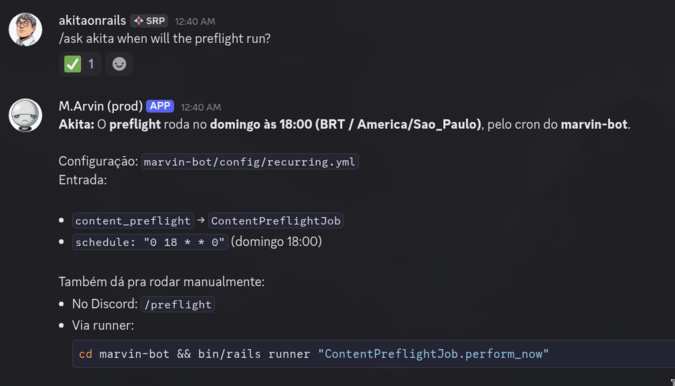
That’s Discord as an operational interface. It’s not a hack — it’s the best CRUD interface there is for a team of one.
Why Discord Instead of a Web Admin?
Let’s be honest about what an admin panel demands:
- Authentication: login, session, CSRF, password reset
- Authorization: roles, permissions, who can do what
- UI: tables, pagination, forms, client-side validation
- Deployment: another route, another controller, another set of tests
- Mobile: responsive? App? PWA?
And what Discord already gives you for free:
- Auth: Discord handles it. You just check the
author_id - Authorization: a list of admin IDs and you’re done
- UI: embeds with colors, fields, thumbnails, reactions as status
- Deployment: zero. Uses what’s already deployed
- Mobile: native iOS and Android app, push notifications
The trade-off? It doesn’t fit everything. A complex CRUD with 20-field forms? Better off with a web admin. But for command/response operations — which are 90% of what you do day to day — Discord is unbeatable.
discordrb: A Gem That Works
The discordrb gem (shardlab fork, version 3.7.2) is the most mature one for Ruby. It’s not perfect — it has its quirks. But it genuinely works in production.
The minimal setup:
bot = Discordrb::Bot.new(
  token: token,
  intents: Discordrb::INTENTS[:server_messages] |
           Discordrb::INTENTS[:direct_messages] |
           (1 << 15)  # message_content intent
)

bot.message do |event|
  # Every message flows through here
end

bot.run
That (1 << 15) is the Message Content Intent. Without it, your bot receives events but event.content comes in empty. You need to enable it in the Discord Developer Portal > Bot > Privileged Gateway Intents. That’s the first trap that catches everyone.
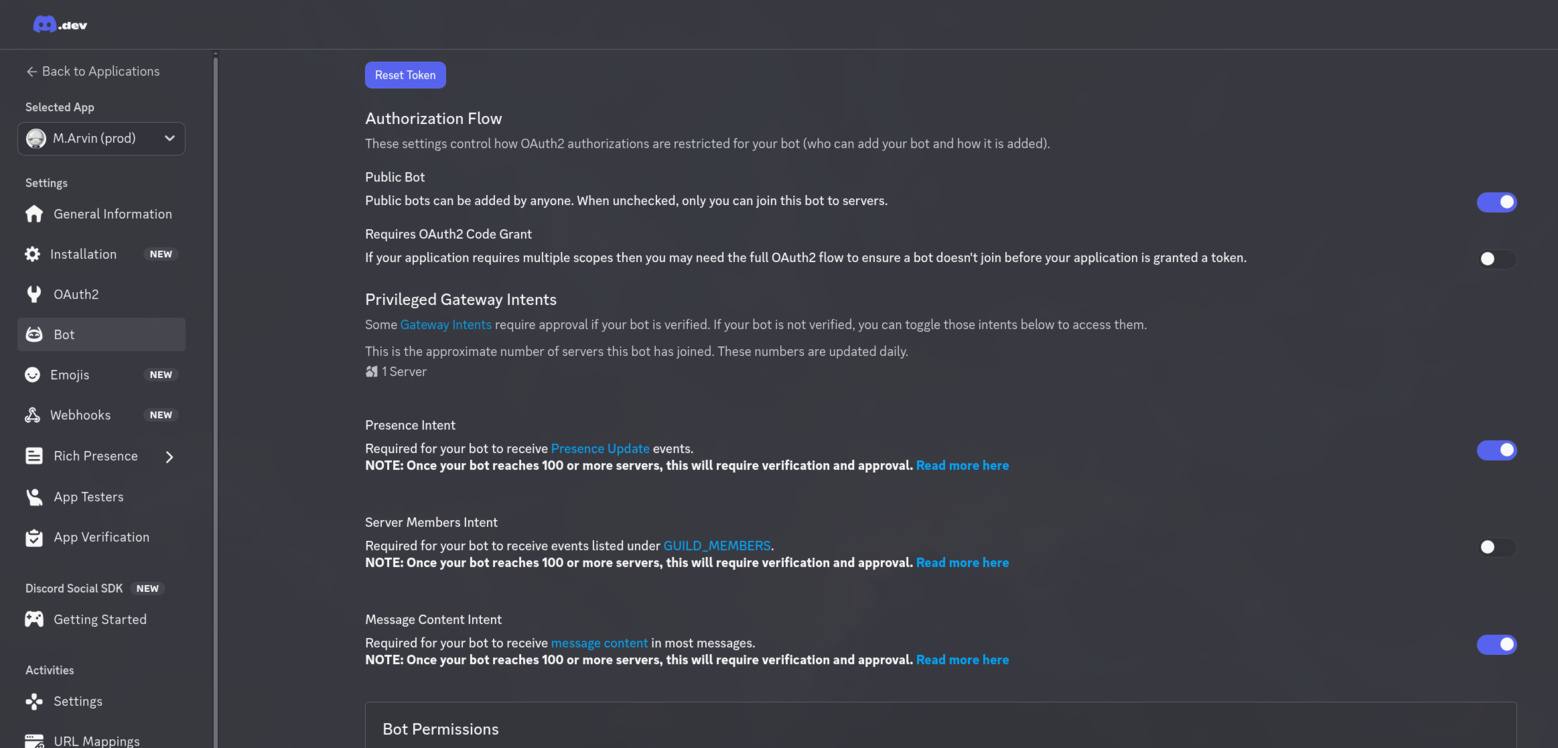
I won’t walk through how to set up a Discord bot, there are plenty of tutorials for that already, easy to find online. I’ll focus only on my use case as an example.
Pattern 1: Parser + Dispatcher
Mixing command parsing with business logic is a recipe for spaghetti. Split it into three layers:
Discord Event → Parser → Dispatcher → Job/ServiceThe runner (the thing that talks to the Discord API) is deliberately dumb:
bot.message do |event|
  next if event.author.bot_account?

  parsed = SlashCommandParser.parse(event.content, attachments: urls)

  case parsed
  when SlashCommandParser::Command
    CommandDispatcher.dispatch(parsed, channel_id: channel_id)
    event.message.react("\u{2705}")  # checkmark
  when SlashCommandParser::Submission
    ProcessMessageJob.perform_later(url: parsed.url, tags: parsed.tags)
    event.message.react("\u{1F916}")  # robot
  end
rescue StandardError => e
  event.message.react("\u{274C}")  # red X
end
Three instant visual results: checkmark (command accepted), robot (URL being processed), red X (error). The user knows what happened without waiting for any text response.
The parser returns typed objects, not strings. The dispatcher runs a giant case but each handler is an isolated method. Each handler calls a job or service. No business logic in the runner.
Evolution: Discord Application Commands
The initial version parsed raw text — the user typed /week and the parser interpreted it. It works, but it has limits: no autocomplete, no argument validation, no inline documentation.
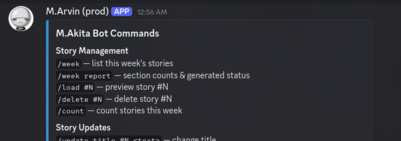
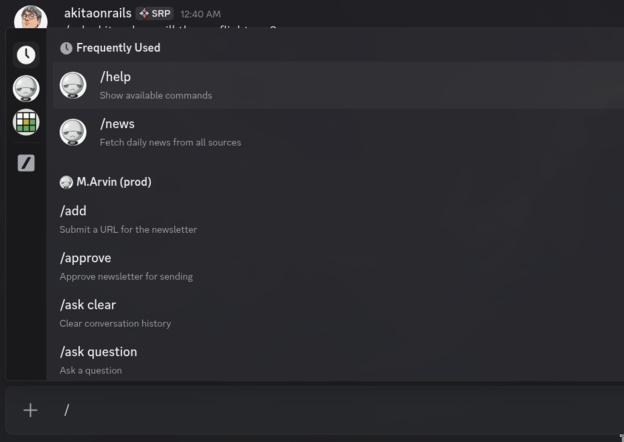
Discord has a native Application Commands system — slash commands registered with the API that show up with autocomplete, description, and typed parameters. When the user types /, Discord displays every available command with its description.
bot.register_application_command(:week, "List this week's stories", server_id: guild_id)
bot.register_application_command(:approve, "Approve newsletter for sending", server_id: guild_id)
bot.register_application_command(:ask, "Ask AI a question", server_id: guild_id) do |cmd|
  cmd.string("question", "Your question", required: true)
  cmd.string("personality", "AI personality", choices: { "Akita" => "akita", "Marvin" => "marvin" })
end
The handler uses bot.application_command instead of parsing text:
bot.application_command(:week) do |event|
  CommandDispatcher.dispatch_week(channel_id: event.channel.id)
  event.respond(content: "Listing stories...")
end
Both systems coexist: Application Commands for those who prefer autocomplete, raw text for those who prefer typing fast. The dispatcher is the same — the only difference is how the command arrives.
Pattern 2: Reactions as Status

The most underrated feature of Discord for bots is reactions. They’re instant visual feedback that doesn’t pollute the channel with messages:
- Checkmark = command received and queued
- Robot = async processing started
- Red X = error (details in the embed that follows)
The user pastes a link. Sees the robot appear. 30 seconds later, a rich embed shows up with title, summary, image and AI commentary. If something fails, a red embed appears with the error message.
That beats any loading spinner in a web UI.
Pattern 3: Rich Embeds as Dashboard
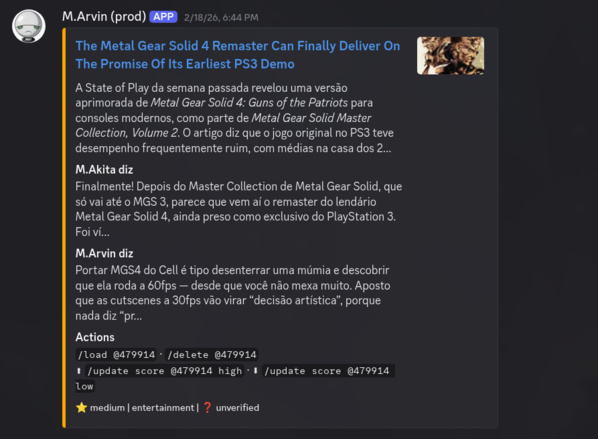
Discord embeds are surprisingly powerful:
embed = {
  title: "Story Preview",
  url: source_url,
  color: 0xFF4500,           # orange-red for high priority
  description: summary,
  thumbnail: { url: image },  # article image
  fields: [
    { name: "M.Akita diz", value: akita_comment, inline: false },
    { name: "M.Arvin diz", value: marvin_comment, inline: false },
    { name: "File", value: "`stories/2026-02-16-titulo.md`", inline: false }
  ],
  footer: { text: "fire high | tech_news | verified" }
}

Discordrb::API::Channel.create_message(token, channel_id, "", false, [embed])
Colors signal priority (red = high, amber = medium, green = low). The footer shows score, section and fact-check status all on a single line. You glance at it and know the state of things.
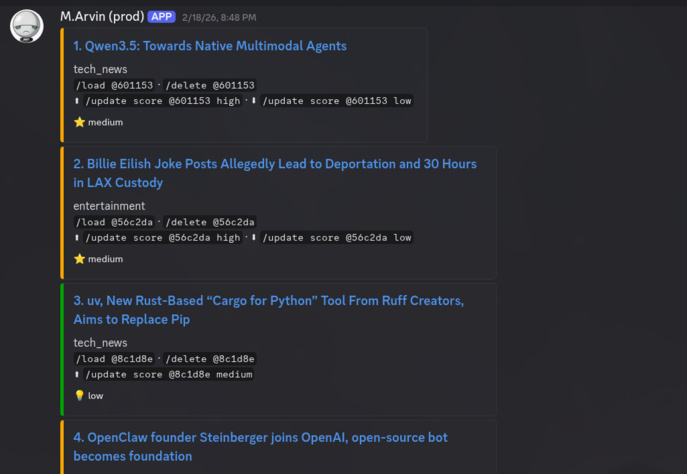
For reports, multiple embeds side by side (Discord accepts up to 10 per message) work as a mini-dashboard. The /week command lists every story with inline actions — /load @a3f2b1 to see details, /delete @a3f2b1 to remove it. The hash is stable (based on the file path), so it doesn’t shift when you delete another story.
Pattern 4: Context Per Channel
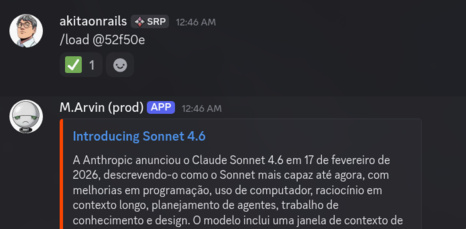
When the user types /load #3, the #3 refers to the most recent listing. But what if two channels are being used at the same time?
class ChannelContext < ApplicationRecord
  EXPIRY_DURATION = 2.hours

  def self.for_channel(channel_id)
    find_or_create_by!(channel_id: channel_id.to_s)
  end

  def set_week_stories!(hash)
    update!(week_stories_json: hash.to_json, expires_at: EXPIRY_DURATION.from_now)
  end

  def resolve_story_reference(ref)
    if ref.match?(/\A@[a-f0-9]+\z/i)
      # Hash reference (stable across re-listings)
      hash = ref.delete("@").downcase
      week_stories.values.find { |path| md5_prefix(path) == hash }
    elsif ref.match?(/\A#?\d+\z/)
      week_stories[ref.delete("#")]
    end
  end
end
Each channel has its own context with a 2-hour expiration. /week stores the number→file mapping. Then /load #3 queries that context. If it expired, the bot says “run /week first”.
And the most useful detail: hash-based references (@a3f2b1) instead of numbers. When you delete story #2, #3 becomes #2 — but the hash @a3f2b1 still points to the same file. That avoids the classic “I deleted the wrong one because the list shifted”.
Pattern 5: Simple Admin Check
No complex RBAC. A list of IDs:
ADMIN_COMMANDS = %i[delete update_score approve newsletter publish_blog].freeze

def self.dispatch(command, channel_id:, author_id:)
  if ADMIN_COMMANDS.include?(command.type) && !admin?(author_id)
    send_error(channel_id, "Permission denied. Admin privileges required.")
    return
  end
  # ...
end

def self.admin?(author_id)
  admin_ids = ENV["DISCORD_ADMIN_USER_IDS"].to_s.split(",")
  return true if admin_ids.empty?  # dev: no IDs = everything allowed
  admin_ids.include?(author_id)
end
In dev, without DISCORD_ADMIN_USER_IDS set, everything is allowed. In production, it’s a list of Discord user IDs. No database, no roles table, no middleware. Ten lines handle authorization.
Pattern 6: Async Operations with Feedback
Slow operations (generating an image, processing an article, calling an AI) go to background jobs. Visual feedback comes in three beats:
def self.handle_ask(personality, question, attachments, channel_id)
  # 1. Immediate feedback: "I'm thinking"
  thinking_id = DiscordNotifier.send_message(channel_id, content: "Thinking...")

  # 2. Job does the heavy lifting in the background
  AskJob.perform_later(
    question,
    channel_id: channel_id,
    thinking_message_id: thinking_id
  )
end

# In AskJob:
def perform(question, channel_id:, thinking_message_id: nil)
  result = AiChat.ask_multimodal(question, tools: [GenerateImageTool])

  # 3. Remove "Thinking..." and show result
  DiscordNotifier.delete_message(channel_id, thinking_message_id)
  DiscordNotifier.send_message(channel_id, content: "**Marvin:** #{result[:text]}")
end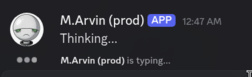
The “Thinking…” shows up instantly, the job runs in the background, and when it finishes the temporary message disappears and the real result appears. If the job fails, “Thinking…” disappears and an error embed shows up.
Without this, the user sends a question and stares at the screen not knowing if the bot heard them. Terrible UX.
Pattern 7: RubyLLM + Tool Calling on Discord
The most powerful part: giving the LLM tools. /ask has three tools available: GenerateImageTool (generates images via Gemini), WebSearchTool (searches the web via Brave Search), and WebFetchTool (fetches and summarizes web pages). The LLM decides on its own which one to use based on the question. When the user asks “generate an image of a cat programming”, the LLM picks the right tool:
class GenerateImageTool < RubyLLM::Tool
  description "Generate an image using Gemini. Use when the user asks to create or draw."
  param :prompt, desc: "Image description"
  param :aspect_ratio, desc: "1:1 or 16:9", required: false

  def execute(prompt:, aspect_ratio: "1:1")
    image_data = ImageGenerator.generate(prompt: prompt)
    return "Failed to generate image" unless image_data

    path = save_temp_file(image_data)
    Thread.current[:generated_images] << path

    "Image generated successfully. Tell the user it's ready."
  end
end
The Thread.current[:generated_images] is the trick to pass data back from the tool to the job. The LLM calls the tool during chat.ask, the tool saves the file and registers the path. After chat.ask returns, the job grabs the paths and sends them to Discord as file uploads.
Why thread-local and not a direct return? Because the LLM can call multiple tools within a single response, and the tool’s return value goes back to the LLM (not to your code) — the LLM decides what to say to the user. Thread-local is the side channel for your code to know what happened.
Pattern 8: Production Status Notifications
Every content generation job notifies a dedicated channel:
module DiscordStatus
  def notify_start(label)
    DiscordNotifier.send_to_status_channel("Starting #{label}...")
  end

  def notify_done(label)
    DiscordNotifier.send_to_status_channel("#{label} complete.")
  end

  def notify_error(label, error)
    DiscordNotifier.send_to_status_channel("#{label} FAILED: #{error}")
  end
end
The status channel is separate from the operations channel. When the 8 content generation jobs run on Sunday at 5pm, the status channel turns into a real-time log:
Starting Anime Ranking...
Starting Hacker News...
Starting YouTube Digest...
Anime Ranking complete.
YouTube Digest complete.
Hacker News complete.
Starting Market Recap...  (wave 2, after world events)
...
In the morning, if something went wrong, you open Discord on your phone and you know exactly what — no SSH into the server, no grep in logs.
And when the bot restarts after a deploy:
bot.ready do |_event|
  status_channel = ENV["DISCORD_STATUS_CHANNEL_ID"]
  DiscordNotifier.send_message(status_channel, content: "Bot reconnected and ready.")
end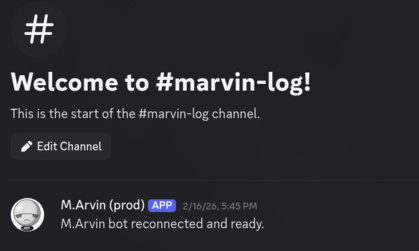
Simple, but you know the deploy worked without checking anything.
Pattern 9: Cross-App Communication
The system has two Rails apps that need to talk to each other. The newsletter needs to notify Discord when it finishes assembling an edition. But the newsletter has no Discord connection — marvin-bot is the one that does.
Solution: HTTP relay.
# In the newsletter — send it to marvin-bot
class DiscordRelayClient
  def self.send_embed(title:, description:, color:)
    post("/api/discord_notify",
      type: "embed",
      payload: { title: title, description: description, color: color }
    )
  end
end

# In marvin-bot — receive it and forward to Discord
class Api::DiscordNotifyController < ApplicationController
  def create
    case params[:type]
    when "embed"
      DiscordNotifier.send_embed(status_channel, params[:payload])
    when "message"
      DiscordNotifier.send_message(status_channel, content: params[:payload][:content])
    end
  end
end
The newsletter speaks HTTP. marvin-bot translates it to Discord. A shared ADMIN_TOKEN authenticates. Every method rescues errors and returns nil — if Discord is down, the newsletter doesn’t lock up. Fire and forget.
But there’s a second, more interesting cross-app flow: the podcast trigger. When the newsletter is approved, it needs to tell marvin-bot to generate the podcast:
# In the newsletter — trigger podcast generation on marvin-bot
class MarvinBotClient
  def self.trigger_podcast(date:)
    post("/api/trigger/podcast", date: date.to_s)
  end
end
That kicks off an entire pipeline on marvin-bot: two-pass LLM script → per-turn TTS on the GPU → assembly with loudnorm → S3 upload. And the newsletter’s PublishAndSendJob waits (via retry_on PodcastNotReady) until the podcast is ready. Two apps, two backend languages (Ruby and Python), connected by fire-and-forget HTTP with result polling. It’s not elegant — but it works every single week with no intervention.
Pattern 10: Integrated Cost Tracking
Every AI call is tracked with tokens and estimated cost:
def self.create_chat(caller:, model:, provider:)
  chat = RubyLLM.chat(model: model, provider: provider)
  chat.on_end_message do |message|
    ApiUsage.create!(
      caller_name: caller,
      input_tokens: message.input_tokens,
      output_tokens: message.output_tokens,
      cost_usd: estimate_cost(model, message)
    )
  end
  chat
end
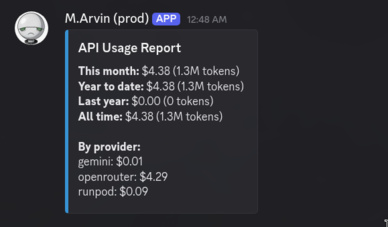
And on Discord: /cost shows spending by month, year, and by provider. No separate dashboard, no Grafana, nothing. One command and the information that matters.
Pattern 11: Never Fail Silently
This is the pattern I should have implemented from the start, but I only learned it the hard way — in production.
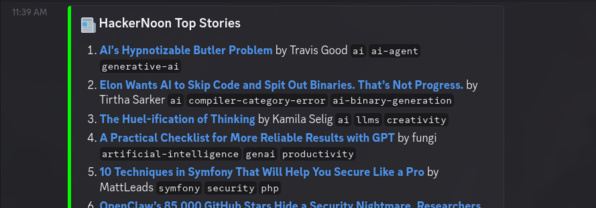
The project has ~10 daily jobs that fetch data from external sources (Hacker News, GitHub Trending, Morningstar, etc.) and post embeds to Discord. Each client follows a “defensive” pattern:
# The pattern that LOOKS right:
class DailyDevClient
  def self.fetch_popular(limit: 10)
    response = HTTParty.get(API_URL, headers: { "Authorization" => "Bearer #{token}" })
    return [] unless response.success?
    parse(response.body)
  rescue StandardError => e
    Rails.logger.warn("DailyDevClient failed: #{e.message}")
    []
  end
end

# And in the job:
class DailyDailyDevJob < ApplicationJob
  def perform
    posts = DailyDevClient.fetch_popular(limit: 10)
    return if posts.empty?  # ← THE PROBLEM
    # ... posts embed to Discord
  end
end
This code never crashes. Never raises an exception. Never fills the log with errors. It’s the most “robust” code possible.
It’s also completely useless for diagnosis. When I deployed and ran the daily jobs manually, only one of ten worked. But there was no error in the logs. None. return [] unless response.success? swallowed the HTTP 401 without logging. return if posts.empty? discarded the result without telling anyone. All green, all silent, zero data.
The fix has two parts:
Part 1: Clients log the HTTP code:
unless response.success?
  Rails.logger.warn("DailyDevClient: API returned HTTP #{response.code}")
  return []
end
It sounds obvious, but it’s easy to forget when you write return [] as a defensive reflex. response.code is the information that distinguishes “expired token” (401) from “rate limited” (429) from “API down” (503). Without it, everything looks the same: empty array.
Part 2: Jobs warn on Discord when they have no data:
module DailyDiscordEmbed
  def report_empty(title)
    Rails.logger.warn("#{self.class.name}: #{title} returned no results")
    channel_id = Rails.application.config.discord.channel_ids.first
    return unless channel_id.present?

    embed = {
      title: "⚠️ #{title}",
      description: "#{self.class.name} returned no results. Check logs.",
      color: 0xFFA500,  # orange = warning, not red = error
      timestamp: Time.current.iso8601
    }
    DiscordNotifier.send_embed(channel_id, embed)
  rescue StandardError => e
    Rails.logger.error("#{self.class.name} empty report failed: #{e.message}")
  end
end
Now when a daily job brings back no data:
def perform
  posts = DailyDevClient.fetch_popular(limit: 10)
  if posts.empty?
    report_empty("daily.dev Popular")
    return
  end
  # ...
end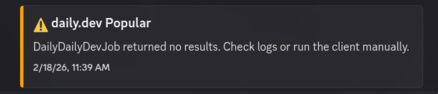
An orange embed appears on Discord. In the morning, I open the channel and see: “⚠️ daily.dev Popular returned no results”. I check the logs and find: “DailyDevClient: API returned HTTP 401”. Expired token. Fixed in 2 minutes.
Without this pattern, I would have discovered it weeks later — when someone asked “why are there never any daily.dev posts?”.
The lesson: rescue => [] is not error handling. It’s error hiding. Every failure point needs two signals: a log with the technical detail (HTTP code, exception message) and a visual notification in the channel where you’re already looking (Discord). If the bot IS your operational interface, bot failures need to show up ON the interface.
Pattern 12: Conversations With Memory (Multi-Turn /ask)
The first version of /ask created a brand new RubyLLM::Chat on every invocation. It worked, but it was like talking to someone with amnesia:
/ask what is Ruby?
→ Ruby is a programming language created by Matz in 1995...

/ask compare it with Python
→ Compare what with Python? Could you be more specific?
ruby_llm already keeps history internally — every chat.ask() appends to the message list and sends the full context to the model. What was missing was persisting the Chat object between invocations.
The solution is an in-memory store with three safeguards:
class AskSessionStore
  MAX_SESSIONS = 100       # total across all users
  SESSION_TTL = 2.hours    # inactivity timeout
  MAX_MESSAGES = 50        # ~25 exchanges, then auto-reset

  Session = Struct.new(:chat, :last_used, keyword_init: true)

  def get_or_create(author_id, personality, system_prompt:, tools:)
    synchronize do
      cleanup_expired
      key = [author_id, personality]

      if (session = @sessions[key])
        session.last_used = Time.current
        if session.chat.messages.length > MAX_MESSAGES
          @sessions.delete(key)
          return create_session(key, system_prompt: system_prompt, tools: tools)
        end
        session.chat
      else
        evict_oldest if @sessions.size >= MAX_SESSIONS
        create_session(key, system_prompt: system_prompt, tools: tools)
      end
    end
  end
end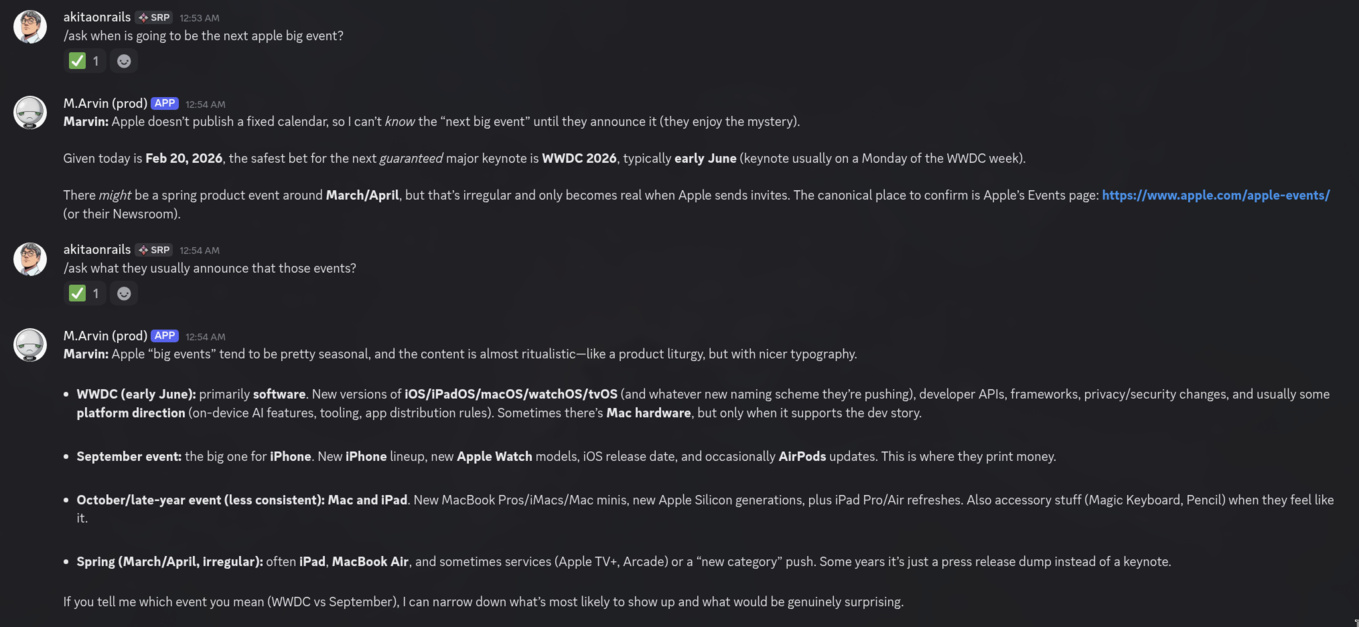
The key is (author_id, personality) — each user has separate sessions for Marvin and for Akita. Volatile on purpose: restart the server, lose the history. No database, no serialization, no complexity. It’s working memory, not persistence.
/ask clear resets the session. Without it, there’s no way to “start over” when the conversation gets tangled.
Now:
/ask what is Ruby?
→ Ruby is a programming language created by Matz in 1995...

/ask compare it with Python
→ Ruby and Python have similar philosophies — both prioritize programmer
  happiness — but Ruby embraces blocks and metaprogramming while Python
  prefers explicitness...
The LLM knows “compare” refers to Ruby because the session history includes the previous question. That’s the difference between a chatbot and an assistant.
Pattern 13: Registering Application Commands (Native Autocomplete)
The Application Commands section above showed the simplified concept. In practice, registering 18 commands with subcommands, typed parameters and choices demands a dedicated structure. Here’s how the project handles it.
The Problem With Raw Text
When the bot only parses text, the user has to memorize the syntax:
/update score #1 #2 #3 high       ← works
/update score #1 #2 #3 alta       ← fails silently
/update scoree #1 high             ← ignored
No autocomplete, no parameter validation, no inline documentation. The user types / and has no idea what’s available.
The DiscordCommands Module
All command definitions live in a separate module with two public methods: register! (registers the commands with the Discord API) and setup_handlers! (wires the handlers to the bot):
module DiscordCommands
  SCORE_CHOICES  = { "High" => "high", "Medium" => "medium", "Low" => "low" }.freeze
  SECTION_CHOICES = {
    "Tech" => "tech", "Global" => "global", "Financial" => "financial",
    "Q&A" => "qa", "Entertainment" => "entertainment", "Open Source" => "opensource",
    "Product" => "product", "Book" => "book"
  }.freeze
  PERSONALITY_CHOICES = { "Marvin (default)" => "marvin", "Akita" => "akita" }.freeze

  def self.register!(bot)
    server_id = Rails.application.config.discord.server_id
    sid = server_id.present? ? server_id.to_i : nil

    register_week(bot, sid)
    register_add(bot, sid)
    register_update(bot, sid)
    register_ask(bot, sid)
    # ... 14 more commands
  end

  def self.setup_handlers!(bot)
    setup_week_handlers(bot)
    setup_add_handler(bot)
    setup_update_handlers(bot)
    setup_ask_handlers(bot)
    # ... 14 more handlers
  end
end
Guild vs Global
The server_id (or sid) controls the registration scope. With server_id, the command shows up instantly on the specified server. Without it, the command is global — available on every server, but can take up to an hour to propagate.
For a private bot doing internal operations, always go guild-scoped. The DISCORD_SERVER_ID env var is set at deploy time:
sid = server_id.present? ? server_id.to_i : nil
bot.register_application_command(:week, "Story list and weekly report", server_id: sid)
If sid is nil, discordrb registers globally. In dev it’s convenient; in production, guild-scoped is faster and lets you have different commands per server.
Anatomy of a Command
The simplest method — no parameters:
def self.register_count(bot, sid)
  bot.register_application_command(:count, "Show story count for this week", server_id: sid)
end
With typed parameters:
def self.register_add(bot, sid)
  bot.register_application_command(:add, "Submit a URL for the newsletter", server_id: sid) do |cmd|
    cmd.string(:url, "The URL to submit", required: true)
    cmd.string(:tags, "Tags (e.g. #tech #high)")
    cmd.string(:comment, "Optional comment about this link")
  end
end
Discord renders this as an inline form: required url field, optional tags and comment. The user sees each parameter’s description as they fill it in.
Subcommands: Grouping Actions
Complex commands use subcommands. /update on its own does nothing — the user has to pick what to update:
def self.register_update(bot, sid)
  bot.register_application_command(:update, "Update story properties", server_id: sid) do |cmd|
    cmd.subcommand(:score, "Update story priority score") do |sub|
      sub.string(:stories, "Story numbers (e.g. #1 #2 #3 or 1,2,3)", required: true)
      sub.string(:level, "Priority level", required: true, choices: SCORE_CHOICES)
    end
    cmd.subcommand(:tag, "Update story section tag") do |sub|
      sub.string(:stories, "Story numbers (e.g. #1 #2 #3 or 1,2,3)", required: true)
      sub.string(:section, "Section tag", required: true, choices: SECTION_CHOICES)
    end
    cmd.subcommand(:image, "Update story image") do |sub|
      sub.string(:stories, "Story numbers (e.g. #1 #2 #3 or 1,2,3)", required: true)
      sub.attachment(:file, "Image file (omit for AI generation)")
    end
    # ... more subcommands: title, description, comment, source
  end
end
When the user types /update, Discord shows a list of subcommands: score, tag, title, description, comment, image, source. Pick score and the stories field (free text) and level field (dropdown with High/Medium/Low) appear. Syntax errors become impossible.
Choices: Native Dropdowns
The SCORE_CHOICES hash becomes a dropdown on Discord. The key is the visible label (“High”), the value is what arrives in the handler (“high”):
SCORE_CHOICES = { "High" => "high", "Medium" => "medium", "Low" => "low" }.freeze

# In the registration:
sub.string(:level, "Priority level", required: true, choices: SCORE_CHOICES)
The user doesn’t have to remember whether it’s “high”, “HIGH”, “alta”, or “3”. Pick it from the dropdown and done. That eliminates an entire category of input errors.
Attachments: File Uploads
Discord supports attachment-type parameters — the user can drag a file straight into the command:
cmd.subcommand(:image, "Update story image") do |sub|
  sub.string(:stories, "Story numbers (e.g. #1 #2 #3 or 1,2,3)", required: true)
  sub.attachment(:file, "Image file (omit for AI generation)")
end
In the handler, the resolved attachments come through as Discord CDN URLs:
def self.resolve_attachments(event)
  return [] unless event.resolved&.attachments&.any?
  event.resolved.attachments.values.map(&:url)
end
Lifecycle: Where to Register, Where to Wire Handlers
This is the point that confuses people most. The handlers have to be registered before bot.run. The registration with the Discord API can happen inside bot.ready (which fires after the WebSocket connection):
class MarvinBotRunner
  def self.run!
    bot = Discordrb::Bot.new(token: token, intents: ...)

    # 1. Handlers BEFORE bot.run (otherwise the bot doesn't know how to respond)
    DiscordCommands.setup_handlers!(bot)

    bot.ready do |_event|
      # 2. API registration AFTER connection (idempotent, safe on reconnect)
      DiscordCommands.register!(bot)
    end

    bot.run
  end
end
Why inside bot.ready? Because the bot can reconnect (Discord closes WebSockets periodically). register! is idempotent — registering the same command twice doesn’t duplicate it, it just updates. Putting it in ready makes sure the commands exist even after a reconnect.
Bridge: Application Command → CommandDispatcher
The most elegant part of the architecture: the Application Command handler has no business logic. It translates Discord’s parameters into the format the CommandDispatcher already expects:
def self.dispatch_interaction(event, type, match: [nil], attachments: [])
  event.respond(content: "\u{2705}", ephemeral: true)  # checkmark visible only to the author
  command = SlashCommandParser::Command.new(
    type: type,
    args: { match: match, attachments: attachments }
  )
  CommandDispatcher.dispatch(command,
    channel_id: event.channel.id.to_s,
    message_id: nil,
    author_id: event.user.id.to_s
  )
rescue StandardError => e
  Rails.logger.error("Discord interaction error (#{type}): #{e.message}")
end
Each subcommand handler is a one-liner that assembles the args and calls dispatch_interaction:
bot.application_command(:update).subcommand(:score) do |event|
  stories = event.options["stories"]
  level = event.options["level"]
  dispatch_interaction(event, :update_score, match: [nil, stories, nil, level])
end
CommandDispatcher doesn’t know if the command came from raw text or from an Application Command. Same logic, same authorization, same jobs. No duplicated code.
The Result
The project registers 18 Application Commands with combinations of subcommands, typed parameters, dropdowns and file uploads. The user types / and sees everything available with descriptions. Pick a command and Discord guides you field by field. Syntax errors are impossible — Discord validates before sending.
And both systems coexist: people who prefer autocomplete use Application Commands, people who prefer to type fast use raw text. CommandDispatcher receives both the same way. Adding a new command means adding a register_*, a setup_*_handler, and a dispatcher method — without touching the runner.
The discordrb Pitfalls
It’s not all roses. Some real pain points:
Gateway disconnects: The WebSocket to Discord drops every once in a while. discordrb reconnects automatically, but your bot.ready and bot.message handlers need to be resilient to reconnects.
Message Content Intent: Since 2022, bots in more than 75 servers need approval to read message content. For private bots (which is the case for internal operations), that’s a non-issue. But if you plan to distribute the bot, get ready for paperwork.
API Rate Limits: Discord rate-limits per route. Sending 10 embeds at once to the same channel? You’ll hit the limit. discordrb handles rate limits internally, but calls that are too fast cause visible delays.
Embed Limits: Title max 256 chars. Description 4096. Field value 1024. Exceeded them? Silent error. Always truncate before sending.
File Uploads: 25MB limit on the free plan, 50MB with Nitro. For AI-generated images that’s never an issue, but if you’re shipping PDFs or audio, be careful.
When NOT to Use Discord as Admin
- Complex forms: editing 15 fields on a record? Web screen
- Bulk operations: importing a CSV with 1000 records? Script
- Data visualization: charts, analytical dashboards? Grafana/Metabase
- Multi-step approval: workflows with 5 approval stages? You need persisted state
But for day-to-day operations — curating content, approving newsletters, monitoring jobs, checking costs, talking to AI — Discord is the most productive interface I’ve ever used. And the best part: the subscribers will never know their weekly newsletter was curated by a guy typing commands into Discord on his phone while drinking coffee.
Conclusion
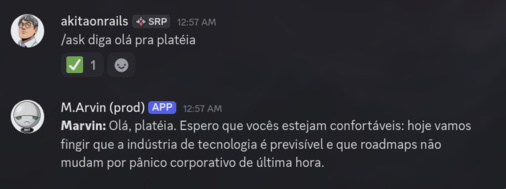
Using Discord as an admin panel isn’t laziness — it’s pragmatism. The best interface is the one you already use all day long. Auth, push notifications, mobile, rich formatting, file sharing — all free. You only build the business logic.
The ruby_llm gem with tool calling takes the bot from “command executor” to “assistant that thinks”. Add session memory and it thinks and remembers. When the LLM can generate images, search the web, keep context across questions, and answer questions about the architecture of its own system — that’s when it stops being CRUD and becomes a co-pilot.
And the Parser → Dispatcher → Job pattern keeps everything testable. The parser knows nothing about Discord. The dispatcher knows nothing about AI. The jobs know nothing about the interface. Swap any one of those layers and the others don’t even notice.
In the end, the best admin UI is the one that doesn’t need a separate deploy. And the worst bug is the one that fails in silence — if the bot is your operational interface, the bot’s failures need to show up on the interface, not hidden away in a log nobody reads.