Web Scraping in 2026 | Behind the Scenes of The M.Akita Chronicles
This post is part of a series; follow along via the tag /themakitachronicles. This is part 2.
And don’t forget to subscribe to my new newsletter The M.Akita Chronicles!
–
Ten years ago, fetching data from a website was trivial. Four lines of Ruby: Net::HTTP.get, Nokogiri parse, CSS selector, done. The whole world was open to any script with a decent User-Agent.
Today? Half the sites I need to read to put together my newsletter return “Are you a robot?” for any conventional HTTP request. The other half renders the content entirely in JavaScript — there’s no HTML at all in the server response. And the most paranoid ones combine both.
My goal was to create a daily routine so that M.arvin would deliver the top news to me in the morning on my Discord. That way I wouldn’t have to go hunting for the news of the day. Sounded simple… at first.
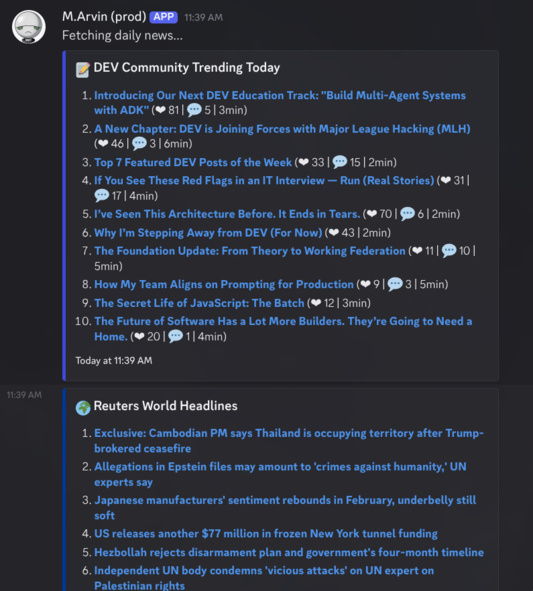
This post is about how I went from “one HTTP call” to “packing an entire Chromium into Docker” — and why this is the reality of any project that needs to read the web programmatically in 2026.
The Golden Age: Simple HTTP
Let’s start with what still works. Some services offer structured data with zero resistance:
# RSS feeds: the most resilient format on the web
uri = URI("https://news.google.com/rss/search?q=when:24h+allinurl:reuters.com/world")
xml = Net::HTTP.get(uri)
doc = REXML::Document.new(xml)
doc.get_elements("//item").each do |item|
  title = item.get_text("title").to_s
  url   = item.get_text("link").to_s
end

# Public APIs: clean JSON, documented, stable
response = HTTParty.get("https://api.jikan.moe/v4/top/anime?filter=airing")
animes = response.parsed_response["data"]

# GitHub trending: server-rendered HTML with no protection
html = HTTParty.get("https://github.com/trending").body
doc = Nokogiri::HTML(html)
repos = doc.css("article.Box-row")
Hacker News, GitHub Trending, anime APIs, RSS feeds, Project Gutenberg — they all work with a GET and a parser. No JavaScript, no implicit authentication, no fingerprinting. Just like the web was supposed to be.
The problem is that these are the exception. Sites with financial data, exclusive news, or premium content — exactly the data that matters most — are increasingly armored.
The First Obstacle: SPAs and JavaScript Rendering
When the server returns something like:
<html>
<body>
  <div id="root"></div>
  <script src="/app-3fa8c2.js"></script>
</body>
</html>
Your Net::HTTP.get returns exactly that: an empty div and a link to a 2 MB bundle. The real content — articles, prices, lists — is assembled in the browser by React, Vue, Angular, or the framework of the week.
For a script, this page is useless. To extract the content, you need to execute the JavaScript. That means running a real browser.
In the Ruby world, the answer is the ferrum gem — a CDP (Chrome DevTools Protocol) client that controls Chromium programmatically:
browser = Ferrum::Browser.new(headless: "new", timeout: 30)
browser.go_to("https://www.morningstar.com/markets")
browser.network.wait_for_idle  # wait for JS to finish loading
html = browser.body  # now the DOM is populated
browser.quit
That browser.body returns the HTML after the JavaScript has executed. The same data you see in the browser, now accessible to your parser.
But here’s where the headache begins: you need a Chromium binary available on the system. In Docker, that means adding ~300MB to the image. On the server, that’s one more dependency to manage. And the latency of opening a browser, navigating, waiting for JS to render, and extracting the HTML — we’re talking 3 to 10 seconds per page, instead of the 200ms of an HTTP GET.
The project uses this as the main strategy in ArticleFetcher: first it tries with a browser (to catch SPAs), then falls back to simple HTTP (to grab OpenGraph metadata when the browser fails). Most of the links that readers send in Discord are from sites that render with JavaScript, so browser-first pays off.
The Second Obstacle: Bot Detection
Opening a page with headless Chromium solves the JavaScript problem. But it solves 50% of the sites — not 100%. Because there’s an entire industry dedicated to distinguishing real browsers from automated browsers.
What Headless Chrome Reveals
Chromium in headless mode is almost identical to regular Chrome. Almost. The differences are subtle, but enough for detection:
1. navigator.webdriver — In any Chrome controlled by automation, this property returns true. In normal browsers, undefined. It’s the most obvious flag.
2. navigator.plugins — Normal Chrome has 3-5 plugins (PDF viewer, etc.). Headless returns an empty array. Bot detected.
3. navigator.userAgentData — The Client Hints API. Real Chrome returns brands, platform, mobile flag. Headless may not have that.
4. WebGL fingerprint — The WebGL renderer in a headless Chrome returns “SwiftShader” (software renderer). Real Chrome returns “NVIDIA GeForce” or “Intel Iris” or whatever. Bot detected.
5. Timing and behavior — Real browsers take time to load. They scroll. They move the mouse. They have focus events. A script that does go_to → body in 2 seconds doesn’t look like a human.
The solution is what I call StealthBrowser — a wrapper that injects JavaScript patches before any script on the page runs:
class StealthBrowser
  STEALTH_JS = <<~JS
    // Remove the automation flag
    Object.defineProperty(navigator, 'webdriver', { get: () => false });

    // Simulate real plugins
    Object.defineProperty(navigator, 'plugins', {
      get: () => [
        { name: 'Chrome PDF Plugin', filename: 'internal-pdf-viewer' },
        { name: 'Chrome PDF Viewer', filename: 'mhjfbmdgcfjbbpaeojofohoefgiehjai' },
        { name: 'Native Client', filename: 'internal-nacl-plugin' }
      ]
    });

    // Simulate a real WebGL renderer
    const getParameter = WebGLRenderingContext.prototype.getParameter;
    WebGLRenderingContext.prototype.getParameter = function(p) {
      if (p === 37445) return 'Google Inc. (NVIDIA)';
      if (p === 37446) return 'ANGLE (NVIDIA, GeForce GTX 1080 ...)';
      return getParameter.call(this, p);
    };

    // Client Hints API (absent in headless = bot signal)
    if (!navigator.userAgentData) {
      Object.defineProperty(navigator, 'userAgentData', {
        get: () => ({
          brands: [
            { brand: 'Chromium', version: '131' },
            { brand: 'Google Chrome', version: '131' }
          ],
          mobile: false, platform: 'Linux'
        })
      });
    }
  JS

  def self.fetch(url, name:, wait_for: nil)
    browser = Ferrum::Browser.new(headless: "new", timeout: 30,
      browser_options: {
        "disable-blink-features" => "AutomationControlled",
        "user-agent" => REAL_USER_AGENT
      })

    # Inject BEFORE any script on the page runs
    browser.page.command("Page.addScriptToEvaluateOnNewDocument", source: STEALTH_JS)

    browser.go_to(url)
    yield browser
  ensure
    browser&.quit
  end
end
The key trick is Page.addScriptToEvaluateOnNewDocument — a CDP command that registers JavaScript to be executed before any script on the page. That means when the bot detector runs, it sees the fake values we injected, not the real ones. And disable-blink-features=AutomationControlled removes the navigator.webdriver flag at the browser level, even before JavaScript.
This works for most sites. Morningstar, Hindenburg Research, generic news sites — they pass with the stealth. Yahoo Finance needs more — TLS fingerprinting that blocks even Chromium without crumb authentication. But the stealth browser handles the bulk.
The Third Obstacle: DataDome and Anti-Bot CDPs
And now we get to the pros. DataDome, Cloudflare Turnstile, PerimeterX, Akamai Bot Manager — services specialized in detecting automation. And they play at a completely different level.
Reuters, for example, uses DataDome. When I tried to hit reuters.com/world/ with StealthBrowser, I got back a 1,500-byte page with a JavaScript captcha. All the navigator.webdriver, WebGL, plugin patches — useless.
Why? Because DataDome doesn’t just check JavaScript properties. It detects the automation protocol itself.
The Fundamental Problem with CDP
When Ferrum (or Puppeteer, or Playwright) controls a Chrome, it does so via the Chrome DevTools Protocol — CDP. And the first thing Ferrum does when connecting is send Runtime.enable — a command that enables runtime evaluation in the browser.
The problem is that Runtime.enable changes the observable behavior of the browser. Specifically, it activates internal interceptors that can be detected via console.debug. DataDome uses this: it does a console.debug with a getter that watches whether the runtime is intercepting. If it is — and with CDP it always is — bot detected.
// What DataDome does (simplified):
let detected = false;
const el = document.createElement('div');
Object.defineProperty(el, 'id', {
  get: () => { detected = true; return 'test'; }
});
console.debug(el);
// If Runtime.enable is active, the getter is triggered
// In a normal browser, it isn't
This is not something you can patch with JavaScript. Runtime.enable is sent by Ferrum before any script runs — it’s part of the automation protocol. To fix this, you’d have to modify Ferrum to not send that command, which would break most of the gem’s functionality.
The Alternatives (and Why None Are Ideal)
I researched extensively. The options:
nodriver (Python): Uses Chrome via CDP without
Runtime.enable. No equivalent in Ruby. And even so, it’s in a cat-and-mouse race with DataDome.curl-impersonate: Does TLS fingerprinting identical to Chrome without opening a browser. Good for sites with TLS detection, useless for SPAs.
Scraping APIs (ScraperAPI, ZenRows): Outsource the problem. They work, but they cost money and add latency and dependency.
Fork Ferrum: Modify the gem to optionally not send
Runtime.enable. Technically viable, but endless maintenance.Google News RSS: Google has already read Reuters. The result is in a public RSS feed. No JavaScript, no DataDome, no browser.
Option 5 won. For Reuters, I traded all the headless browser complexity for:
class ReutersClient
  RSS_URL = "https://news.google.com/rss/search?q=when:24h+allinurl:reuters.com/world"

  def self.fetch_headlines(limit: 10)
    xml = Net::HTTP.get(URI(RSS_URL))
    doc = REXML::Document.new(xml)
    doc.get_elements("//item").first(limit).filter_map do |item|
      title = item.get_text("title")&.to_s&.strip
      url   = item.get_text("link")&.to_s&.strip
      next if title.blank? || url.blank?
      { title: title.sub(/\s*-\s*Reuters\s*\z/, ""), url: url, category: nil }
    end
  rescue StandardError => e
    Rails.logger.warn("ReutersClient failed: #{e.message}")
    []
  end
end
Simple. Reliable. Zero browser dependencies. The Google News link redirects to the original article when the reader clicks — works perfectly for a newsletter.
Not every scraping problem needs a scraping solution. Sometimes the data is already available in an accessible format — you just have to find it.
The Fourth Obstacle: Sites That Change Structure (Daily)
Even when scraping works, maintenance never stops. Morningstar is a textbook case — because it made me get it wrong twice before reaching a resilient solution.
Attempt 1: Select by DOM Hierarchy
Originally, the article links were inside <h2> and <h3>:
<h2><a href="/markets/article-slug">Article Title</a></h2>One day later: zero results. Morningstar changed the structure to flat links with specific CSS classes — no heading elements:
<a class="mdc-basic-feed-item__mdc" href="/markets/article-slug">
  <header><h3>Article Title</h3></header>
  <div class="mdc-metadata__mdc">Author · Date</div>
</a>
Attempt 2: Select by CSS Class
The obvious fix: swap DOM hierarchy for CSS selectors based on the component class:
ARTICLE_CSS = "a.mdc-basic-feed-item__mdc, a.mdc-card--link__mdc"
doc.css(ARTICLE_CSS).each { |link| ... }
It worked. For exactly one day. Then: zero results again. Morningstar — like many modern sites with CSS-in-JS frameworks — generates class names dynamically. What was mdc-basic-feed-item__mdc became something else. And it may become something else tomorrow.
This is increasingly common. Sites using CSS Modules, styled-components, or Tailwind with JIT generate random hashes in class names as part of the build. Every time the site deploys, the classes change. Your hardcoded selector is a time bomb.
Attempt 3: Don’t Rely on Any Class Name
The final solution is to flip the logic: instead of telling the parser which classes to look for, let the parser discover which links are articles based on structural properties that don’t change:
- Article links have long URLs:
/news/why-stock-market-is-up-today-2026-02-17vs. navigation links like/marketsor/tools - Article links are grouped: they appear in lists, feeds, grids — multiple links with the same CSS class
- Article links have descriptive titles: long text, not short labels like “Markets” or “Tools”
The algorithm:
def self.parse_html(html, limit)
  doc = Nokogiri::HTML(html)

  # 1. Collect all internal <a> with href, class, and enough text
  candidates = doc.css("a[href]").filter_map do |link|
    href = link["href"].to_s.strip
    css_class = link["class"].to_s.strip
    next if href.blank? || css_class.blank?
    next unless internal_href?(href)

    path = extract_path(href)
    segments = path.split("/").reject(&:empty?)
    next if segments.length < 2  # nav links have 1 segment: /markets

    title = extract_title(link)
    next if title.blank? || title.length < 10

    { title: title, url: absolutize(href), css_class: css_class, slug_length: path.length }
  end

  # 2. Group by CSS class
  groups = candidates.group_by { |c| c[:css_class] }

  # 3. Filter: minimum 3 links in the group (article clusters, not stray links)
  # 4. Pick the group with the highest average slug length
  best = groups
    .select { |_cls, items| items.length >= 3 }
    .max_by { |_cls, items| items.sum { |i| i[:slug_length] }.to_f / items.length }

  return [] unless best

  best[1].map { |c| c.slice(:title, :url) }.uniq { |a| a[:url] }.first(limit)
end
What saves this approach: no class name is hardcoded. Morningstar can rename every class tomorrow and the parser will keep working — because it discovers the article pattern through structure, not through names.
What’s stable on a site:
- Article URLs are always longer than navigation URLs (that’s architectural, not cosmetic)
- Articles are always grouped under the same component (that’s UX, not implementation)
- Article titles are descriptive (that’s editorial, not technical)
What’s not stable:
- CSS class names (change on every build)
- DOM hierarchy (changes on every redesign)
data-*attributes (change as the frontend team decides)
Bottom line: don’t try to identify elements by name — identify them by behavior. Article links behave differently from navigation links in measurable ways (URL length, clustering, title), and those properties are inherent to what the element IS, not to how it was implemented.
The Reliability Hierarchy
After hours of banging my head, a hierarchy of data sources became obvious:
| Source | Reliability | Latency | Maintenance |
|---|---|---|---|
| Official API (JSON) | High | ~200ms | Low |
| RSS/Atom feed | High | ~300ms | Low |
| Server-rendered HTML | Medium | ~500ms | Medium |
| SPA with headless browser | Low-Medium | ~5s | High |
| Site with active anti-bot | Low | ~8s+ | Very high |
The rule: always prefer the simplest source that works. If the site has RSS, use RSS. If it has an API, use the API. Only go to the headless browser when there’s no alternative.
In the project, the distribution ended up like this:
Simple HTTP (Net::HTTP or HTTParty):
- Google News RSS (Reuters world headlines)
- Hacker News RSS (top stories)
- HackerNoon RSS (top stories)
- dev.to API (trending articles)
- Jikan API (anime rankings)
- YouTube Data API (videos)
- Yahoo Finance news RSS
Headless browser (StealthBrowser + Ferrum):
- Morningstar (SPA + dynamic components)
- Yahoo Finance charts (TLS fingerprinting + crumb auth)
- FinViz market map (canvas rendering)
- Generic reader articles (any URL could be an SPA)
- Hindenburg Research (JavaScript-rendered)
In other words: most data sources work without a browser. The browser is needed for a handful of problem sites — but those sites are the ones that cause the most trouble.
The Real Cost
Let’s be practical about what “packing a Chrome” means:
Docker image: +300MB. Chromium and its dependencies (fonts, graphics libs, sandbox) are huge. In an optimized Dockerfile with multi-stage build:
# Install Chromium and minimal dependencies
RUN apt-get install -y chromium fonts-liberation libnss3 libatk-bridge2.0-0 \
libdrm2 libxkbcommon0 libgbm1Memory: Each Chromium instance consumes 200-400MB of RAM. If you have 3 parallel workers, that’s 1.2GB just for browsers. On a 2GB VPS, that’s 60% of the memory.
Latency: A page that takes 200ms via HTTP takes 3-8 seconds via headless browser (process boot, navigation, JS execution, network idle). For 10 data sources, that’s 30-80 seconds instead of 2.
Stability: Chromium can crash, hang, or leak memory. A 30-second timeout with cleanup in ensure is mandatory:
def self.fetch(url, name:)
  browser = create(name: name)
  browser.go_to(url)
  yield browser
ensure
  browser&.quit  # ALWAYS quit, even on exception
end
If you don’t quit, the Chromium process stays hanging around burning CPU and memory. I’ve had a server with 15 zombie Chrome processes eating 3GB of RAM because an ensure was missing.
The Future (Or: It’s Going to Get Worse)
The trend is clear: sites are getting harder to access programmatically. Every quarter, the DataDomes and Cloudflares of the world add new detection techniques. Headless Chrome gets more similar to real Chrome — but the detectors keep up.
The web that was born open and machine-readable is becoming a walled garden. Even RSS, which is trivial to implement and useful to everyone, is being abandoned by many sites — because they don’t want their data read outside the context (and the ads) of the original site.
For anyone building systems that aggregate information, the playbook is:
- Use APIs and feeds whenever they exist. More stable, faster, more respectful
- Keep a stealth browser for SPAs that have no alternative
- Never hardcode CSS selectors. Sites with CSS-in-JS change class names on every deploy. Identify elements by structural properties (URL length, clustering, title size) that survive redesigns
- Detect blocks and fail gracefully —
og:descriptionas fallback, title extracted from the URL as a last resort - Never depend on a single access method. The site that works today may block tomorrow
- Accept that some sites are inaccessible. If DataDome won’t allow it, the data will have to come from another source
The web in 2026 is a battlefield between those who want to read and those who want to control the reading. But in the long run, the creativity of those who want to access data wins — but it costs more effort every year. And, contrary to what I thought at the beginning: it’s never simple.