AI Agents: Is GLM 4.7 Flash really that good?
I recently wrote a post comparing several LLMs. The good news is that commercial LLMs are genuinely impressive. The bad news is that no open source LLM was able to complete my coding challenge (read the previous post to understand the challenge).
Also recently, ZAI released version 4.7 of their famous “GLM” model, a 30 billion parameter model encoded in BF16, needing around 60GB of VRAM to fit entirely on a GPU. So it’s heavy.
Even more recently, they released the GLM 4.7 Flash version, which is the same 30 billion parameter model but quantized (roughly: “compressed” or “truncated and re-normalized”), which fits on a GPU with at least 32GB, which is the case with my RTX 5090.
Yes, the most expensive consumer GPU on the market is the bare minimum to run the best open source models. That’s because what matters isn’t processing power but the amount of VRAM. That’s why a Mac Studio, with a technically “weaker” GPU, has an advantage in LLMs because it shares memory with the RAM, with a theoretical max of 512GB. So the largest models fit without any problem at all.
Other options are Mini PCs with AMD Ryzen AI Max+ CPUs that can share up to 128GB of VRAM.
The challenge was to see if I could run GLM 4.7 Flash locally on my machine.
TL;DR: GLM 4.7 Flash is possibly the best open source LLM — with a few caveats.
VLLM vs LM Studio vs Ollama
On their official page there’s documentation on how to run it in VLLM and I’ll warn you up front: it doesn’t work. It requires features that only exist on the master branch of VLLM and transformers and you’ll get a headache with version conflicts and dependency resolution, and even then, in the end, I couldn’t get it to run properly.
LM Studio doesn’t work either. It has an option to download the model, and I tried tuning every possible parameter. KV Cache quantization, GPU layers, CPU threads, etc etc. But it doesn’t matter, the model loads but runs absurdly slow. So slow it’s unusable. I think it’s because it can only download the BF16 model, so half the layers don’t fit on the GPU. Therefore, as of the date of this post, neither LM Studio nor VLLM is usable.
But then I saw a tweet saying Ollama would finally support GLM 4.7, but again, as of the date of this post, it’s still not in the stable release. The only way to use it is by compiling from source the bits that are on their master branch.
git clone https://github.com/ollama/ollama.git
cd ollama
cmake -B build
cmake --build build
go build -v .
On the last command it will look like it’s stuck because nothing shows on the screen, but that’s because it’s compiling hundreds of C++ files. Just wait and eventually it finishes. And finally you can run it:
OLLAMA_FLASH_ATTENTION=1 \
GGML_VK_VISIBLE_DEVICES=-1 \
OLLAMA_KV_CACHE_TYPE=q4_0 \
OLLAMA_CONTEXT_LENGTH=45000 \
go run . serve
These are the parameters to fit everything in the 32GB of VRAM without offloading to the CPU. 45 thousand tokens is the max, maybe even a bit less to make sure the KV Cache fits.
On top of that you need to quantize to 4-bits with q4_0. Normal is 16-bit floats. To fit we’ll have to truncate (lose precision).
In my case, I have an AMD iGPU. To prevent Ollama from trying to use it, there’s this option GGML_VK_VISIBLE_DEVICES=-1. That should guarantee only the nvidia gets used.
Finally, we enable Flash Attention to try to reduce memory growth as the context window grows.
Trade-off: speed vs context
GLM 4.7 Flash is a model with 48 layers. With the configuration I showed above, all 48 layers fit on the GPU. But a 45k context window can be too small depending on your use case. You’ll have to test for yourself.
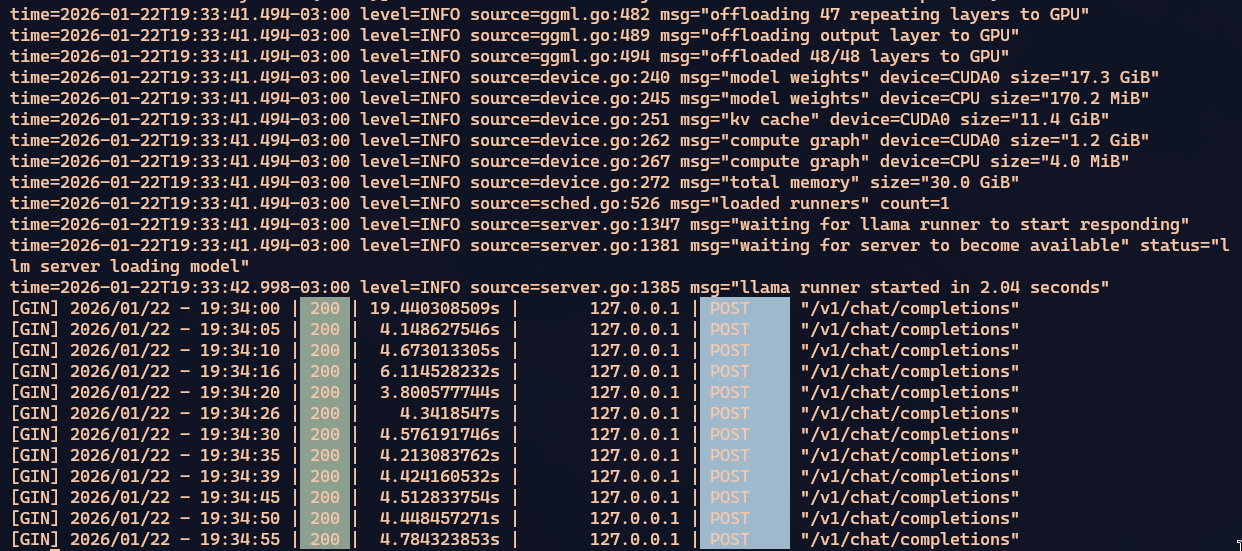
When everything fits on the GPU, processing is reasonably fast. A bit slower but still comparable to Qwen3 Coder or GPT-OSS. You can tell everything’s on the GPU because looking at BTOP the CPU is doing nothing while nvidia-smi shows the GPU pulling around 500W out of the 600W it can draw.
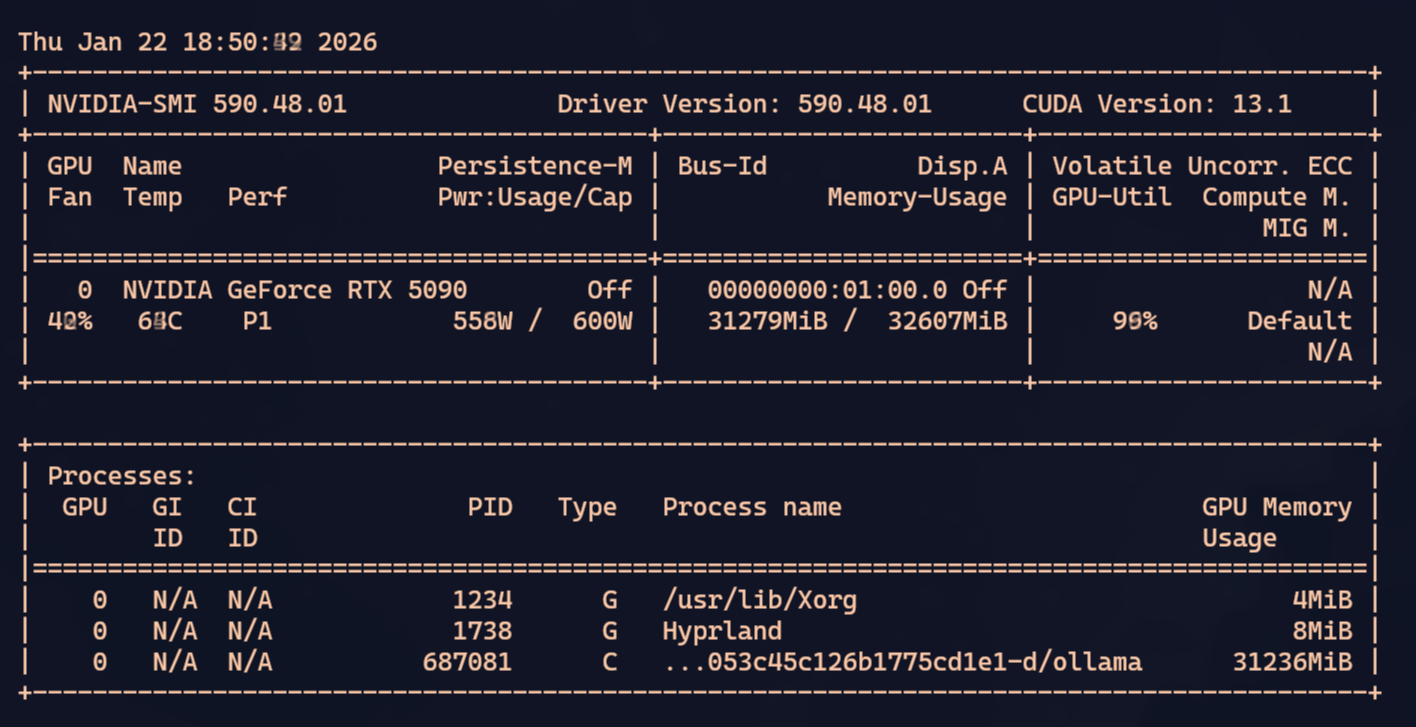
In my tests, depending on what you’re doing, those 45k fill up VERY FAST. Using tools like OpenCode or Crush, when the context is close to full, they ask the LLM to summarize what’s been discussed/researched so far, save it, and restart with the summary. But even so, the summaries themselves grow large.
With agents, the model runs commands on your system (compile, list files, search code snippets, search the web) and all of that consumes context. The more context you have left, the better.
I tried running with OLLAMA_CONTEXT_LENGTH=65576, around 65k tokens. That prevents all layers from staying on the GPU and Ollama ends up swapping, using the CPU. So processing gets much slower. BUT, the context window gets bigger. It’s a trade-off.
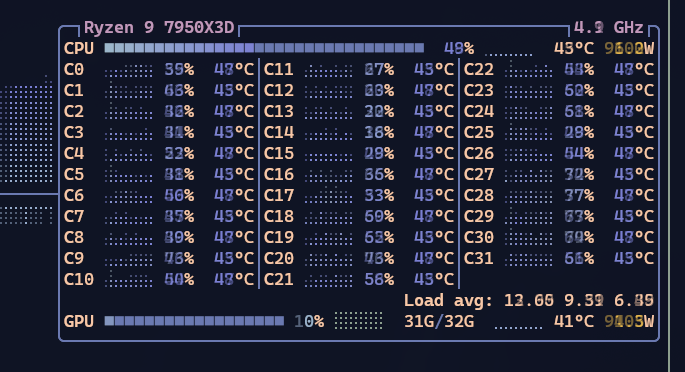
Right off the bat you can see the CPU starts spinning up. On my 7850x3d it’s running at 50% constantly. Look at how slow Ollama response times got:
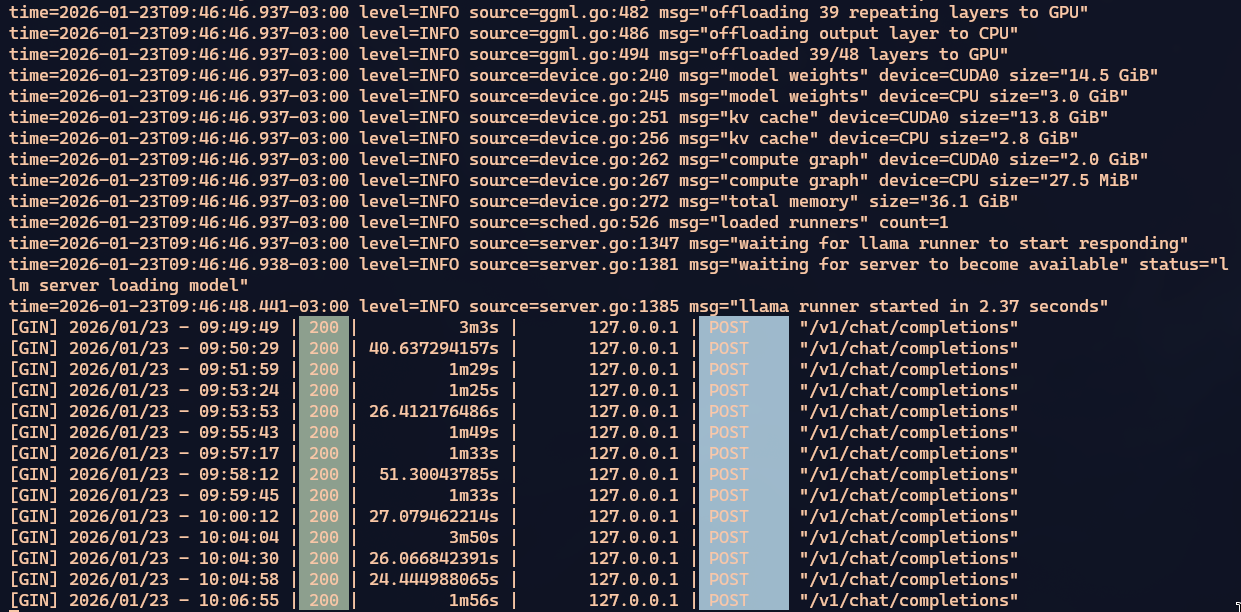
Goes from around 4 seconds to 90 seconds. 20x slower. And that’s with 39 of the 48 layers still on the GPU. That’s why I don’t think you can push beyond 65k. The ideal is to stay at 45k, but for my challenge I felt I needed to compensate.
Either Crush/OpenCode gets slow because the window runs out too fast and it has to summarize the work constantly and lose context details — which means extra work re-researching the same thing more than once. Or you preserve more context details for longer, but then every response gets slower. It’s a really tough trade-off. And it’s all the fault of these crappy video cards having so little VRAM.
If you use a Mac Studio that goes up to 512GB or some Mini-PC with AMD Ryzen AI Max+ that goes up to 128GB, we wouldn’t have to deal with this limit. But those are machines that cost over BRL 20k. You can’t justify it. For that price it’s better to just pay credits on OpenRouter and use larger, faster commercial models like Claude Opus or GPT 5.2, or GLM 4.7 itself on ZAI’s cloud.
Pull Request on Crush
As a side quest, I had a small problem that was bothering me. One of the problems with a small context window is that every once in a while Crush would just stop, even though there was still work to do. The reason is that the context fills up before it has time to summarize, so when it goes to make a tool call, which is a big XML blob, it gets truncated for lack of space.
Truncated XML is invalid, it can’t call the tool and the processing crashes, like this:

And even trying to control the memory usage ceiling, eventually that ceiling breaks and processing halts for lack of memory:

Whether from truncated XML or Ollama OOM, processing eventually stops. And since it’s slow processing, it’s a pain having to wait for this to happen and manually restart the process.
So I decided to see if I could make Crush itself detect that it stopped for these reasons and auto-continue from where it left off. I opened Crush on top of the Crush project itself and asked Claude Opus to check the possibility of a fix.
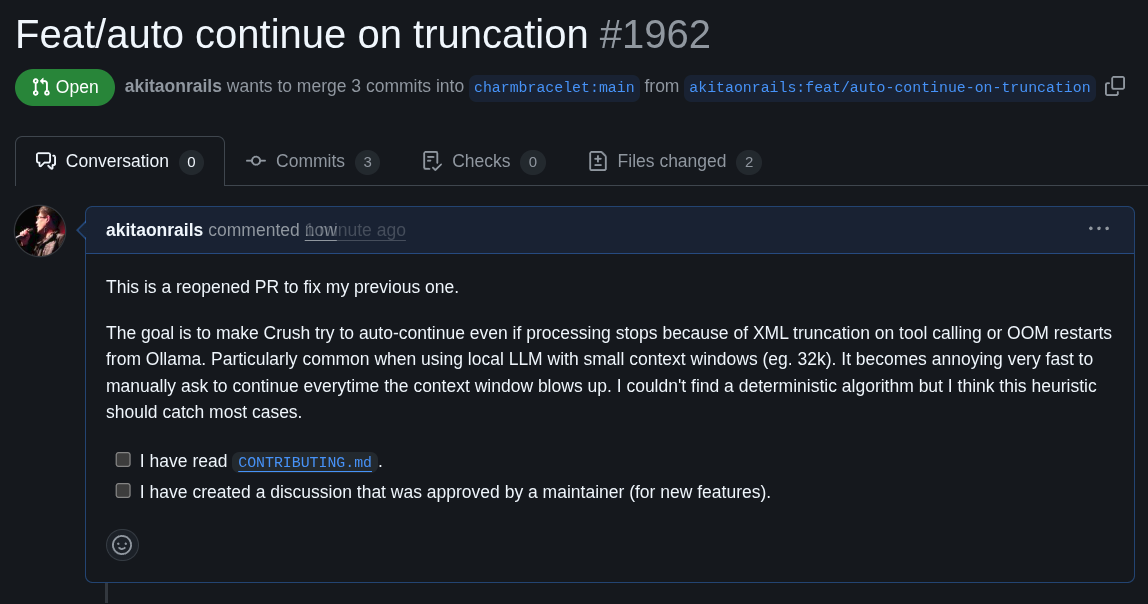
Yes, I made a 100% vibe coded pull request using Crush itself to fix Crush 😂 Let’s see if the Crush folks accept it. I tried my best not to produce AI Slop.
Either way, with this I can leave the agent running for hours without stopping until it gets to where I want.
Conclusion
This is NOT the right way!
Let me be clear that leaving an agent doing things on its own with no one watching is bad practice. In my case it’s an isolated exercise. I’m using my AI JAIL and I’ve run this prompt many times as a benchmark and I know the behavior of all the LLMs well.
As I said in my previous post, my challenge prompt is full of bad practices you shouldn’t follow: I ask for many complex things at once, with little context, in a vague and confusing way, precisely to see how the LLM will handle it. Day-to-day you should send small prompts, objective unitary tasks, well specified, with good explanation and context, so the responses are fast and short. One step at a time.
The goal of my challenge is precisely to push the limits of common sense a bit. With the idea that if it passes my challenge, it should be able to handle simpler day-to-day prompts.
And in this challenge only the commercial LLMs got through: Claude Opus, GPT 5.2, Gemini 3. No open source model made it, not Qwen3 Coder, not GPT-OSS, not my first attempt with GLM 4.7 cloud, nor MiniMax v2.
But this new GLM 4.7 Flash gave me hope. It didn’t go into an “agentic loop” like Qwen3 — which always reaches a point where it stops trying to solve and just repeats “I’m done” without being done.
It also didn’t crash for no reason. Every time processing stopped, it was out of memory. And even so, sending “continue” via prompt in Crush, it manages to pick up where it left off and keep going.
Every fix it makes makes sense. I didn’t see it going off on tangents outside the scope like I saw Gemini doing many times. When it has doubts, it can request an “agentic fetch” and go search the web before continuing. Every time it makes fixes it knows to run the build command to check for compilation errors.
I liked that it tries to fix one small error at a time instead of rewriting everything or solving more than one problem at once.
In the end, it was the only open source one that got the build working and produced a binary.
I couldn’t have it test the program because it would need to load another LLM on a GPU that was already hosting an LLM, so I stopped the test without resolving runtime bugs. And I also didn’t ask it to refactor because it had already taken too long. It had already surpassed the other OSS ones so I stopped there. Here’s the pull request with the build fixes it made. Simple, not touching things it shouldn’t, doing what was asked.
So of the open source models, this was the best behavior I saw, comparable to what I’ve seen Claude Opus or GPT 5.2 doing. Considering those commercial models have trillions of parameters, running on the beefiest NVIDIA H200 servers, I consider this GLM, at just 30 billion parameters, running on a measly local 5090, to be doing impressively well.
The trade-offs are clear: it’s orders of magnitude slower than Claude Opus. But a slow model that gets to the same result beats a fast one that goes into an infinite loop thinking it solved everything without having done anything, like Qwen3.
I think for challenges like mine — a giant prompt that needs a lot of context to solve — no open source model is good enough. But if I were starting a small project from scratch, with simple and short tasks, I imagine GLM 4.7 would handle it without any headaches, costing zero and preserving my privacy by running 100% locally and offline.
My recommendation: GLM 4.7 Flash is the best OSS model of early 2026.