AI Agents: Locking Down Your System
These days we have dozens of AI coding agents — Cursor, Claude Code, Windsurf, Copilot, OpenCode, Crush and more. But there’s a problem that’s already turned into a meme: the risk of them trashing your system or shipping your private data off to someone on the internet (malware-style behavior).
The thing is, to be useful these tools need access to your filesystem so they can poke around your project files and analyze your code. And more: they need to run things like compilers, linters, and the everyday stuff like grep, sed, awk, ls, and other system commands.
Eventually, an LLM might fire off some random rm -rf / and start wiping things from your system, for example. The code itself, if it accidentally deletes something it shouldn’t, in theory you should be safe because your code should at the bare minimum be in a Git repo (GitHub, GitLab, etc.), so you’d just revert the change. But if the agent runs an rm outside your project directory, you can be in for all kinds of trouble.
It doesn’t happen often and all these tools have checks for it, including asking whether you really want to run a command. At the same time, they also have an option to let any command run during the session without asking — because at some point it gets tedious to “ok” every individual command. Everyone eventually gets lazy and says “screw it, run whatever you want”.
And you might be thinking “oh, my favorite tool is well-behaved, it always asks before running anything, so I’m in control”. Don’t forget: SUPPLY-CHAIN ATTACKS exist. Every other day some open source library gets compromised with malware and the programs that depend on those libs end up infected without anyone noticing. This has happened many times, in many NPM libraries for example. There’s no way to guarantee that even open source software is trustworthy. Always assume everything is insecure until proven otherwise, and treat these programs accordingly: with maximum restrictions.
To make sure these agents really aren’t going to do anything outside the project directory, the best option is to build a JAIL. Here’s the command for that:
bwrap --ro-bind /usr /usr \
      --ro-bind /bin /bin \
      --ro-bind /lib /lib \
      --ro-bind /lib64 /lib64 \
      --dev /dev \
      --proc /proc \
      --bind $(pwd) $(pwd) \
      --chdir $(pwd) \
      --unshare-all \
      --share-net \
      bash
bwrap is Bubblewrap, one of the components that make things like Flatpak possible. It creates a sandbox. The Bash that fires up when you run the command above is essentially in “jail” — locked in. Inside it we hand out read-only access to a few system directories in case it needs libraries and tools. That’s what --ro-bind is for.
But only the current directory pwd has write permission. Any command that runs inside the jail has no permission to write anywhere else on your system. Look at the example in the screenshot below where I try to delete a file in my $HOME:
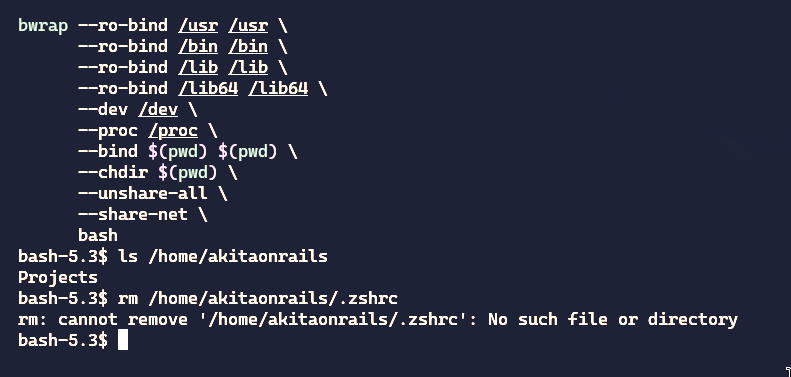
It can’t even list the files in my home directory. Everything is invisible inside the sandbox. This is one of the upsides of apps running under Flatpak: they’re much more isolated than apps installed directly.
Inside this sandboxed bash we can now run opencode, crush, cursor or any other agent and be confident that they aren’t going to do anything stupid to your system.
To make life easier, I’d recommend creating a script like ~/.local/bin/ai-jail:
#!/bin/bash

# ai-jail — bubblewrap sandbox for AI coding agents
# Mounts the project dir read-write, auto-discovers home dotfiles with a
# deny-list for sensitive dirs, and isolates namespaces.
#
# Usage: ai-jail [--map PATH]... COMMAND [ARGS...]
#        ai-jail claude
#        ai-jail bash

PROJECT_DIR=$(pwd)
TEMP_HOSTS=$(mktemp /tmp/bwrap-hosts.XXXXXX)

trap 'rm -f "$TEMP_HOSTS"' EXIT

# ── Mise discovery ─────────────────────────────────────────────
REAL_MISE_BIN=$(type -p mise 2>/dev/null || echo "")

# ── Localhost fix (Go resolver needs /etc/hosts) ───────────────
printf '127.0.0.1 localhost ai-sandbox\n::1       localhost ai-sandbox\n' > "$TEMP_HOSTS"

# ── Parse --map / --rw-map arguments ─────────────────────────
EXTRA_MOUNTS=()
while [[ "${1:-}" == --map || "${1:-}" == --rw-map ]]; do
    FLAG="$1"
    MAP_PATH="$2"
    if [ -e "$MAP_PATH" ]; then
        if [[ "$FLAG" == "--rw-map" ]]; then
            EXTRA_MOUNTS+=("--bind" "$MAP_PATH" "$MAP_PATH")
        else
            EXTRA_MOUNTS+=("--ro-bind" "$MAP_PATH" "$MAP_PATH")
        fi
    else
        echo "Warning: Path $MAP_PATH not found, skipping." >&2
    fi
    shift 2
done

# ── Mise init command ──────────────────────────────────────────
if [ -n "$REAL_MISE_BIN" ]; then
    MISE_INIT="$REAL_MISE_BIN trust && eval \"\$($REAL_MISE_BIN activate bash)\" && eval \"\$($REAL_MISE_BIN env)\""
else
    MISE_INIT="true"
fi

# ── Dotfile deny-list (never mounted — sensitive data) ─────────
DOTDIR_DENY=(.gnupg .aws .mozilla .basilisk-dev .sparrow)

# Subdirs of ~/.config to hide (tmpfs over rw config mount)
CONFIG_DENY=(BraveSoftware Bitwarden)

# Subdirs of ~/.cache to hide (sensitive browser/app caches)
CACHE_DENY=(BraveSoftware basilisk-dev chromium spotify nvidia mesa_shader_cache)

# Dotdirs requiring read-write access
DOTDIR_RW=(.claude .crush .codex .aider .config .cargo .cache .docker)

# ── Helper functions ───────────────────────────────────────────
is_denied() {
    local name="$1"
    for d in "${DOTDIR_DENY[@]}"; do [[ "$name" == "$d" ]] && return 0; done
    return 1
}

is_rw() {
    local name="$1"
    for d in "${DOTDIR_RW[@]}"; do [[ "$name" == "$d" ]] && return 0; done
    return 1
}

# ── Auto-discover dot-directories in $HOME ─────────────────────
# Only directories — regular dotfiles (e.g. .claude.json) are NOT mounted.
# The tmpfs $HOME is writable so tools can create dotfiles as needed.
DOTFILE_MOUNTS=()
for entry in "$HOME"/.*; do
    [ -d "$entry" ] || continue
    name=$(basename "$entry")
    [[ "$name" == "." || "$name" == ".." ]] && continue
    is_denied "$name" && continue

    if is_rw "$name"; then
        DOTFILE_MOUNTS+=("--bind" "$entry" "$HOME/$name")
    else
        DOTFILE_MOUNTS+=("--ro-bind" "$entry" "$HOME/$name")
    fi
done

# ── Explicit dotfile mounts (regular files) ────────────────────
[ -f "$HOME/.gitconfig" ] && DOTFILE_MOUNTS+=("--ro-bind" "$HOME/.gitconfig" "$HOME/.gitconfig")
[ -f "$HOME/.claude.json" ] && DOTFILE_MOUNTS+=("--bind" "$HOME/.claude.json" "$HOME/.claude.json")

# ── Hide sensitive subdirs inside ~/.config (after rw mount) ───
CONFIG_HIDE_MOUNTS=()
for denied in "${CONFIG_DENY[@]}"; do
    [ -d "$HOME/.config/$denied" ] && CONFIG_HIDE_MOUNTS+=("--tmpfs" "$HOME/.config/$denied")
done

# ── Hide sensitive subdirs inside ~/.cache (after rw mount) ──
CACHE_HIDE_MOUNTS=()
for denied in "${CACHE_DENY[@]}"; do
    [ -d "$HOME/.cache/$denied" ] && CACHE_HIDE_MOUNTS+=("--tmpfs" "$HOME/.cache/$denied")
done

# ── Override ~/.local subdirs as rw (parent .local is ro) ──────
LOCAL_OVERRIDES=()
[ -d "$HOME/.local/state" ] && LOCAL_OVERRIDES+=("--bind" "$HOME/.local/state" "$HOME/.local/state")
for rw_share in zoxide crush opencode atuin mise yarn flutter kotlin NuGet pipx ruby-advisory-db uv; do
    [ -d "$HOME/.local/share/$rw_share" ] && LOCAL_OVERRIDES+=("--bind" "$HOME/.local/share/$rw_share" "$HOME/.local/share/$rw_share")
done

# ── GPU device mounts (NVIDIA + DRM) ─────────────────────────
GPU_MOUNTS=()
for dev in /dev/nvidia* /dev/dri; do
    [ -e "$dev" ] && GPU_MOUNTS+=("--dev-bind" "$dev" "$dev")
done

# ── Docker socket ────────────────────────────────────────────
DOCKER_MOUNT=()
[ -S /var/run/docker.sock ] && DOCKER_MOUNT+=("--bind" "/var/run/docker.sock" "/var/run/docker.sock")

# ── Shared memory (Chromium needs large /dev/shm) ───────────
SHM_MOUNT=()
[ -d /dev/shm ] && SHM_MOUNT+=("--dev-bind" "/dev/shm" "/dev/shm")

# ── Display passthrough (X11 + Wayland) ─────────────────────
DISPLAY_MOUNTS=()
DISPLAY_ENV=()

# X11 / XWayland socket
[ -d /tmp/.X11-unix ] && DISPLAY_MOUNTS+=("--bind" "/tmp/.X11-unix" "/tmp/.X11-unix")
[ -n "${DISPLAY:-}" ] && DISPLAY_ENV+=("--setenv" "DISPLAY" "$DISPLAY")
[ -n "${XAUTHORITY:-}" ] && {
    DISPLAY_MOUNTS+=("--ro-bind" "$XAUTHORITY" "$XAUTHORITY")
    DISPLAY_ENV+=("--setenv" "XAUTHORITY" "$XAUTHORITY")
}

# Wayland socket (lives in XDG_RUNTIME_DIR, typically /run/user/UID)
if [ -n "${XDG_RUNTIME_DIR:-}" ] && [ -d "$XDG_RUNTIME_DIR" ]; then
    DISPLAY_MOUNTS+=("--bind" "$XDG_RUNTIME_DIR" "$XDG_RUNTIME_DIR")
    DISPLAY_ENV+=("--setenv" "XDG_RUNTIME_DIR" "$XDG_RUNTIME_DIR")
    [ -n "${WAYLAND_DISPLAY:-}" ] && DISPLAY_ENV+=("--setenv" "WAYLAND_DISPLAY" "$WAYLAND_DISPLAY")
fi

# ── Assemble and launch ───────────────────────────────────────
echo "Jail Active: $PROJECT_DIR"

bwrap \
  --ro-bind /usr /usr \
  --symlink usr/bin /bin \
  --symlink usr/lib /lib \
  --symlink usr/lib /lib64 \
  --ro-bind /etc /etc \
  --ro-bind "$TEMP_HOSTS" /etc/hosts \
  --ro-bind /opt /opt \
  --ro-bind /sys /sys \
  --dev /dev \
  "${GPU_MOUNTS[@]}" \
  "${SHM_MOUNT[@]}" \
  --proc /proc \
  --tmpfs /tmp \
  --tmpfs /run \
  "${DOCKER_MOUNT[@]}" \
  "${DISPLAY_MOUNTS[@]}" \
  --tmpfs "$HOME" \
  "${DOTFILE_MOUNTS[@]}" \
  "${CONFIG_HIDE_MOUNTS[@]}" \
  "${CACHE_HIDE_MOUNTS[@]}" \
  "${LOCAL_OVERRIDES[@]}" \
  "${EXTRA_MOUNTS[@]}" \
  --bind "$PROJECT_DIR" "$PROJECT_DIR" \
  --chdir "$PROJECT_DIR" \
  --die-with-parent \
  --unshare-pid \
  --unshare-uts \
  --unshare-ipc \
  --hostname "ai-sandbox" \
  "${DISPLAY_ENV[@]}" \
  --setenv PS1 "(jail) \w \$ " \
  --setenv _ZO_DOCTOR 0 \
  bash -c "$MISE_INIT && ${*:-bash}"
This version is heavily customized. Read it through carefully because it has a deny-list so that only the directories you actually need inside the Jail are available. Some are read-write because Claude needs to be able to write to ~/.claude or Codex needs ~/.codex; several directories should never be inside the Jail like a Brave password store or BitWarden. Everything else you might need should be read-only. This script handles all of that.
Just chmod +x ~/.local/bin/ai-jail. Now you can run it directly or pass the command you want to run inside the sandbox:
~/.local/bin/ai-jail crushIn this version it’ll create a temporary $HOME directory in case it needs to write something temporary there. And I also set it up to map your ~/.config so the agents have access to your settings. If you need more stuff like environment variables and the like, modify it to map those too — but this is the bare minimum to put together a safe sandbox.
Be very careful with programs that run random commands on your system. Nothing is 100% safe, especially an LLM that can hallucinate at any moment and decide to delete things, or shady tools you downloaded without being sure of where they came from that might be malware in disguise. Always run truly suspicious things only in a VM, or at the very least, inside a jail like this one.
This isn’t just for AI agents, obviously. Any time you’re about to run any command you’re not sure about or that looks fishy, run it inside this jail.
As a bonus, note that I also map Mise into the container. If you’re on Omarchy, you should be using Mise too.
Specifically for Claude Code, which is what I use the most, I don’t like to leave everything authorized in automatic mode with --allow-dangerously-skip-permissions, but I also don’t like having to keep authorizing dumb stuff like every single domain it wants to search the web for (just searching is no problem at all) or any command that just lists things like ls or grep. So you can improve things by configuring directly in ~/.claude/settings.json:
{
  "permissions": {
    "allow": [
      "Bash(git add *)",
      "Bash(git commit *)",
      "Bash(git status *)",
      "Bash(git diff *)",
      "Bash(git log *)",
      "Bash(git branch *)",
      "Bash(git checkout *)",
      "Bash(git switch *)",
      "Bash(git stash *)",
      "Bash(git show *)",
      "Bash(git fetch *)",
      "Bash(git pull *)",
      "Bash(git merge *)",
      "Bash(git tag *)",
      "Bash(git remote -v*)",
      "Bash(git rev-parse *)",
      "Bash(git ls-files *)",
      "Bash(ls *)",
      "Bash(find *)",
      "Bash(grep *)",
      "Bash(wc *)",
      "Bash(cat *)",
      "Bash(head *)",
      "Bash(tail *)",
      "Bash(file *)",
      "Bash(which *)",
      "Bash(echo *)",
      "Bash(pwd)",
      "Bash(cd *)",
      "Bash(ps *)",
      "Bash(env *)",
      "Bash(printenv *)",
      "Bash(mkdir *)",
      "Bash(cp *)",
      "Bash(mv *)",
      "Bash(touch *)",
      "Bash(npm *)",
      "Bash(npx *)",
      "Bash(yarn *)",
      "Bash(pnpm *)",
      "Bash(bun *)",
      "Bash(node *)",
      "Bash(ruby *)",
      "Bash(bundle *)",
      "Bash(rails *)",
      "Bash(rake *)",
      "Bash(go *)",
      "Bash(cargo *)",
      "Bash(rustc *)",
      "Bash(python *)",
      "Bash(pip *)",
      "Bash(docker compose *)",
      "Bash(docker ps *)",
      "Bash(docker logs *)",
      "Bash(docker images *)",
      "Bash(make *)",
      "Bash(gh *)",
      "Bash(curl *)",
      "Bash(jq *)",
      "Bash(sed *)",
      "Bash(awk *)",
      "Bash(sort *)",
      "Bash(uniq *)",
      "Bash(diff *)",
      "Bash(* --version)",
      "Bash(* --help)",
      "WebSearch",
      "WebFetch"
    ],
    "deny": [
      "Bash(rm -rf *)",
      "Bash(rm -r *)",
      "Bash(sudo *)",
      "Bash(chmod 777 *)",
      "Bash(git reset --hard *)",
      "Bash(git clean *)",
      "Bash(git push --force *)",
      "Bash(git push -f *)",
      "Bash(docker rm *)",
      "Bash(docker rmi *)",
      "Bash(docker system prune *)"
    ],
    "ask": [
      "Bash(git push *)",
      "Bash(git rebase *)",
      "Bash(git branch -D *)",
      "Bash(git branch -d *)",
      "Bash(rm *)",
      "Bash(kamal *)",
      "Bash(docker run *)",
      "Bash(docker exec *)",
      "Bash(docker stop *)"
    ],
    "defaultMode": "acceptEdits"
  },
  "enabledPlugins": {
    "gopls-lsp@claude-plugins-official": true,
    "typescript-lsp@claude-plugins-official": true,
    "pyright-lsp@claude-plugins-official": true,
    "rust-analyzer-lsp@claude-plugins-official": true,
    "github@claude-plugins-official": true,
    "pr-review-toolkit@claude-plugins-official": true,
    "frontend-design@claude-plugins-official": true
  },
  "alwaysThinkingEnabled": true
}
Look up the documentation (or just ask Claude itself) about more customizations you can do in this file to better fit your project type or workflow.
This is basically how a Docker or Podman container works too. I explained that in my video about Docker. If you haven’t watched it yet, I recommend it.